1
When downloading from EBL or EBSCOhost choose to
open using ADE. ADE will download the e-book and it
will appear in your library. For more information on
downloading e-books from EBL and EBSCOhost please
visit:
http://www.bodleian.ox.ac.uk/ssl/findthings/resource
s-by-format2/find-e-books/using-e-books/
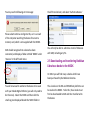
To transfer an e-book from your ADE library to the
NOOK, select it, then drag and drop it into the NOOK
folder in the menu on the left hand side of the screen:
Loans from EBL and EBSCOhost last for 1 day. After
this period you will need to download and transfer
the book to your NOOK once more.
If you have any questions or feedback
about the NOOKs, please contact us at
[email protected]