1
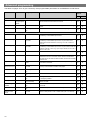
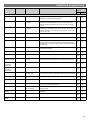
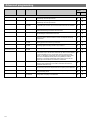
Advanced programming Parameter Name Default Value Range / Options Description Programming Devices UHS4 UN-LCDHS For Channel 3 (PIR Sensor) Local Code 1 1 to 999 A number corresponding to the Local Code of all devices to be controlled by this PIR input channel. Sub Local Code Not set 1 to 99 A number corresponding to the Sub Local Code of all devices to be controlled by this PIR input channel. Area Code(s) Not set 1 to 999 0 to clear A number corresponding to the Area Code of all devices to be controlled by this PIR input channel. Up to 10 Area Codes can be set for Channel 3. Sensitivity On 5 1 (min) to 9 (max) Sensitivity level for detecting movement when the detector is already on. * * *UHS4 sets Sensitivity On and Off to the same value. Sensitivity Off 5 1 (min) to 9 (max) Sensitivity level for detecting movement when the detector is off. *UHS4 sets Sensitivity On and Off to the same value. Walk Test LED Off On or Off When set to On this causes a red LED to flash on the sensor when it detects movement. Use this feature to check for adequate Sensitivity On/Off levels. Switch Level On 400 0 (disabled) or 1 to 999 Sets a minimum light level below which the PIR sensor is enabled, allowing lights to be turned on by movement. Switch Level Off 700 0 (disabled) or 1 to 999 Sets a maximum light level above which the PIR sensor is disabled, preventing lights from being turned on by movement. Light Level 550 0 (disabled) or 1 to 999 Sets a target light level to be maintained by the lighting system. Power Up State On On or Off When power is applied to the unit the PIR sensor goes through a settling down period of up to 40 seconds. With Power Up set to On, the outputs go to the last levels for up to 15 seconds, then the Local On Scene (scene 1 by default) is invoked plus the Time Adjustment Period, after which the Local Step/Off Scene (scene 20 by default) is invoked (assuming no movement is detected). With Power Up set to Off, the outputs go to the last levels until movement is detected. Disable Detector N Y or N Disables detection, leaving the relay output permanently off with the dimming output operational. This mode is used when the unit is for maintained illuminance only. Speed On 10 3 to 255 seconds The time between maintained illuminance messages being sent out, after the setup period has elapsed and after occupancy is first detected. Speed Set 3 3 to 255 seconds The time between maintained illuminance messages being sent out during the setup period Set Seconds 120 0 to 999 seconds 0 to disable Determines how long the set-up period lasts on power-up or on setting change after occupancy is first detected. (maintained illuminance) 14