1
IND560 User’s Guide
Record Selection Using Shared Data
Alternatively, the Shared Data server can be used to activate target records stored
in the Target Table. Refer to the Shared Data Access section of Appendix D,
Communications, and the Shared Data Reference found on the documentation CD
for specific instructions.
Target Units
If second and/or third units are established in the IND560, target records that
utilize either second or third units can be retrieved from the Target Table into Active
Target status. The IND560 will convert the retrieved record into active units when
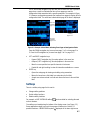
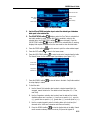
the record is recalled. Pressing the TARGET softkey
will show the original units
as recalled from the Target Table.
If an attempt is made to retrieve a record from the Target Table that does not use
primary, second or third units, a “Units Mis-match” error will display indicating that
record recall was unsuccessful.
Comparators
Comparators are simple targets, five of which can be configured in setup. They are
controlled either by coincidence or by comparison with a range. The source for
comparison can be the Gross Weight, Displayed Weight, Rate or assigned by a
custom TaskExpert application. When assigned to the home screen, the
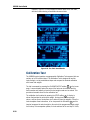
Comparator softkey
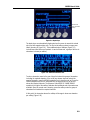
permits direct access to the Comparators. This screen
displays each Comparator’s ID, Description, Limit, Unit, High Limit (if applicable)
and Active operator. Only the limit value/s can be edited. To edit parameters other
than limits, the Comparator configuration screen must be accessed in setup.
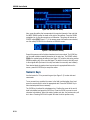
To access a comparator’s limit editing page directly from the home screen, press
the ID number of the Comparator, then the Comparator softkey. If the ID number is
not known, press the Comparator softkey
, use the UP/DOWN keys to select
the desired Comparator from the list, and press the Edit softkey
.
For Range comparators, the value for the High Limit must always be greater
than the Limit value.
When the Active value is <, <=, =, >= or >, the selected source is compared to a
target weight. When the Active value is within (>_ _<) or outside (_< >_) a range,
the selected source is compared to a range defined by the Limit and High Limit
values.
Using Comparators
To use a Comparator, it must be assigned to a discrete output.
Target Value Comparators
In this case, the output will be triggered depending on the Active setting. For
example, if the Active operator is <= (less than or equal to) and the Limit is 1000
kg, the output will turn off when the measured value reaches 1000 kg.
2-25