1
,QVWDOOLQJDQG2SHUDWLQJ,QVWUXFWLRQV
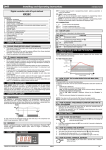
5.1 HOW TO SEE THE ALARM DURATION AND MAX (MIN) TEMPERATURE
6.6 HOW TO LOCK THE KEYBOARD
If the alarm LED is on, an alarm has taken place.
To see the kind of alarm, the max (min) reached temperature and alarm duration do as
follows:
1.
Push the Up or Down key.
2.
On the display the following message is shown::
“HAL” for high temperature alarm (“LAL” for the minimum allarm), followed by the
Maximum (minimum) temperature.
Then the “tiM” (tiMe) message is displayed, followed by the “Duration” in h.mm.
3.
Then the instrument displays the temperature once again.
1.
2.
3.
Keep pressed for more than 3 s the UP and DOWN keys.
The “POF” message will be displayed and the keyboard will be locked. At this point
it will be possible only to see the set point or the MAX o Min temperature stored
If a key is pressed more than 3s the “POF” message will be displayed.
6.7 TO UNLOCK THE KEYBOARD
Keep pressed together for more than 3s the
will be displayed.
NOTE1: if an alarm is still occurring the “tim” shows the partial duration.
NOTE2: the alarm is recorded when the temperature come back to normal values
9 and 8 keys, till the “Pon” message
6.8 THE CONTINUOUS CYCLE
5.2 HOW TO RESET A RECORDED ALARM OR ONE THAT IS STILL
OCCURRING
1.
2.
When defrost is not in progress, it can be activated by holding the
“ ” key pressed for about 3 seconds.
Hold the SET key pressed for more than 3s, while the recorded alarm is displayed.
(the rSt message will be displayed)
To confirm the operation, the “rSt” message starts blinking and the normal
temperature will be displayed.
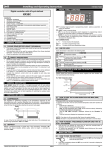
6.1 HOW TO SEE THE SETPOINT
2.
Push and immediately release the SET key: the display will
show the Set point value;
Push and immediately release the SET key or wait for 5 seconds to display the
probe value again.
6.2 HOW TO CHANGE THE SETPOINT
1.
2.
3.
4.
Push the SET key for more than 2 seconds to change the Set point value;
The value of the set point will be displayed and the
LED starts blinking;
To change the Set value push the
or arrows within 10s.
To memorise the new set point value push the SET key again or wait 10s.
9 8
6.3 HOW TO START A MANUAL DEFROST
Push the DEF key for more than 2 seconds and a manual defrost
will start.
6.4 HOW TO CHANGE A PARAMETER VALUE
To change the parameter’s value operate as follows:
1. Enter the Programming mode by pressing the Set and DOWN
key for 3s ( and
start blinking).
2. Select the required parameter.
3. Press the “SET” key to display its value (now only the
LED is
blinking).
4. Use “UP” or “DOWN” to change its value.
5. Press “SET” to store the new value and move to the following parameter.
To exit: Press SET + UP or wait 15s without pressing a key.
NOTE: the set value is stored even when the procedure is exited by waiting the time-out
to expire.
6.5 THE HIDDEN MENU
The hidden menu Includes all the parameters of the instrument.
6.5.1 HOW TO ENTER THE HIDDEN MENU
1. Enter the Programming mode by pressing the Set +
key for
3s (LED 1 and
start blinking).
2. When a parameter is displayed keep pressed the Set+
for
more than 7s.
The Pr2 label will be displayed immediately followed from the HY
parameter. NOW YOU ARE IN THE HIDDEN MENU.
3. Select the required parameter.
4. Press the “SET” key to display its value (Now only the
LED is blinking).
5. Use
or to change its value.
6. Press “SET” to store the new value and move to the following parameter.
or wait 15s without pressing a key.
To exit: Press SET +
NOTE: the set value is stored even when the procedure is exited by waiting the time-out
to expire.
8
9 8
The compressor operates in continuous mode for the time set through the “CCt”
parameter. The cycle can be terminated before the end of the set time using the same
activation key “ ” for 3 seconds.
9
7. PARAMETERS
6. MAIN FUNCTIONS
1.
9
8
9
6.5.2 HOW TO MOVE A PARAMETER FROM THE HIDDEN MENU
TO THE FIRST LEVEL AND VICEVERSA.
Each parameter present in the HIDDEN MENU can be removed or put into “THE FIRST
LEVEL” (user level) by pressing “SET + ”.
In HIDDEN MENU when a parameter is present in First Level the decimal point is on.
8
1592007250 XR60C GB r1.1 27.10.2003.doc
;5&
NOTE: the parameters preceded by dots are in the Hidden Menu.
REGULATION
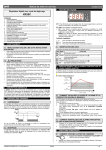
Hy Differential: (0,1 ÷ 25,5°C / 1÷255 °F) Intervention differential for set point.
Compressor Cut IN is Set Point Plus Differential (Hy). Compressor Cut OUT is
when the temperature reaches the set point.
• LS Minimum set point: (- 50°C÷SET/-58°F÷SET): Sets the minimum acceptable
value for the set point.
• US Maximum set point: (SET÷110°C/ SET÷230°F). Set the maximum
acceptable value for set point.
Ot Thermostat probe calibration: (-12.0÷12.0°C;
-120÷120°F) allows to adjust possible offset of the thermostat probe.
P2P Evaporator probe presence: n= not present: the defrost stops by time; y=
present: the defrost stops by temperature.
• OE Evaporator probe calibration: (-12.0÷12.0°C; -120÷120°F). allows to adjust
possible offset of the evaporator probe.
• OdS Outputs activation delay at start up: (0÷255min) This function is enabled
at the initial start up of the instrument and inhibits any output activation for the
period of time set in the parameter.
AC Anti-short cycle delay: (0÷50 min) minimum interval between the compressor
stop and the following restart.
• CCt Compressor ON time during continuous cycle: (0.0÷24.0h; res. 10min)
Allows to set the length of the continuous cycle: compressor stays on without
interruption for the CCt time. Can be used, for instance, when the room is filled with
new products.
• COn Compressor ON time with faulty probe: (0÷255 min) time during which the
compressor is active in case of faulty thermostat probe. With COn=0 compressor is
always OFF.
• COF Compressor OFF time with faulty probe: (0÷255 min) time during which
the compressor is OFF in case of faulty thermostat probe. With COF=0 compressor
is always active.
DISPLAY
• CF Temperature measurement unit:
°C=Celsius; °F=Fahrenheit. WARNING: When the measurement unit is changed
the SET point and the values of the parameters Hy, LS, US, Ot, ALU and ALL
have to be checked and modified if necessary).
rES Resolution (for °C): (in = 1°C; dE = 0.1 °C) allows decimal point display.
•
Lod Display : select which probe is displayed by the instrument: P1 =
Thermostat probe; P2 = Evaporator probe
DEFROST
tdF Defrost type: EL = electrical heater; in = hot gas
dtE Defrost termination temperature: (-50÷50 °C/
-58÷122°F) (Enabled only when EdF=Pb) sets the temperature measured by the
evaporator probe, which causes the end of defrost.
IdF Interval between defrost cycles: (0÷120h) Determines the time interval between
the beginning of two defrost cycles.
MdF (Maximum) length for defrost: (0÷255min) When P2P = n, (not evaporator
probe: timed defrost) it sets the defrost duration, when P2P = y (defrost end based
on temperature) it sets the maximum length for defrost.
• dSd Start defrost delay: ( 0÷99min) This is useful when different defrost start
times are necessary to avoid overloading the plant.
• dFd Temperature displayed during defrost: (rt = real temperature; it =
temperature at defrost start; SEt = set point; dEF = “dEF” label)
• dAd MAX display delay after defrost: (0÷255min). Sets the maximum time
between the end of defrost and the restarting of the real room temperature display.
• Fdt Drip time: (0÷120 min) time interval between reaching defrost termination
temperature and the restoring of the control’s normal operation. This time allows
the evaporator to eliminate water drops that might have formed due to defrost.
2/4