1
PELLET STOVE ARITERM MYSINGE
1.5 Safety system
The stove is equipped with five independent safety systems.
1. The feeder releases the pellets from a chute, which separates the burner from
the fuel store.
2. The pellet hopper is equipped with tight fitting filler hatches. The hatches must be closed and
locked during operation, as soon as one of the hatches is opened the fuel feed is interrupted
and warning text is shown on the display.
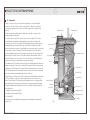
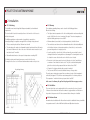
3. Three thermostats are located as shown in section 1.2 Components (fig 1). If the maximum
permitted temperature is exceeded the feeder stops, the stove switches itself off and the
display shows “Operational stoppage”. The alarm must be confirmed by pressing a button.
Do not forget to rectify the cause of the operational stoppage. See section 3.6.1.
4. A flame sensor that detects flames is located in the burner housing (fig 1).
5. The door is equipped with a safety switch.
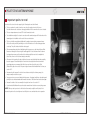
The safety switches are tested by unlocking one of the filler hatches during operation or
start-up. The pellet feeder should then be stopped. Repeat with the other hatch.
1.6 Settings
The settings are made in the control panel in a menu system. Before entering the
menu the panel is in display mode. Enter the menu by pressing the dial.
If the menu is inactive for a long time the panel returns to display mode.
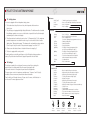
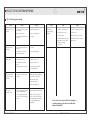
The menu system consists of a main menu and sub-menus “Usermenu” and “Settings”.
In addition, there are menus only intended for authorised installers.
Turn the dial to scroll through the menu. To jump out of the menu, hold the button in
for 4 seconds. The menu appears as follows:
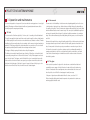
Main menu
Start? (Stop?)
Stop T
Usermenu
Back
Confirm by pressing once to start (stop).
Press to select and adjust desired stop temperature.
Press for Usermenu.
Press for display.
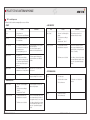
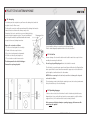
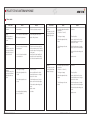
Usermenu
Settings
Service
View
- Press for Settings.
- Menu for authorised service technicians.
- Press for Display menu
(See levels, operating time, programme version etc.)
- Limited operating time.
- Start at desired time.
- Stop at desired time.
- Possibility of lowering temperature below
specific time period during the day (1).
- Possibility of lowering temperature below
specific time period during the day (2).
- Set the lower temperature that is required
when maintenance heating is activated.
- Set date and time.
- Press for main menu.
OnTimer
TimeStrt
TimeStop
NghtDrop
DayDrop
Assist.H
Clockset
Back
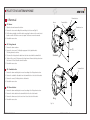
Settings
SetCode (021)
Service
Ign.dose
FeedHI
TstHdose
LoPowOn
FeedLO
TstLdose
TempDiff
AudioOff
Language
ResOnLog
Res#Ign
Default?
Back
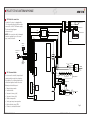
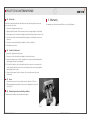
Flame
Indicated
ARITERM-SP-PX26868-B.1
-
-
Firing element
Activated
Menu for authorised service technicians.
Adjust and test the pellet amount at ignition.
Adjust the pellet amount at high output.
Test the pellet amount at high output.
Activate low output.
Adjust the pellet amount at low output.
Test the pellet amount at low output.
Adjust the number of degrees between start and stop.
Sound off or on.
Select language.
Operational time measurement is reset here.
The counter for number of firings is reset here.
All the values are reset to factory settings here.
Press for Usermenu.
Feeder motor
Activated
Combustion fan
Activated
ARITERM SWEDEN AB
Fault function
Indicated
Stove
in operation
Installation Instructions - 2013.10.10 - 9/20