1
PIP (PICTURE IN PICTURE) SHIFT FUNCTION
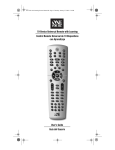
In this feature, you can switch the navigation buttons to control the PIP function of
the TV. If you press the [PIP] button first, the navigation buttons will then control
the PIP function of TV, press the [PIP] button again to exit this feature. The list below
shows the keypads PIP equivalent functions. If the remote control is using the PIP
function, you can press the [SWAP] button to switch between both PIP and the
navigation function.
Number Keys Function
TTX Function
Arrow_Right
Arrow_Left
MENU
INFO
Arrow_Up
Arrow_Down
PIP +
PIP PIP - SIZE
PIP - POS
PIP - SOURCE
PIP - FREEZE
QUICK VIEW CHANNEL FUNCTION
With this feature, you will be able to quickly view the channel on the TV, SAT or CBL
device stepping quickly through the channels without the need to press any buttons.
Please follow the steps below to use this feature:
1. Press and hold the [CH+] or [CH-] button down and keep pressed for about 3
seconds then release it, the device LED will light up to show it has entered this
function. Every 1.5 seconds, the remote control will step through the channels by
itself.
2. Press the [CH+] or [CH-] buttons again to exit this feature.
CHECKING THE CODE NUMBER
You can use this feature to check the three-digit code for your programmed device;
follow these steps using the remote control keypad:
1. Press and hold the device button that you would like to check such as TV, keep the
button pressed for about 3 seconds then release it and the device led will light up.
2. Press the [INFO] button and the device led will blink once.
3. The device button will then blink a number of times in three groups to indicate the
original code number. You will need to make a note of this number.
NOTE:
1. If the digit code number is “0”, the device led will fast blink once.
2. After the led has blinked the first number of the three-digit code there will
be a gap of 1.5 seconds, the led will blink again for the following numbers.
For example: for three-digit code is “095”, then:
0 The led will fast blink 1 time, the led turn off 1.5 seconds.
9 The led will blink 9 times, the led turn off 1.5 seconds.
5 The led will blink 5 times, the led turn off and go out
NEW URC6D INSTRUCTIONS2.indd 7
7
10/01/2012 10:00