1
FAQs
Question
Answer
When I switch on the Sapphire the blue
power light does not come on.
The battery is flat. Try charging the battery
using the power adaptor.
I have charged the battery but the
indicator light is still not on.
Ensure the power adaptor is plugged into
the correct socket on the Sapphire
(marked DC5V).
There is no audio and the blue playback
indicator is not flashing.
Ensure the memory device is correctly
inserted, check the pause button has not
been pressed. Check the audio files on
the device are in mp3 format. Turn the
sapphire off for 10 seconds then back on.
There is no audio but the blue playback
indicator is flashing.
Ensure the main volume control is turned
fully clockwise. Hold down the volume +
button on the remote control to increase
the volume.
The quality of the audio is poor.
Try changing the “EQ” setting via the
remote control.
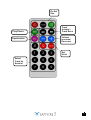
My remote has no effect on the Sapphire.
Ensure the battery has been activated by
removing the cellophane strip at the base
of the remote. Replace the battery if
necessary.
A short section of audio keeps repeating
on battery power.
The battery is flat. Recharge the battery.
Note: Switching the Sapphire player off and back on rapidly can cause loss of
play back and functionality. In the event of this happening, switch the sapphire
to the off position for 10 seconds before switching back on.
5