1
4
OPERATION
>>>
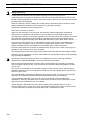
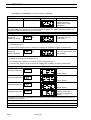
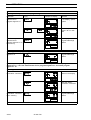
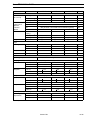
Setting the switching time
Instruction
Select time-switch
function, display time
remaining for timing
period
Key(s)
set
Example of display
approx. 3
sec.
Remarks
Display flashes, time-switch
funcition is displayed. If timing
period in progress, displays
time remaining
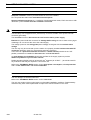
Increase preset time
Value can be adjusted
between 1 minute and 99
hours. Adjustable in full hours
from 10.0 hour setting.
Reduce preset time
The heating is switched on or
off, according to set status,
once timing period has
expired, e.g. control unit
status "off" - time-switchfunction switches "on".
Store new preset time
value
The time value is transferred
to the memory, the inside
temperature then appears on
the display.
set
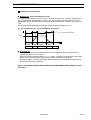
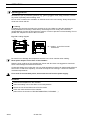
The flashing status display indicates that the time-switch function has been activated. In this case
the status of the control unit "on " or "off" can´t be changed, if desired the switching time has to be set
to "0.00".
If you do not wish to use the time-switch function, enter 0. 0 0 as the preset time.
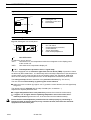
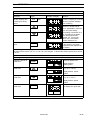
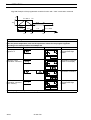
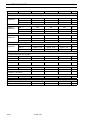
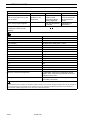
Selecting the air speed level
Display the preset air
speed level
Preset air speed level
vent
Display flashes,
speed symbol
Increase preset air
speed level
Value increases
(e.g. 70 % / 100 %)
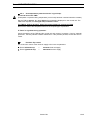
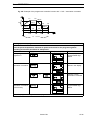
Display flashes, speed
symbol
Value decreases
(e.g. 70 % / 40 %)
Reduce preset air
speed level
Display flashes, speed
symbol
Store new preset air
speed level
Air speed level is stored and
the display then goes dark
vent
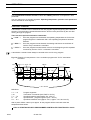
Note: With air speed level lower than 100% a swelling noise is generated by the ventilator.
50 042 750
19/ 35