1
Operating Instructions
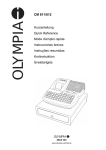
CM 811/812 Cash Register
Programming Instructions
Intended Use
This cash register is intended exclusively for processing cash register business indoors.
Any other use is considered unintended use.
General Information / Safety Notes
• Make sure that the power supply matches that specified on the rating plate located on the back of the cash register.
• This cash register is a highly sophisticated piece of equipment. Never attempt to repair it yourself. If repairs should
become necessary, please bring the cash register to an authorised service centre or the sales outlet.
• Never insert metallic objects, such as a screwdriver, paper clip etc., into the cash register. This could damage the
cash register and also exposes you to risk of electric shock.
• Always switch the cash register off when it is no longer in use.
• Clean any dust from the cash register by wiping it gently with a dry cloth. Never use water or solvents, such as paint
thinner, alcohol etc., to clean the cash register.
• To disconnect the power supply fully, disconnect the plug from the power socket.
• Never expose the cash register to extreme temperatures.
• Keep all the transport locks in a safe place for future use. The transport locks must be reinstalled for any future
transportation of the cash register.
Transport Locks
Before the cash register can be used, remove any transport locks installed and store them for future use. Important
transport information: In the event of any transport damage, the machine must be returned in the packaging together
with the operating instructions and any accessories.
Connecting to the Power Supply
Before connecting the cash register to the power supply, please check that the voltage and frequency specifications
stipulated on the rating plate match the local power supply.
Safety note: The power outlet must be near the cash register and easily accessible.
This means that the cash register can be quickly disconnected from the power supply in an emergency.
Note: All data is retained when the power supply is disconnected. The batteries ensure the data is retained for approx. 2
months after the cash register has been disconnected from the power supply.
Printer Mechanism
Attention: To guarantee long, trouble-free operation, observe the following:
• Never
– print when paper is not installed!
– pull out the paper while the printer is printing!
– use poor quality paper!
– insert used rolls of paper!
– tamper with the printer using hard objects or move the drive by hand!
• Pay attention to the markings indicating the end of the paper roll. Change the paper roll immediately.
• Have the cash register / printer mechanism serviced regularly by an authorised service centre.
Olympia
8.2005
Page 4
All Rights Reserved