1
REV17..
Is symbol
displayed ?
The radio clock symbol only appears if the receiver is set up and activated to receive
the time signal from Frankfurt (Germany). A permanent symbol indicates that both time
and date of the controller are synchronized to Frankfurt radio clock (DCF77).
The symbol flashes if the signal is not received for more than 1 week.
Operating instructions
REV17.. - 7-day room temperature controller with weekday/weekend selection for the right
temperature at the right time. All factory settings already provide optimal living comfort. You can
easily adjust the controller to your needs with the user-assisted clear-text display and program
selection slider.
Is symbol
displayed ?
Note the following for placing the room unit:
The controller is in heating mode
• Make sure no other influencing factors influence the room unit's temperature sensor (no solar radiation and
other heat or cold source influences).
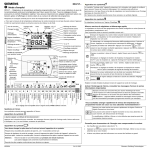
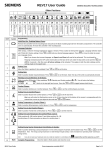
Day of week
Display
Commission the controller and quick start
Radio clock
active
Replace battery
Date
Setting: 1-5, 6-7
Reading: 1..7
The controller contains a factory-set heating switching pattern and temperature values.
Proceed as follows for initial commissioning:
Time display
Remote control active
Info mode
Holiday mode
Automatic mode
Installer mode
Party mode active
Remove the controller from the mounting base and pull off the black insulating
tape from the 2 batteries: The controller turns on automatically. Reinsert the
controller in the mounting base.
Exception day mode
Temperature
setpoint symbols
Text display
Alarm
Heating mode
Switching pattern
with time cursor
Continuous comfort mode
After startup, a welcome message appears for ca. 2 minutes. Press a button
to interrupt the message. Language selection starts with “ENGLISH“ (factory
°C or °F
setting). Press
or
until your language appears. Press
the slider to accept your language.
Continuous energy
saving mode
Slider in position 1 (time setting): Press
Heating On
Note:
Frost protection mode
Temperature display
Operating mode
selector:
- Exception day
- Energy saving
mode
Factory setting is
to set the date.
.
Press the Info button once to activate display backlighting. Backlighting
goes off automatically after a short time.
Continuing to press the Info button activates the information display:
is lit. The device first shows pending error messages and then
important information (e.g. switching programs, ...).
Slider positions
Temperature remote
control
End
Absence
Temperature
Absence
Start
Absence
Saving temp. time
program
End
Comfort phase 3
Temperature
Comfort phase 3
Start time
Comfort phase 3
10 11 12 13 14 15 16 17 18
End
Comfort phase 2
9
Temperature
Comfort phase 2
8
Start time
Comfort phase 2
7
End
Comfort phase 1
6
Temperature
Comfort phase 1
5
Start time
Comfort phase 1
1, 2 or 3
Comfort phases
Weekdays 1-5
Weekend 6-7
Date
Day / Month / Year
4
or
You do not need to enter the date when DCF77 receiver for the
time signal from Frankfurt (Germany) is equipped.
Turn on display lighting, check error messages or other important
information
Program selection slider
3
You do not need to enter the time when DCF77 receiver for the
time signal from Frankfurt (Germany) is equipped.
Set the operating mode with the operating mode selector.
RUN
2
to set the time.
Fold the operating instructions and reinsert in the mounting base.
Decrease values, set time or
make a selection
- Frost
protection
mode
or move
RUN Move the slider to the very right to position RUN (only way to close the cover).
Change between Comfort and
energy saving temperature
(active until next switching time)
and Party function
- Comfort mode
Time setting
Operating elements and settings
Note:
Increase values, set time or
make a selection
- Automatic
or
Slider in position 2 (date: day/month/year): Press
Info button
1
.
Change the temperature level in the time switch program,
or are you not at home for a while?
In the time switch program, press this button to change from the current
temperature level to the next and back.
Quickly activate energy saving temperature when you leave the apartment
briefly to save energy.
The change appears on the display. It is valid only until the next switching
time.
If the selected operating mode does not support the setting, the time display shows PASS.
Special symbols displayed
The controller display can show the following special symbols:
Is symbol
Tips to save energy without reducing comfort
displayed ?
•
Heat your rooms to max 21 °C.
The alarm indicates an error!
•
Use
Press the Info button and check the error message (e.g. radio clock signal, radio connection to receiver, etc.).
Contact a specialist as needed.
•
Air out your rooms briefly, but with wide-open windows.
Is symbol
to switch to energy saving temperature even if you are absent only briefly.
displayed ?
This symbol tells you that you must exchange the batteries within the next 3 months.
Insert 2 new alkaline batteries type AA, 1.5 V as follows:
Remove the controller from the mounting base; open the battery compartment on the rear; remove the old
batteries; insert the new batteries and reinsert the controller in the base.
Caution:
Time and date are retained for max. 1 minute.
(All other settings are fixed and remain unchanged!)
Dispose of the batteries as per regulations.
B2203en
24.12.2007
Siemens, Building Technologies
Select operating mode
Press the operating mode button
Enter holidays or absence
You can enter start, temperature and end of your holidays. The controller switches to the set holiday
temperature at the start of the holidays and back to the preset operating mode at the end of the holidays.
to select one of 5 modes.
Operating modes with time program
During holiday mode, symbol
The controller offers both time programs Automatic
Proceed as follows:
.
and Exception day
flashes and the end of the holidays is displayed.
Do you feel too warm / too cold ?
Slider in position 15 (start of absence): Press
Press
or
to set the temperature. The setting is temporary and active only until the
next time the controller activates a change.
Slider in position 16 (temperature during absence): Press
effective during the holidays.
Note:
Slider in position 17 (end of absence): Press
To set your own programs, see: "Enter customized temperatures and switching
times".
RUN
Continuous operating modes
or
to set a continuous temperature.
Symbol
or
to set the time.
Slider in position 2 (date: Day/month/year): Press
or
to set the date.
Select operating mode
or
Slider in position 3 (weekdays
select the desired block.
, weekend
): Press
or
to set the
for 3 seconds. All temperature
Caution: All customized settings are lost !
,
20 °C
,
16 °C
,
or
to set the
Slider in position 5 (start time comfort phase 1): Press
start time.
or
to set the
or
or
to set the
to set the
Slider in position 14 (energy saving temperature in time switch programs
or
to set the temperature.
The energy saving temperature is valid Monday through Sunday.
It does not depend on operating mode "Continuous energy saving".
Move the slider to RUN position and close the cover.
8 °C
12 °C
,
Factory settings: Switching times
Slider positions 8…10 (comfort phase 2) and slider positions 11…13
(comfort phase 3): Same procedure as above for comfort phase 1.
Automatic and Exception day): Press
,
to
Slider in position 4 (number of comfort phases): Press
number of comfort phases.
Slider in position 7 (end time comfort phase 1): Press
end time.
Comfort phases
P1
P2
P3
P4
P5
P6
1.
07:00
23:00
PASS
PASS
PASS
PASS
2.
06:00
08:00
17:00
22:00
PASS
PASS
3.
06:00
08:00
11:00
13:00
17:00
22:00
Activate Party mode
You can activate Party mode only in operating modes
to any selectable temperature for any selectable time.
In Party mode, symbol
and
. In Party mode, the device controls
is displayed along with the end of Party mode.
Proceed as follows:
1. Press
2.
for 3 seconds.
Press
or
to set the duration for Party mode. Party mode can last max. 9 hours.
The entry is accepted after 20 seconds or when you press
Notes (e.g. individual settings):
3. Press
4.
24.12.2007
or
.
to set the temperature.
Party mode ends automatically after the Party duration ends or when you press
or
B2203en
or
Factory settings: Heating
.
Slider in position 6 (temperature comfort phase 1): Press
temperature.
RUN
flashes with active remote control.
Press
and
together with the operating mode button
and time settings are reset to default values.
The clocks starts at 12:00.
The controller has three different switching patterns that you can allocate to the weekday blocks
1-5 or weekend block 6-7.
Proceed as follows:
Note:
or move the slider.
Reset to factory settings
Enter customized temperatures and switching times
,
,
RUN Move the slider back to RUN.
You do not need to enter time and date when DCF77 receiver for the time signal
from Frankfurt (Germany) is equipped. The time display shows PASS.
,
,
Slider in position 18 (temperature for active remote control): Press
temperature for active remote control.
RUN Reset the slider to the RUN position.
,
,
.
Proceed as follows:
Slider in position 1 (time setting): Press
,
to set the end of the holidays (date).
With remote control, you are free to select the temperature. Activating remote control immediately
enables control to the remote operating temperature regardless of the current operating mode. After you
switch off remote control, the device returns to the set operating mode.
Enter time and date
Note:
to set the temperature
Enter temperature for active remote control
Do you feel too warm / too cold ?
Press
or
or
,
.
and frost protection mode
to set the start of the holidays (date).
appears to the left of symbol
To quit holiday mode prematurely, press
The controller offers continuous operating modes "Continuous comfort mode“
"Continuous energy saving mode“
Move the slider back to RUN. Symbol
or
.
Siemens, Building Technologies