1
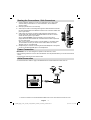
Connecting the LCD TV to a
PC
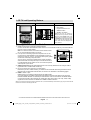
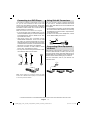
Using Side USB Input
HDMI 1
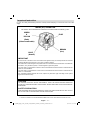
For displaying your computer’s screen image on
your LCD TV, you can connect your computer to the
TV set.
• Power off both computer and display before making
any connections.
• Use 15-pin D-sub display cable to connect a PC
to the LCD TV. Use an audio cable between audio
inputs of the TV (side) and audio output of your PC
to enable sound connection.
• When the connection is made, switch to PC-VGA
source. See “Input selection” section.
• Set the resolution that suits your viewing requirements.
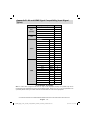
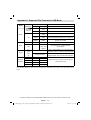
Resolution information can be found in the appendix
parts.
VGA
SPDIF
• You can connect USB devices to your TV by using
the USB input of the TV. This feature allows you to
display/play music,photo or video files stored in a
USB stick.
• It is possible that certain types of USB devices (e.g.
MP3 Players) may not be compatible with this TV.
• You may back up your files before making any
connections to the TV set in order to avoid any
possible data loss. Note that manufacturer will not
be responsible for any file damage or data loss.
• The TV supports only FAT32 disk formatting. NTFS
format is not supported. If you connect a USB disk
with NTFS format, “usb is unformetted” osd will
be displayed.
• Do not pull out USB module while playing a file.
CAUTION: Quickly plugging and unplugging
USB devices, is a very hazardous operation.
Especially, do not repeatedly quickly plug
and unplug the drive. This may cause
physical damage to the USB player and
especially the USB device itself.
Coax.OUT
USB Memory Connection
• Plug your USB device to the USB input of the
TV.
SCART
Note: USB hard disk drives are not supported.
PC audio cable
(not supplied)
to AUDIO INPUTS
on the TV
PC Input
5Vdc-Max:500mA
Audio
Inputs
PC RGB cable
(not supplied)
to PC input
IF YOU NEED ANY ASSISTANCE OR A CUSTOMER REFERENCE NUMBER PLEASE CONTACT THE TECHWOOD HELP LINE ON 0845 543 0485
English - 8 -
01_MB46_[GB]_(01-TV)_1900UK_IDTV_NICKEL15_22742W_10071406_50181370.indd 8
03.12.2010 16:21:48