1
G510 Ins:Layout 1
1/11/12
10:51
Page 2
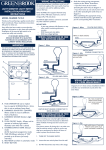
Installing The Fan in an External Wall
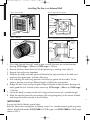
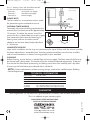
Dia 1- Front Cover
Dia 2- Internal Fan Layout
Terminal Block
(To the top)
Cable
Clamp
Fixing
Holes
Cable Entry
Knockout
Fixing
Holes
Fixing
Screw
Dia 3 - Wall Kit
Front Cover Locking Screw
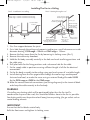
Dia 4 - Installation in an External Wall
Cavity
External
Wall
External
Grille
Fixed
Grill or
Cavity
Shutter
Possible
Cable
Position
Fan
Flexible
Ducting
(G510 100mm)
(G242 155mm)
Inside Diameter Ducting
Interior
Wall
1. Cut a hole through the wall, sized to give a small clearance on inside diameter
ducting: G510 range = 100mm or G242 range = 155mm.
2. Remove the front cover from the fan by loosening its locking screw (Dia.1)
3. Remove the cable entry knockout.
4. Hold the fan body assembly (terminal block to the top) centrally in the hole and
mark two fixing positions and the cable entry.
5. Drill and plug the two fixing positions and chase a groove for the cable. Fix the
cable in position,ensuring sufficient length is left for the connections.
6. Bridge the wall cavity using a length of rigid or flexible inside diameter ducting and
make good the wall surfaces where necessary. G510 range = 100mm or G242 range
= 155mm.
7. Fix the fan body assembly to the wall using pan head screws of a suitable length.
8. Make the correct electrical connections (see wiring diagrams) to the terminal block
and clamp the cable securely to the fan body.
4
W
c
IMPORTANT
Ensure that the fan blades rotate freely.
Refit the front cover and tighten its locking screw. Fit a suitable external grille or gravity
shutter KingShield models G425/G400 for G510 range, and G625/G600 for G242 range
shown in Dia 3.