1
Table of Contents
Table of Contents......................................................................................................................... 1
To Ensure Safe Use....................................................................................................................... 3
Important Notes on Handling and Use ............................................................................................ 9
Chapter 1 Getting Started............................................................................................................... 11
1-1 Great Features.................................................................................................................... 12
Engraving - ENGRAVER...............................................................................................................................................................12
Scoring - SCORE ...........................................................................................................................................................................12
1-2 Part Names and Functions................................................................................................. 13
Front..................................................................................................................................................................................................13
Rear....................................................................................................................................................................................................13
Control Panel..................................................................................................................................................................................14
Chapter 2 Installation and Setup.................................................................................................... 15
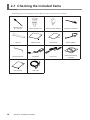
2-1 Checking the Included Items............................................................................................... 16
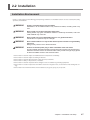
2-2 Installation........................................................................................................................... 17
Installation Environment...........................................................................................................................................................17
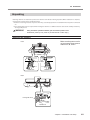
Unpacking.......................................................................................................................................................................................19
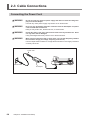
2-3 Cable Connections.............................................................................................................. 20
Connecting the Power Cord.....................................................................................................................................................20
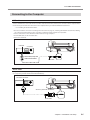
Connecting to the Computer...................................................................................................................................................21
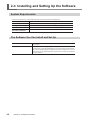
2-4 Installing and Setting Up the Software................................................................................ 22
System Requirements.................................................................................................................................................................22
The Software You Can Install and Set Up.............................................................................................................................22
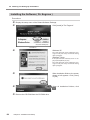
Installing the Windows-based Driver....................................................................................................................................23
Installing the Software ( Dr. Engrave )...................................................................................................................................24
Chapter 3 Getting Ready for and Performing Cutting.................................................................. 25
3-1 Switching the Power On and Off......................................................................................... 26
Switching On the Power............................................................................................................................................................26
Switching Off the Power............................................................................................................................................................26
3-2 Before Starting to Cut......................................................................................................... 27
Loading the Material...................................................................................................................................................................27
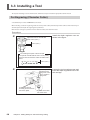
3-3 Installing a Tool................................................................................................................... 28
For Engraving (Character Cutter)............................................................................................................................................28
How to Remove the Cutter for Engraving...........................................................................................................................30
How to Remove the Depth Regulator Nose.......................................................................................................................31
For the Scoring (Diamond scraper)........................................................................................................................................31
Setting the Origin Point.............................................................................................................................................................33
About Tools and Materials.........................................................................................................................................................33
Test Cutting....................................................................................................................................................................................34
3-4 Setting Cutting Conditions.................................................................................................. 35
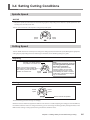
Spindle Speed................................................................................................................................................................................35
Cutting Speed................................................................................................................................................................................35
Attaching the Vacuum-adapter for Chip Cleaning...........................................................................................................36
3-5 Sending Cutting Data.......................................................................................................... 37
Sending Cutting Data.................................................................................................................................................................37
Changes That Can Be Made While Cutting..........................................................................................................................37
3-6 Ending Cutting Operations.................................................................................................. 38
Ending Cutting Operations.......................................................................................................................................................38
Chapter 4 Appendix......................................................................................................................... 39
4-1 Maintenance....................................................................................................................... 40
Cleaning...........................................................................................................................................................................................40
1