1
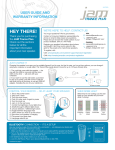
Controlling your Droid
1. Charge Light: Red Light indicates the Battery is charging, the Light goes out when the
Battery is fully charged.
2. Volume Down (-)
3. Play/Pause (Short Press for song Play / Pause), Long Press for Bluetooth on / off / pair
4. Volume Up (+)
5. Operation Light: Bluetooth and Line-in operation light (more details see General
Instructions)
6. DC Input (MicroUSB Port)
7. Line-in Port
8. Power Switch (ON/OFF)