1
3.1 Voltage and Current
Each successive press of the
4.1 Set-up Menu Structure
Warnings
button selects a new parameter:
Important Safety Information is contained in the
Maintenance section. Familiarize yourself with this
information before attempting installation or other
procedures. Symbols used in this document:
Change password
4-digit number – default ‘1000’
Phase to neutral voltages.
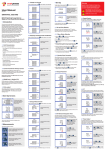
User Manual
Risk of Danger: These instructions contain
important safety information. Read them before
starting installation or servicing of the equipment.
v1.0
SMARTconnect X835
Set the ratio of the CT
4-digit number 0001~2000.
Current on each phase.
MULTIFUNCTION POWER MONITOR
1 Introduction
The multifunction panel meter SMARTconenct X835 is a top,
new-generation intelligent panel meter, used not only in the
electricity transmission and power distribution system but also
in the power consumption measurement and analysis in high
voltage intelligent power grid.
This document provides operating, maintenance and
installation instructions for the SMARTconenct X835. The unit
measures and displays the characteristics of single phase
two wires and three phase four wires supplies, including
voltage, frequency, current, power, active and reactive energy,
imported or exported. Energy is measured in terms of kWh
& kVarh. Maximum demand current can be measured over
preset periods of up to 60minutes. In order to measure energy,
the unit requires voltage and current inputs in addition to the
supply required to power the product. The requisite current
input(s) are obtained via current transformers (CT).
3.2 Frequency and Power Factor and Demand
Each successive press of the
The SMARTconenct X835 can be configured to work with a
wide range of CTs, giving the unit a wide range of operation.
Built-in interfaces provide pulse and RS485 Modbus RTU
outputs. Configuration is password protected.
button selects a new range:
Total kW
Frequency
Power factor (total)
• Line voltage and THD% (total harmonic distortion)
of all phases
• Line Frequency
• Power, maximum power demand and power factor
Maximum Power Demand.
• Active energy imported and exported
• Reactive energy imported and exported
1. Use the
and
buttons to select the required item
from the menu shown in section 4.1.
• Changing password
• Supply system selection 1phase2wire, 3phase 4wires
Maximum Current Demand.
• CT Ratio and secondary current
• PT Ratio and secondary voltage
and
to
3.3 Power
Each successive press of the
button selects a new range:
repeatedly until
4.2.2 Number Entry Procedure
Instantaneous active power (kW)
The unit can be configured to operate with a CT ratio which
is calculated by dividing the primary and secondary current
(100/5A CT would be 20 as 100÷5=20). You can select for the
CT Rate between 1 and 2000 and for the CT secondary you
can select 1 or 5A.
Instantaneous reactive power (kVar)
1.3 RS485 Serial – Modbus RTU
This uses an RS485 serial port with Modbus RTU protocol to
provide a means of remotely monitoring and controlling the
SMARTconnect X835. Set-up screens are provided for setting
up the RS485 port. See section 4.8
This provides 2 pulsed outputs that measure active and
reactive energy. The constant for reactive energy is 5000imp/
kVarh. The pulse width for active energy can be set from the
Set-up menu.
1. The current digit to be set flashes and is set using the
and
buttons.
button
Each successive press of the
button selects a new range:
Imported active energy
in kWh.
Exported active energy
in kWh.
The second screen indicates the
firmware installed in the unit and its
build number.
Imported reactive energy
in kVArh.
Exported reactive energy
in kVArh.
Next the unit performs a self-test and
indicates if the test passes.
Select the Frequency and Power factor display
screens. In Set-up Mode, this is the “Up”
button.
Select the Power display screens.
In Set-up Mode, this is the
“Down” button.
Select the Energy display screens.
In Set-up mode, this is the “Enter” or “Right”
button.
Secondary CT setting
Hold
to adjust the CT secondary
current value (1A or 5A).
3. After setting the last digit, hold the
button to confirm
your selection. Once the selection stops flashing the
selection will be saved.
Set CT Rate value
Hold
to adjust the CT Rate
setting screen. The range is from
0001 to 2000 (allowing up to a
10000/5A CT).
Use the
and
to choose the change
password option.
Hold the
button
to enter the change
password. The new
password screen will
appear with the first digit
flashing.
To work out your CT rate, divide your CT Primary current value
by your CT Secondary current value. For example, using a
100/5A CT would have a CT rate of 20 (100÷5=20).
4.7 PT
The PT option sets the secondary voltage (PT2 100~500V) of the
Voltage transformer (PT) that connects to the meter.
Use
and
to set the
first digit and press
to
move to the next digit.
From the set-up menu, use
and
buttons to select the PT option.
The screen will show the voltage PT
secondary value.
Repeat the procedure for
the remaining three digits.
Hold
to adjust the selection, use
the
and
buttons to set the
correct secondary value, hold
to
confirm the selection.
3.4 Energy Measurements
Selects the Voltage and Current display
screens. In Set-up Mode, this is the
“Left” or “Back” button.
From the set-up menu,
use
and
buttons to select the
CT option. The screen will show the
CT secondary current value.
Total kW, kVarh, kVA
2 Start Up Screens
The buttons operate as follows:
The CT option sets the current transformer rate (1~2000) and
secondary current (CT2 1A or 5A) of the current transformer
(CT) that is connected to the meter.
Instantaneous Volt-amps (KVA)
1.4 Pulse output
3 Measurements
4.6 CT
4.3 Change Password
1.2 Current Transformer Current ratio
*After a short delay, the screen will display active
energy measurements.
Hold
to confirm the selection.
Once the selection stops flashing the
selection will be saved.
5. Having completed a parameter setting, hold
to save
your adjustment. You will return to the set-up menu and
will be able to use the
and
buttons for further menu
selection.
2. Once you have set the flashing number press the
to move along to the next digit.
• Demand Interval time
The first screen lights all display
segments and can be used as a
display check
Use
and
buttons to select
the required system option:
1P2(Single Phase)
3P4(3 Phase 4 Wire).
to adjust the current set-up option shown.
When setting up the unit, some screens require the entering
of a number. In particular, on entry to the setting up section, a
password must be entered. Digits are set individually, from left
to right. The procedure is as follows:
The unit has password-protected set-up screens for:
Hold
to enter the selection. The
current selection
will flash.
4.2.1 Menu Option Selection
6. On completion of all setting-up, press
the measurement screen is restored.
• Currents, Current demands and current THD%
of all phases
A pulse output indicates real-time energy measurement. An
RS485 output allows remote monitoring from another display
or a computer.
Some menu items, such as password and CT, require a four-digit
number entry while others, such as supply system, require selection
from a number of menu options.
3. If an item flashes, then it can be adjusted by the
buttons. If not, there maybe a further layer.
Power factor of each phase
From the set-up menu, use
and
buttons to select the system
option. The screen will show the
currently selected power supply.
4.2 Set-up Entry Methods
4. Having selected an option from the current layer, hold
confirm your selection.
The SMARTconenct X835 can measure and display:
• Pulse output duration
Use this section to set the type of power supply being
monitored. Please note this product will not work as a 3-phase
3-wire system.
DIT(Demand Integration Time). This is the period in minutes over
which the current and power readings are integrated for maximum
demand measurement. Options are: off, 5, 8, 10, 15, 20, 30 and 60
minutes.
2. Hold
1.1 Unit Characteristics
• Reset for demand measurements
4.5 Supply System
Set the ratio of PT
4-digit number 0001~2000.
Phase to neutral voltage THD%.
Current THD% for each phase.
Caution: Risk of Electric Shock
Total active energy in kWh.
Total reactive energy
in kVArh.
4 Set Up
To enter set-up mode, press and hold the
password screen appears.
You will now return to the set up menu, using the
and
buttons will allow you to scroll through the other set-up
options.
4.4 DIT Demand Integration Time
This sets the period in minutes over which the current
and power readings are integrated for maximum demand
measurement. The options are: 0 (off), 5, 8, 10, 15, 20, 30 and
60 minutes.
From the set-up menu,
use
and
buttons
to select the DIT option.
The screen will show
the currently selected
integration time.
Hold
to adjust the PT rate. The
range is from 0001 to 9999, use
the
and
buttons to set the
correct PT rate.
*To work out your PT rate, divide your PT primary current value by your PT
secondary current value.
Hold
to confirm the selection. Once the selection stops
flashing the selection will be saved.
4.8 Pulse Output
This option allows you to configure the pulse output. The
output can be set to provide a pulse for a defined amount of
active or reactive energy. Use this section to set up the relay
pulse output—Available units: kWh, kVArh.
From the set-up menu, use
and
buttons to select the Pulse
output option.
button until the
Use
and
buttons to adjust
the flashing digit, Press
to
move to the right for the next digit
selection.
Setting up is password-protected so you must enter the
correct password (default ‘1000’) before processing. If an
incorrect password is entered, the display will show: PASS Err
To exit setting-up mode, press
measurement screen is restored.
Hold
to confirm
the selection. Once the
selection stops flashing the
selection will be saved.
Hold
to enter
the selection.
The current time interval
will flash.
Use the
and
buttons to select the time
required.
repeatedly until the
Hold
to confirm
the selection. Once the
selection stops flashing the
selection will be saved.
Hold
to enter the selection. The
unit symbol will flash.
Use
and
kWh or kVArh.
buttons to choose
Hold
to confirm the selection. Once the selection stops
flashing the selection will be saved.
4.8.1 Pulse rate
4.9.4 Stop bits
Use this to set the energy represented by each pulse. Rate
can be set to 1 pulse per 0.001Wh/0.01kWh/0.1kWh/1kWh/10
kWh/100kWh. (It shows 1 impulse = 1Wh/kVarh)
From the set-up menu, use
and
buttons to select the stop
bit option.
From the set-up menu,
use
and
buttons to select
the Pulse Rate option.
Hold
to enter the selection. The
current setting will flash.
4.8.2 Pulse Duration
The energy monitored can be active or reactive and the pulse
width can be selected as 200, 100 or 60ms. (It shows pulse
width of 200ms)
From the set-up menu,
use
and
buttons to select
the Pulse width option.
5 Specifications
Use
and
buttons to choose
the relevant stop bit (2 or 1)
On completion of the entry procedure, hold
to confirm the
setting, once the selection stops flashing the selection will be
saved.
4.10.1 CLR kWh
• Ambient temperature
23°C ±1°C
• Input waveform
50 or 60Hz ±2%
• Input waveform
Sinusoidal (distortion
factor < 0·005)
• Auxiliary supply voltage
Nominal ±1%
• Auxiliary supply frequency
Nominal ±1%
• Auxiliary supply waveform (if AC)
Sinusoidal (distortion
factor < 0·05)
• Magnetic field of external origin
Terrestrial flux
5.1.1 Voltage and Current
• Voltages between phases 173 to 500V a.c.
(3p supplies only)
• Percentage total voltage harmonic distortion (THD%) for
each phase to N ( not for 3p3w supplies)
• Percentage voltage THD% between phases
(three phase supplies only)
• Current on each phase – 1 to 9999A range, set by external
current transformer(s) (CTs)
• Current THD% for each phase
• Frequency in Hz
• Instantaneous power
• Power 0 to999MW
• Volt-amps 0 to 999 MVA
Use
and
buttons to choose pulse width
(200/100/60ms). On completion of the entry procedure, hold
to confirm the setting, once the selection stops flashing
the selection will be saved.
4.9 Communication
There is an RS485 port that can be used for communication
using Modbus RTU protocol.
Hold
to adjust the selection. The
CLR will flash.
4.10.2 CLR KVarh
From the set-up menu, use
and
buttons to select the
reset option.
4.9.1 RS485 Address
From the set-up menu, M and
buttons to select the address
P
ID.
Hold E
to adjust the selection.
The current setting will be flashing.
Use M and P
buttons to
choose Modbus address (001 to
247).
On completion of the entry procedure, hold
to confirm the
setting, once the selection stops flashing the selection will be
saved.
• Maximum demanded power since last Demand reset
Power factor
• Maximum neutral demand current, since the last Demand
reset (three phase supplies only)
On completion of the entry procedure, hold
to confirm the
setting, once the selection stops flashing the selection will be
saved.
Hold
to adjust the selection. The
CLR will flash.
• Imported active energy
0 to 9999999.9 kWh
• Exported active energy
0 to 9999999.9 kWh
• Imported reactive energy
0 to 9999999.9 kVArh
• Exported reactive energy
0 to 9999999.9 kVArh
• Total active energy
0 to 9999999.9 kWh
• Total reactive energy
0 to 9999999.9 kVArh
5.2 Measured Inputs
• Voltage
0·5% of range maximum
4.10.2 CLR Max Demand
• Current
0·5% of nominal
• Frequency
0·2% of mid-frequency
• Power factor
1% of unity (0.01)
• Active power (W)
±1% of range maximum
• Reactive power (VAr)
±2% of range maximum
• Apparent power (VA)
±1% of range maximum
• Active energy (Wh)
Class 1 IEC 62053-21
• Reactive energy (VARh)
±2% of range maximum
• Total harmonic distortion
1% up to 31st harmonic
• Temperature co-efficient
Voltage and current =
0.013%/°C typical
= 0·018%/°C, typical
• Active energy
4.9.2 Baud Rate
From the set-up menu,
use
and
buttons to select
the Baud Rate option.
Hold
to adjust the selection. The
current setting will flash.
Use
and
buttons to
choose Baud rate 2.4k. 4.8k,
9.6k, 19.2k, 38.4k
On completion of the entry procedure, hold
to confirm the
setting, once the selection stops flashing the selection will be
saved.
4.9.3 Parity
From the set-up menu, use
and
buttons to select the
parity option.
Hold
to adjust the selection. The
current setting will flash.
Use
and
buttons to choose
the relevant parity (EVEN/ODD/
NONE)
On completion of the entry procedure, hold
to confirm the
setting, once the selection stops flashing the selection will be
saved.
On completion of the entry procedure, hold
to confirm the
setting, once the selection stops flashing the selection will be
saved.
4.11 Reverse Connected Current Inputs
Correction Setting
From the set-up menu,
use
and
to select page “SET
SYS COnt”
-25°C to +55°C*
• Storage temperature
-40°C to +70°C*
• Relative humidity
0 to 90%,
non-condensing
• Altitude
Up to 2000m
• Warm up time
1 minute
• Vibration
10Hz to 50Hz, IEC
60068-2-6, 2g
• Shock
30g in 3 planes
6 Dimensions
7 Wiring Diagram
The measured voltage input is a 4-way plug-in terminal with
2·5mm² stranded wire capacity. This device can be configured
as 3-phase 4-wire or as a single-phase 2-wire set up. The CT
input is a 6-way plug-in terminal with 2·5mm² stranded wire
capacity. Nominal rated input current 5A or 1A via an external
CT.
5.3 Accuracy
Hold
to adjust the selection. The
CLR will flash.
• Operating temperature
5.1.3 Energy Measurements
On completion of the entry procedure, hold
to confirm the
setting, once the selection stops flashing the selection will be
saved.
From the set-up menu, use
and
to select the
reset option.
5.7 Environment
*Maximum operating and storage temperatures are in the
context of typical daily and seasonal variation.
• Reactive Power 0 to 999MVAr
Hold
to enter the selection. The
current setting will flash.
Influence Quantities are variables that affect measurement
errors to a minor degree. Accuracy is verified under nominal
value (within the specified tolerance) of these conditions.
The unit can monitor and display the following parameters of a
single phase, 3-phase 3-wire or 3-phase 4-wire supply.
5.1.2 Power factor, Frequency and Max
Demand
From the set-up menu, use
and
buttons to select the
reset option.
5.6 Reference Conditions of
Influence Quantities
5.1 Measured Parameters
• Phase to neutral voltages 100 to 289V a.c.
(not for 3p3w supplies)
Hold
to enter the selection. The
current setting will flash.
Use
and
buttons to choose pulse rate.
0.001/0.01/0.1/1/10/100kWh/kVarh per pulse. On completion
of the entry procedure, hold
to confirm the setting, once
the selection stops flashing the selection will be saved.
After setting, you still need to activate the auto scroll display
function by repeatedly pressing the ESC button. If you wish
to exit from the auto scroll function, you can press the ESC
button.
• Response time to step input
N
N
1s, typical, to >99% of
final reading, at 50 Hz.
5.4 Auxiliary Supply
This device is a self-supplied meter due to internal links on
terminals 1 and 6. This device does not require an external
auxiliary supply.
5.5 Interfaces for External Monitoring
Three interfaces are provided:
• RS485 communication channel that can be programmed
for Modbus RTU protocol
Hold
to access the sub-option
menu, use
and
to view
Phase A, B & C. The default is frd
(forward)
Hold
to adjust the selection. Use
and
to change between FRD
and REV. Hold
to confirm the
selection. Once the selection stops
flashing the selection will be saved.
4.12 Setting Auto Scroll Display Interval
Use the
and
to find “SET
AUTO”, hold
to adjust the
selection. The current option will
appear with the first digit flashing.
• Relay output indicating real-time measured energy.
(configurable)
• Pulse output 5000imp/kWh (not configurable)
The Modbus configuration (Baud rate etc.) and the pulse
relay output assignments (kW/kVArh, import/export etc.) are
configured through the Set-up screens.
5.5.1 Pulse Relay Output
Opto-coupler with potential free SPST-NO Contact
(Contact range 5-27VDC / Max current input: Imin 2mA and
Imax 27mA DC). The pulse output can be set to generate
pulses to represent kWh or kVArh.
Rate can be set to generate 1 pulse per:
0.01 = 10 Wh/VArh
0.1 = 100 Wh/VArh
1 = 1 kWh/kVArh
10 = 10 kWh/kVArh
100 = 100 kWh/kVArh
Pulse width: 200/100/60 ms.
Use
and
to set the first
digit and press
to confirm your
selection. The next digit will flash.
5.5.2 RS485 Output for Modbus RTU
For Modbus RTU, the following RS485 communication
parameters can be configured from the set-up menu:
Baud rate 2400, 4800, 9600, 19200, 38400
Parity none / odd / even
Repeat the procedure for the
remaining three digits.
Stop bits 1 or 2
RS485 network address nnn – 3-digit number, 1 to 247
Modbus™ Word order Hi/Lo byte order is set automatically to
normal or reverse. It cannot be configured from the set-up menu.
Hold
to confirm the selection.
Once the selection stops flashing the
selection will be saved.
Smart Process & Controls Ltd, 11 Totman Close, Brook Road Industrial Estate, Rayleigh, Essex SS6 7UZ
Customer Service: 01268 773422 | www.smartprocess.co.uk | Specifications are subject to change without notice
Label on the back of the meter:
l11 l12 l21 l22 l31 l32
13 14 15 16 17 18
CURRENT INPUT
Power: 3W / 65 ~ 265VAC
/ 80 ~ 380 VDC
FREQ : 45 ~ 65Hz
COMM : MODBUS (RS485),
2400~38400bps
Overvoltage : CAT III
VOLTAGE INPUT
1 2 3 4 5 6
N V3
V2
V1
+ - + - + 19 20 21 22 23 24
2
1 RS485
1: Configurable
Pulse output
2: 5000imp/kWh
VOLTAGE OUTPUT
!
7 8 9 10 11 12
V1
V2
V3 N