1
Loading Drivers
Loading PP-60 drivers for you’re PDA or Smartphones.
BlackBerry Devices:
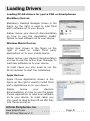
Blackberry Desktop Manager shown in the
figure on the right is used to load third
party software on to your device.
Please review your device’s documentation
on how to use the Application Loader
Option to load software on to your device.
Windows Mobile Devices:
Active Sync shown in the figure on the
right is used to install third party
applications on to your mobile device.
Please review your device’s documentation
on how to use the Active Sync Manager to
load new software on to your device.
In most cases you only need to run the
PP-60 installer to start the installation.
Apple Devices:
Apple iTunes Application shown in the
figure on the right is used to install third
party applications on to your device.
Please
review
your
device’s
documentation on how to use the Apple
iTunes Application to load new software
on to your device. In most cases you
only need to drag & drop PP-60 iOS files
into iTunes and sync.
Infinite Peripherals, Inc.
www.ipcprint.com
PP-60 User Manual v1.0
. . . . . . . . . . . .Page
. . .21. . . . .