1
Link to Download Desktop Software:
SUPPORT.NOMADIO.NET/REACT
Copyright 2006 Nomadio
Published November, 2006
Table of Contents
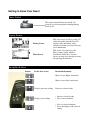
Getting to Know Your React .................................................................................................................8
Power Switch...............................................................................................................................8
Display Screen .............................................................................................................................8
Navigation Buttons ......................................................................................................................8
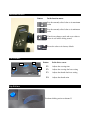
Selection Buttons .........................................................................................................................9
Trim Buttons................................................................................................................................9
Grip Buttons ................................................................................................................................9
Charging and Installing Batteries ....................................................................................................10
Installing the Batteries ....................................................................................................................10
Charging the Batteries ....................................................................................................................11
Installing the Transceiver................................................................................................................12
Mounting the Transceiver ..........................................................................................................12
Connecting the Transceiver........................................................................................................12
Servo Connection..............................................................................................................13
FCC Compliance Reminder ..............................................................................................13
Installing the Optional Sensors............................................................................................................14
Receiver Battery Sensor .................................................................................................................14
Voltage Sensor ...............................................................................................................................14
Temperature Sensor........................................................................................................................15
Installation ......................................................................................................................................... 15
Connection .....................................................................................................................................15
Tachometer Sensor .........................................................................................................................16
Installation ..........................................................................................................................................16
Connection .....................................................................................................................................17