1
2-4
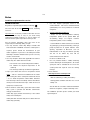
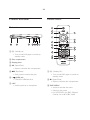
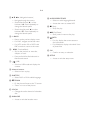
d v V b B (Navigation buttons)
• Navigate through the menus.
• Select an audio language/channel.
• Search fast-forward (B) or fastbackward (b). Press repeatedly to
change the search speed.
• Access the menu to create MP3.
• Search slow-forward (v) or slowbackward (V). Press repeatedly to
change the search speed.
e 2 BACK
• Return to the previous display menu.
n x (Stop)
• Stop disc play.
o u (Play/Pause)
• Start, pause or resume disc play.
p
INFO
• For DVD, navigate to the title menu.
• For disc, display the current status or
disc information.
• For VCD version 2.0 or SVCD with
PBC turned on, return to the menu.
• For slideshows, display a thumbnail view
of photo files.
f í/ë (Previous/Next)
• Skip to the previous or next title,
chapter, or track.
• Press and hold for fast-backward or
fast-forward search.
g
m AUDIO/CREATE MP3
(USB)
• Switch to USB mode and display the
content.
h Numeric buttons
• Select an item to play.
i SUBTITLE
• Select DVD or DivX subtitle language.
j , ZOOM
• Fit the picture format to the TV screen.
• Zoom in or out of the picture.
k VOCAL
• Change the audio channel of a karaoke
disc.
l KARAOKE
• Access or exit the karaoke menu.
q OK
• Confirm an entry or selection.
r SETUP
• Access or exit the setup menu.