1
Upgrading from Oracle Database 10g Release 1 and Older Releases
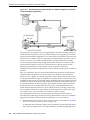
for only a subset of the sessions, for as long as required, to capture all important
SQL statements at least once.
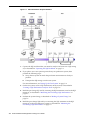
2.
On the production system, create a mapping table, as described in "Creating a
Mapping Table" on page 12-4.
This mapping table will be used to convert the user and object identifier numbers
in the SQL trace files to their string equivalents.
3.
Move the SQL trace files and the mapping table from the production system to the
SQL Performance Analyzer system, as described in "Creating a Mapping Table" on
page 12-4.
4.
On the SQL Performance Analyzer system, construct a SQL tuning set using the
SQL trace files, as described in "Building a SQL Tuning Set" on page 12-4.
The SQL tuning set will contain the SQL statements captured in the SQL trace
files, along with their relevant execution context and statistics.
5.
6.
On the SQL Performance Analyzer system, use SQL Performance Analyzer to
build a pre-upgrade SQL trial and a post-upgrade SQL trial:
a.
Create a new SQL Performance Analyzer task and convert the contents in the
SQL tuning set into a pre-upgrade SQL trial that will be used as a baseline for
comparison, as described in "Building the Pre-Upgrade SQL Trial for Oracle
10g Release 1 and Older Releases" on page 12-6.
b.
Remotely test execute the SQL statements on the test system over a database
link to build a post-upgrade SQL trial, as described in "Building the
Post-Upgrade SQL Trial Upgrading from Oracle Database 10g Release 1 and
Older Releases" on page 12-8.
Compare SQL performance and fix regressed SQL.
SQL Performance Analyzer compares the performance of SQL statements read
from the SQL tuning set during the pre-upgrade SQL trial to those captured from
the remote test execution during the post-upgrade SQL trial. A report is produced
to identify any changes in execution plans or performance of the SQL statements.
If the report reveals any regressed SQL statements, you can make further changes
to fix the regressed SQL. You can then repeat the process of executing the SQL
tuning set and comparing its performance to a previous execution to test any fixes
or additional changes made. Repeat these steps until you are satisfied with the
outcome of the analysis.
Enabling SQL Trace on the Production System
Oracle9i uses the SQL Trace facility to collect performance data on individual SQL
statements. The information generated by SQL Trace is stored in SQL trace files. SQL
Performance Analyzer consumes the following information from these files:
■
SQL text and username under which parse occurred
■
Bind values for each execution
■
CPU and elapsed times
■
Physical reads and logical reads
■
Number of rows processed
■
Execution plan for each SQL statement (only captured if the cursor for the SQL
statement is closed)
Testing a Database Upgrade
12-3