1
Operation
3. Operation
■ Touch screen
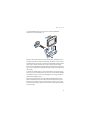
To use the device, tap the screen with your finger.
Important: Avoid scratching the touch screen. Never use a pen
or pencil or other sharp objects to write on the touch screen.
■ Adjust the volume
To adjust the volume, press the volume up or down key to display the
volume bar, and use either key to set the volume.
■ Adjust the screen backlight
To adjust the backlight, press the volume up or down key, and quickly
tap the sun icon (shown in the top right corner) to activate the night
mode or the moon icon to activate the day mode. The sun icon shows
that the day mode is active and the moon icon shows that the night
mode is active.
To change the backlight settings, in the application menu screen, tap
Setup > Backlight.
■ Lock the screen and keys
To prevent accidental operation of the screen and keys, slide the lock
switch at the base of the device toward the padlock icon. A padlock icon
is displayed on the screen. To activate the screen and keys, slide the
switch to the opposite direction.
■ Standby mode
To save battery power, you can set the device to the standby mode by
pressing the standby key. The screen turns off. To use the device, press
the standby key.
14