1
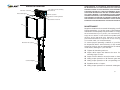
Automatic car gate operator (optional)
Car operating panel
* Your
operating
panel
may look
different
Used to control the elevator from inside the car. Please familiarize yourself with
the Emergency Stop Switch and Emergency Alarm Button for use from inside of
the Elevator car in case of an emergency.
• L.E.D. display shows the floor on which the Elevator is currently stopped.
• Press and release a numbered button to send Elevator to that floor. The ring around
the button illuminates to acknowledge your call.
• The L.E.D. display also alerts you to complications that the control system may
see. Refer to Troubleshooting on page 10 for more details.
• PLEASE NOTE: The Emergency Stop Switch can be activated at any time to stop
the Elevator's movement.
• PLEASE NOTE: The Emergency Alarm Button can be pressed to sound alarm at
any time to alert others in the home of an emergency. A telephone is also provided
in the car for emergency use.
• PLEASE NOTE: The Battery Backup Emergency Light, integrated into the top of the
panel, illuminates during power failure.
• There is a phone integrated into the operating panel. You may use the phone to
call for help in the case of an emergency inside the elevator
• Light switch to override the automatic car lights. With the light override switch
turned "off", the car lights automatically turn on when the Elevator is in use and
turn off after a period of non-use. To leave lights on constantly, turn the switch
to "on".
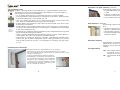
Hoistway door interlocks
Keeps the hoistway door locked when the car is not there.
• The interlock locks the door 20 seconds after the door is closed.
• Press and release the hall station button to unlock the door, (if the
elevator is at that floor).
• Surface mounted electromechanical interlock.
• PLEASE NOTE: The hoistway door interlock can
be opened with a special key from outside the
hoistway in case of emergency or for servicing.
To unlock a door, insert the emergency release
key into the hole in the door, (near the top) and
pry up to release the interlock.
Automatically opens the car gate when Elevator stops at a floor.
• Includes light beam safety curtain to keep gate open until path
is clear.
• If Elevator is already at floor level, the gate automatically opens
when the hoistway door is opened.
• A door open button is provided on the car operating panel.
Auto-Opener™ (optional)
Automatically opens hoistway door when Elevator stops at a
floor.
• Mounts to wall near top of door on the hinge side.
• Works in conjunction with the automatic car gate operator.
• Automatically reverses when an obstruction is encountered.
• If Elevator is already at floor level, door can be opened by pressing
hall station button.
Automatic homing
Approximately 5 minutes after the Elevator has been used, it
automatically "homes" to a preprogrammed floor. The factory
default is the top floor unless another floor was specified when
ordered.
Car light switch
OFF - The car lights automatically turn on when a hall station button
is pressed or the car gate is opened and turn off after 5
minutes of non-use of the Elevator.
ON - The automatic feature is disabled and lights stay on all the
time.
Emergency release
key
6
7