1
a
English
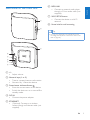
f MP3-LINK
• Connect an external audio player
through a 3.5mm audio cable (not
supplied).
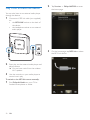
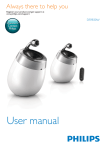
Overview of the main unit
g WI-FI SETUP button
• Connect the device to a Wi-Fi
network.
h Screw hole for wall mounting
b
Tip
•• You can go to Appendix 1 for details about wall
mounting (see 'Appendix 1: Mount the device onto
wall' on page 28).
c
h
g
f
e
d
a +/• Adjust volume.
b Numeric keys (1 to 5)
• Tune to a preset Internet radio station.
• Numeric key 1: Reset the device.
c Power/status indicator/button
• Show the current status of the device.
• Switch the device on or to normal/Eco
standby mode.
d DC IN
• Connect the power adaptor.
e ETHERNET
• (Optional) Connect to a wireless
router through an Ethernet cable (not
supplied).
EN
5