1
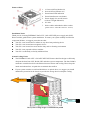
Names of Parts
1.
2.
3.
4.
5.
13.5cm Axial Fan (Intake Air)
8cm Axial Fan (Exhaust Air)
PowerGuard LED indication
PowerGuard buzzer reset button
Power Supply I/O (on/off) switch
(with AC-in light indication)
6. AC inlet
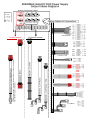
7. Native cables and modular cables sockets
(please refer to “Cable & Connector” session)
Installation Notice
Thank you for choosing ENERMAX GALAXY / GALAXY DXX power supply unit (PSU).
Please read this guide before system installation. To ensure your system stability and increase
component lifetime, we suggest you make sure that:
Your PC is not located near a radiator or any other heat producing device
Your PC is not located near a magnetic device
Your PC is not located in a moist and/or dusty and/or vibrating environment
Your PC is not exposed to direct sunshine
Your PC is sufficiently cooled by additional fans
System Cooling Notice
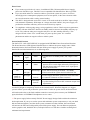
The ENERMAX GALAXY / GALAXY DXX PSU features dual fan design to efficiently
dissipate the heat from CPU, RAM, GPU and other system components. The fans’ RPM is
automatic controlled to achieve the balance between silence and cooling. Please keep the
intake and exhaust fans’ air path clear to maintain best airflow.
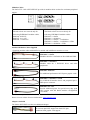
If your system contains several hard disk drives or optical drives, we suggest you install
additional system fans in the chassis to provide the storage devices adequate cooling.
Hot air out
Cool air in
Best system cooling design recommended by AMD