1
Extra Notice
If you want to provide the AC source via additional UPS (Uninterruptible Power Supply),
please use Sine Wave type. This PSU is not compatible with Simulate Sine Wave type UPS.
If you use multi outlets AC extension cables to provide the system AC power, do not use
other high power consumption equipment, such as laser printer, in the same extension cable
nor exceed extension cable’s safety current loading.
This PSU is designed with Active PFC circuit. It can work under 90 to 264VAC input voltage
with automatic adjustment. With input AC voltage more than 200VAC, the power supply can
perform the maximum efficiency and saves more electricity expense.
To compliance with on going energy saving regulations, such as USA low power requirement,
the PSU will turn off the PFC function in standby mode to increase the standby efficiency up
to 50~70% (whereas other power supplies only have 10~40% standby efficiency). This
design will emit a short “Tsst” sound when you power up the system. It is a normal
phenomenon and has no negative effect to whole system.
PowerGuard Function
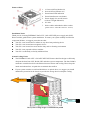
The GALAXY / GALAXY DXX PSU is equipped with ENERMAX new PowerGuard function.
The PowerGuard uses LED light and internal buzzer to indicate the power supply status. Under
abnormal situation, the PowerGuard will turn off the power supply to protect your system.
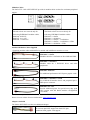
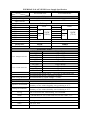
Detailed PowerGuard indications are as following table.
PSU status
LED
Buzzer
On
Orange
light
Green light
Off
Off
Silent
On
Blinking
red light
Short beeps
Suddenly off or
Red light
unable to
power on
Two beeps
interval
Standby
Information
Silent
1. System off or in standby mode, PSU output +5Vsb
only.
Silent
1. PSU and system in normal operation.
1. No AC input. Please turn PSU I/O switch to “I”
position, if I/O switch light and nearby LED light are
off, than please make sure if there is AC input power
from your wall outlet.
1. PSU fan fail warning (Fan RPM < 450 RPM).
2. Please turn off the system and check the PSU fan.
1. Power supply abnormal, protection circuit activated.*
2. Connector terminals are short-circuited.*
1. PG (Power Good) signal abnormal
2. System loading lower than PSU minimum output load
requirement.**
* When PowerGuard starts to beep under abnormal situation, you can press the red Reset button
near the LED light to temporarily deactivate the internal buzzer. When this happens, we suggest
you turn off the system and perform the system check. If after the system check, the PowerGuard
still send out the alert or the fault condition cannot be removed, please contact your ENERMAX
agent, distributor or ENERMAX headquarter service center.
On
Red light
Two beeps
interval
** The power supply follows mainly EPS12V Power Supply Design Guide and has the minimum
load requirement. If you try to test the system with minimum system component (ex. only one hard
disk and onboard graphic), and the whole system consumes less than 50watts, the PowerGuard
will activate the alert and could possibly turn off the power supply. You can add more peripheral,
such as graphics card, hard disk drives, and optical drives to avoid above situation resulting from
minimum load requirement.