1
following rules:
1. via SIP from - PSTN CID is in the SIP From field
2. via P-Asserted-Identity - SIP From field uses the
pre-configured account user Id. PSTN CID is in the
P-Asserted-Identity field
3. Send anonymous - SIP From field uses "anonymous".
PSTN CID is put in the P-Asserted-Identity field
4. Disable - PSTN CID will not be sent. SIP From field uses
the pre-configured account user ID
PIN for PSTN Calls
Enter digits to authorize calling PSTN numbers from VOIP,
default is no.
PIN for VOIP Calls
Enter digits to authorize calling VOIP terminals from PSTN,
default is no.
5.3.3 Configuring The FXO Channels
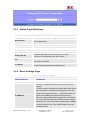
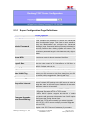
Configuring the FXO channels on the Unicorn 60x0 is an easy process. Follow the GUI
interfaces. The Device Status page terms are defined in FXO Ports page
Setting Options
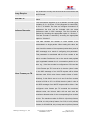
FXS PORT SETTING
Meaning
FXO Port
FXS Port Number
SIP User ID
User account information, provided by VoIP service
provider (ITSP). Usually in the form of digit similar to
phone number or actually a phone number.
Authenticate ID
SIP service subscriber’s Authenticate ID used for
authentication. Can be identical to or different from
SIP User ID.
Password
SIP service subscriber’s account password for
Unicorn 600x to register to (SIP) servers of ITSP.
Name
Name
Profile ID
Select the corresponding Profile ID (1/2)
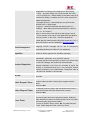
Unconditional Call
Forward to VOIP
Enable PSTN
Disconnect Tone
Detection
PSTN Disconnect
Tone
Hanlong Technology Co., Ltd
Calls are unconditionally forwarded to the specified
VoIP phone number once users dial the FXO port PSTN
number
If set to Yes, arrived Busy Tone is used as the
disconnect signal.
This configuration should be configured by the VoIP
service provider. Some country use single frequency
tone to signal PSTN disconnection, some country use
double frequency tone. This setting can be configured
Unicorn 60x0 User Manual
Firmware 1.0.0.29
Page 21 of 25
Last Updated 8/2010