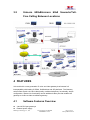
1
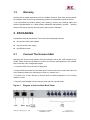
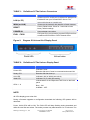
1.3 Warranty Hanlong has a reseller agreement with our reseller customer. End users should contact the company from whom you purchased the product for replacement, repair or refund. If you purchased the product directly from Hanlong, contact your Hanlong Sales and Service Representative for a RMA (Return Materials Authorization) number. Hanlong reserves the right to remedy warranty policy without prior notification. 2 PACKAGING Unpack and check all accessories. The Unicorn 60x0 package contains: One Unicorn 60x0 VoIP adapter One universal power supply One Ethernet cable 2.1 Connect The Unicorn 60x0 Managing the Unicorn 60x0 gateway and connecting the unit to the VoIP network is very simple. Follow these four (4) steps to connect your Unicorn 60x0 gateway to the Internet and access the unit’s configuration pages. 1. Connect PSTN Line to the FXO1-FXO8 ports. 2. Insert the Ethernet cable into the WAN port of Unicorn 60x0 and connect the other end of the Ethernet cable to an uplink port (a router or a modem, etc.) 3. Connect a PC to the LAN port of Unicorn 60x0 for initial configuration or if it is being used as a router. 4. Plug the power adapter into the Unicorn 60x0 and into a power outlet. Figure 1: Diagram of Unicorn 60x0 Back Panel Hanlong Technology Co., Ltd Unicorn 60x0 User Manual Firmware 1.0.0.29 Page 4 of 25 Last Updated 8/2010