1
UG-M10UFM
2015.05.04
UFM Read Operation
4-11
To perform a UFM page erase operation, follow these steps:
1. Disable the write protection mode. Write 0 into the write protection register for the sector through the
Avalon-MM control interface.
2. Write the appropriate bits into the control register to select the page erase location. The flash IP core
stores the page erase address and initiates the page erase operation.
Note: The IP core only accepts the page erase address when the IP is in IDLE state; busy field at status
register is2'b00. If the IP core is busy, it will ignore the page erase address.
3. The flash IP core sets the busy field in the status register to 2'b01 when the erase operation is in
progress.
4. The flash IP core then asserts the waitrequest signal if there are any new incoming read or write
commands from the data interface.
5. The flash IP core erases the page. It stores the physical flash erase result in the erase successful field in
the status register when the page erase operation completes.
Note: The maximum erase time is 350 ms.
6. The flash IP core sets the erase successful field in the status register to 1b'0 (failed) if you send an
illegal address.
7. Repeat the earlier steps if you want to perform another page erase operation.
8. You have to enable back the write protection mode when the page erase operation completes. Write 1
into the write protection register for the corresponding page through the Avalon-MM control
interface.
Note: Check the status register after each erase to make sure the erase operation is successful (erase
successful).
UFM Read Operation
The UFM offers a single 32-bit read operation.
To perform a read operation, the address register must be loaded with the reference address where the
data is or is going to be located in the UFM.
To perform a UFM read operation, follow these steps:
1.
2.
3.
4.
5.
Assert the read signal to send the legal data address to the data slave interface.
Set the burstcount to 1 (parallel mode) or 32 (serial mode).
The flash IP core asserts the waitrequest signal when it is busy.
The flash IP core asserts the readdatavalid signal and sends the data through the readdata bus.
The flash IP core sets the busy field in the status register to 2'b11 when the read operation is in
progress.
6. If the operation goes well, the flash IP core sets the read successful field in the status register to 1'b1 or
read successful. It sets the read successful field in the status register to 1'b0 (failed) and returns empty
flash if you try to read from an illegal address or protected sector.
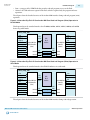
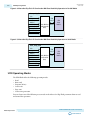
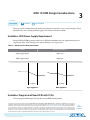
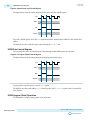
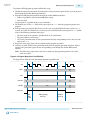
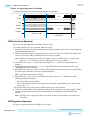
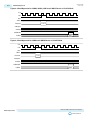
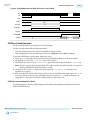
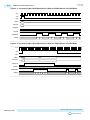
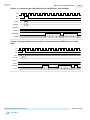
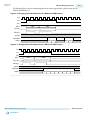
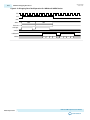
The following figures show the timing diagrams for the read operations for the different MAX 10 devices
in parallel and serial modes.
MAX 10 UFM Implementation Guides
Send Feedback
Altera Corporation