1
4. Board Update Portal
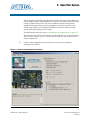
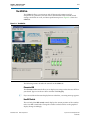
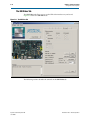
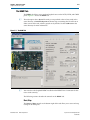
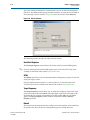
The Board Update Portal web page provides links to useful information on the Altera
website. You can use this web page to interact with your board:
■
Blinking LEDs
■
Writing text messages to the LCD
■
Mouse over the board photo to view features
The Board Update Portal web page is served by the web server application running
on the HPS on your board.
Connecting to the Board Update Portal Web Page
Ensure that you have the following setup or installed:
■
A PC with a connection to a working Ethernet port on a DHCP enabled network.
■
A separate working Ethernet port connected to the same network for the board.
■
The Ethernet and power cables that are included in the kit.
To connect to the Board Update Portal web page, perform these steps:
1. Ensure that the CSEL and BSEL jumpers (Table 3–4 on page 3–4) and the DIP
switch SW2.3 (Table 3–1 on page 3–2) are in the factory default positions.
2. Attach an Ethernet cable to the HPS Ethernet connector (J2) on the upper left of the
board to your LAN.
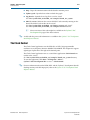
3. Power up the board. The board connects to the LAN’s gateway router and obtains
an IP address and displays it to the LCD. If no IP address is obtained, the LCD
displays No IP obtained. If the system booted, the LCD displays Hello Tim.
If the LCD displays No IP obtained, your system partially booted, but without
Ethernet access. If you receive the No IP obtained message, Altera recommends that
you install the USB virtual COM port drivers to access the Linux system through a
terminal window.
f For more information, refer to the Configuring Serial Connection section of
the Linux Getting Started page on RocketBoards.org.
1
November 2013
Altera Corporation
There are several reasons why your board may fail to get and IP address in
this step:
■
Your port is not active or the cable is not plugged in.
■
You do not have a DHCP server.
■
Your DHCP server ran out of addresses.
■
Your DHCP server was not allowed to respond to the board due to security
filters, such as MAC address filtering.
Cyclone V SoC Development Kit
User Guide