1
Chapter 3: Development Board Setup
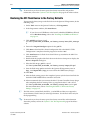
Restoring the MAX V CPLD to the Factory Settings
3–5
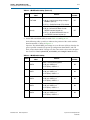
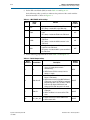
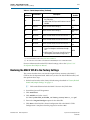
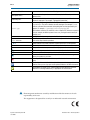
Table 3–4. Default Jumper Settings (Continued)
Board
Reference
Board Label
Default
Position
Description
■
SHORT: JTAG TRST input to HPS driven from
the JTAG chain.
■
OPEN: JTAG TRST input to HPS driven from the
MICTOR.
J16
JTAG MIC SEL
J26
CLKSEL0
Selects the HPS clock settings.(1)
SHORT pins
2-3
J27
CLKSEL1
Selects the HPS clock settings.(1)
SHORT pins
2-3
J28
BOOTSEL0
Selects the boot mode and source for the HPS.(1)
SHORT pins
1-2
J29
BOOTSEL1
Selects the boot mode and source for the HPS.(1)
SHORT pins
2-3
J30
BOOTSEL2
Selects the boot mode and source for the HPS.(1)
SHORT pins
1-2
J31
■
SHORT: Select SPI bus access from HPS to
Linear Tech daughter card interface through
J32.
■
OPEN: Select I2C bus access from HPS to Linear
Tech daughter card interface through J32.(2)
SPI I2C
OPEN
OPEN
Note to Table 3–4:
(1) For more information, refer to the Cyclone V Device Handbook.
(2) This connection can be software controlled from the HPS GPIO pin F16 on rev D and later boards.
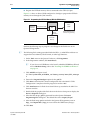
For more information about the FPGA board settings, refer to the Cyclone V SoC
Development Board Reference Manual.
Restoring the MAX V CPLD to the Factory Settings
This section describes how to restore the original factory contents to the MAX V
CPLD on the development board. Make sure you have the Nios II EDS installed, and
then perform these steps:
1. Set the board switches to the factory default settings described in “Factory Default
Switch and Jumper Settings” on page 3–1.
1
DIP switch SW4.4 includes the MAX V device in the JTAG chain.
2. Launch the Quartus II Programmer.
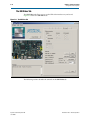
3. Click Auto Detect.
4. Click Add File and select <install
dir>\kits\cycloneVSX_5csxfc6df31_soc\factory_recovery\max<no_ver>.pof.
5. Turn on the Program/Configure option for the added file.
6. Click Start to download the selected configuration file to the MAX V CPLD.
Configuration is complete when the progress bar reaches 100%.
November 2013
Altera Corporation
Cyclone V SoC Development Kit
User Guide