1
Evaluation Board User Guide
UG-293
0
Adjusting the Amplitude of the Input Signal
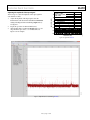
250MSPS
90.1MHz @ –1dBFS
–20 SNR = 70.6dB (71.6dBFS)
SFDR = 88dBc
The next step is to adjust the amplitude of the input signal for
each channel as follows:
–40
–60
THIRD HARMONIC
SECOND HARMONIC
–80
–100
–120
0
10
20
30
40
50 60 70 80
FREQUENCY (MHz)
90
09940-017
–140
100 110 120
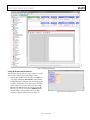
Figure 16. Typical FFT, AD9643
09940-016
2.
3.
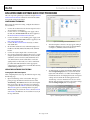
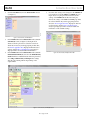
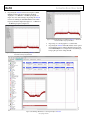
Adjust the amplitude of the input signal so that the
fundamental is at the desired level. (Examine the Fund Power
reading in the left panel of the VisualAnalog Graph window.)
See Figure 17.
Repeat this procedure for Channel B if desired.
Click the Save disk icon within the Graph window to save
the performance plot data as a .csv formatted file. See
Figure 16 for an example.
AMPLITUDE (dBFS)
1.
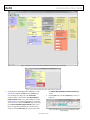
Figure 17. Graph Window of VisualAnalog (AD9643)
Rev. 0 | Page 11 of 28