1
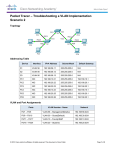
Packet Tracer – Troubleshooting Inter-VLAN Routing Topology Addressing Table Device Interface IP Address Subnet Mask Default Gateway VLAN G0/1.10 172.17.10.1 255.255.255.0 N/A VLAN 10 G0/1.30 172.17.30.1 255.255.255.0 N/A VLAN 30 PC1 NIC 172.17.10.10 255.255.255.0 172.17.10.1 VLAN 10 PC3 NIC 172.17.30.10 255.255.255.0 172.17.30.1 VLAN 30 R1 Objectives Part 1: Locate Network Problems Part 2: Implement the Solution Part 3: Verify Network Connectivity Scenario In this activity, you will troubleshoot connectivity problems caused by improper configurations related to VLANs and inter-VLAN routing. Part 1: Locate the Network Problems Examine the network and locate the source of any connectivity issues. Test connectivity and use the necessary show commands on to verify configurations. List all of the problems and possible solutions in the Documentation Table. © 2013 Cisco and/or its affiliates. All rights reserved. This document is Cisco Public. Page 1 of 2 CCNA: Troubleshooting Inter-VLAN Routing Documentation Table Problems Solutions Part 2: Implement the Solutions Make changes according to your recommended solutions. Part 3: Verify Network Connectivity Verify the PCs can ping other PCs and R1. If not, continue to troubleshoot until the pings are successful. Suggested Scoring Rubric Packet Tracer scores 60 points. Completing the Documentation Table is worth 40 points. © 2013 Cisco and/or its affiliates. All rights reserved. This document is Cisco Public. Page 2 of 2