1
OSPF Troubleshooting Mastery
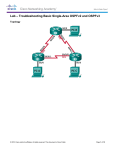
Topology Diagram
Area 0
G0/1
R2
G0/0
G0/1
G0/0
R1
S1
G0/0
G0/1
R3
Directions
Choose a partner from the class with whom to work on this activity. Use Packet Tracer to create the topology
diagram shown for this activity.
Step 1: Build the topology based on the modeling activity page for this scenario.
Step 2: Configure the routers.
a. Use IPv4 for all interfaces.
b. Incorporate VLSM into the addressing scheme.
c.
Make one intentional configuration error.
d. Verify that the network does not work based upon the intentional error.
e. Save your file to be used with Step 3.
Step 3: Exchange your Packet Tracer file with another group.
a. Find the configuration error on the Packet Tracer network file you received from another group.
b. Fix the OSPF configuration error so that the network operates fully.
c.
Record the time it took to find and fix the OSPF network error.
d. When complete, meet with your class to determine the Master Troubleshooter for the day.
© 2013 Cisco and/or its affiliates. All rights reserved. This document is Cisco Public.
Page 2 of 2