1
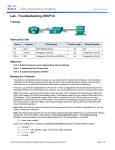
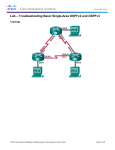
Lab - Troubleshooting DHCPv4 Addressing Table Device R1 Interface IP Address Subnet Mask Default Gateway G0/0 192.168.0.1 255.255.255.128 N/A G0/1 192.168.1.1 255.255.255.0 N/A S0/0/0 (DCE) 192.168.0.253 255.255.255.252 N/A S0/0/0 192.168.0.254 255.255.255.252 N/A S0/0/1 (DCE) 209.165.200.226 255.255.255.252 N/A ISP S0/0/1 209.165.200.225 255.255.255.252 N/A S1 VLAN 1 192.168.1.2 255.255.255.0 192.168.1.1 S2 VLAN 1 192.168.0.2 255.255.255.128 192.168.0.1 PC-A NIC DHCP DHCP DHCP PC-B NIC DHCP DHCP DHCP R2 Objectives Part 1: Build the Network and Configure Basic Device Settings Part 2: Troubleshoot DHCPv4 Issues Background / Scenario The Dynamic Host Configuration Protocol (DHCP) is a network protocol that lets the network administrators manage and automate the assignment of IP addresses. Without DHCP, the administrator must manually assign and configure IP addresses, preferred DNS servers, and the default gateway. As the network grows in size, this becomes an administrative problem when devices are moved from one internal network to another. In this scenario, the company has grown in size, and the network administrators can no longer assign IP addresses to devices manually. The R2 router has been configured as a DHCP server to assign IP addresses to the host devices on router R1 LANs. Several errors in the configuration have resulted in connectivity issues. You are asked to troubleshoot and correct the configuration errors and document your work. Ensure that the network supports the following: 1) The router R2 should function as the DHCP server for the 192.168.0.0/25 and 192.168.1.0/24 networks connected to R1. 2) All PCs connected to S1 and S2 should receive an IP address in the correct network via DHCP. Note: The routers used with CCNA hands-on labs are Cisco 1941 Integrated Services Routers (ISRs) with Cisco IOS Release 15.2(4)M3 (universalk9 image). The switches used are Cisco Catalyst 2960s with Cisco IOS Release 15.0(2) (lanbasek9 image). Other routers, switches and Cisco IOS versions can be used. Depending on the model and Cisco IOS version, the commands available and output produced might vary from what is shown in the labs. Refer to the Router Interface Summary Table at the end of this lab for the correct interface identifiers. Note: Make sure that the routers and switches have been erased and have no startup configurations. If you are unsure, contact your instructor. Required Resources 3 Routers (Cisco 1941 with Cisco IOS Release 15.2(4)M3 universal image or comparable) © 2013 Cisco and/or its affiliates. All rights reserved. This document is Cisco Public. Page 2 of 8