1
80-M900-97-0001-06 20081023
Function Instruction
System Connection
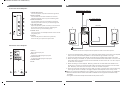
*Front View of the Amplifier
To sound card、CD、MP3,etc
1.POWER INDICATOR
Turn on the power, the power indicator is lightened
2.BASS CONTROL
Turn the bass control anti-clockwise to minimum,
adjusting the bass control to your demanding level
3.TREBLE CONTROL
Turn the treble control anti-clockwise to minimum,
adjusting the treble control to your demanding level
4.VOLUME CONTROL
Adjust the speaker system's volume, turn the volume
control anti-clockwise to minimum, adjusting the
volume control to your demanding level
5.PHONE JACK
You can connect your headphones with 3.5mm stereo
plug to this jack
6.POWER
Press this key down to switch the system ON,
Press this key up to place the system OFF
1
BASS
2
TREBLE
3
VOLUME
4
6
5
PHONE
POWER
To VCD 、DVD ,etc
Subwoofer
Amplifier
R
L
AUDIO INPUT
INPUT 1
INPUT 2
L
R
AC IN
R
L
S.W.
AUDIO OUTPUT
FUSE
T315mAL250V
*Back View of the Amplifier
1.INPUT 1
Stereo signal input jack
2.INPUT 2
2.0 channel (2 RCA) signal input jack
3.AUDIO OUTPUT
2.1 channel (3 RCA) signal output jack
4.POWER CORD
5.FUSE
AUDIO INPUT
INPUT 1
1
INPUT 2
2
L
3
R
AC IN
4
R
L
S.W.
AUDIO OUTPUT
FUSE
T315mAL250V
5
3
*Please note the correct placement of speaker is shown in the above picture.
1. Connect the satellite speaker cables to the L & R audio output sockets on the back of the amplifier,
then put the left channel satellite speaker on the left and the right satellite on the right.
2. Connect the cable of the woofer speaker to the back of the Amplifier audio output S.W. socket.
3. While connecting to VCD/DVD, etc, please use the double RCA ends audio cable. Connect one end
of the audio cable to the output socket on the VCD /DVD , the other end to the "L" & "R" of Input 2
on the back of the amplifier.
4. While connecting to sound card(CD、MP3,etc) , please use the audio cable with double 3.5mm
stereo plugs. Connect one end of the audio cable to the audio output sockets on the sound card
(CD、MP3,etc) , then other end to the Input 1 socket on the back of amplifier.
5. Check the connection and make sure every cable is correctly connected, then connect power plug
to the right AC outlet. The shape of the plug and power outlet depends on the country of use.
*When you connect the headpones to your speaker, you can only hear the sound in your headpones.
*Statement indicates that the socket-outlet shall be installed near the equipment and shall be easily
accessible.
o
*The highest environmental temperature suitable for this product is 40 C.
4