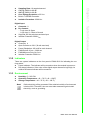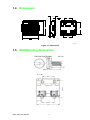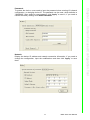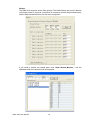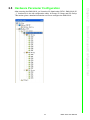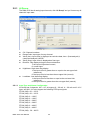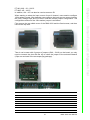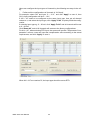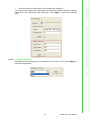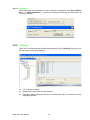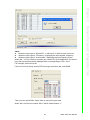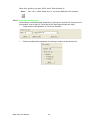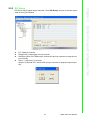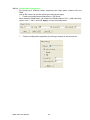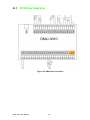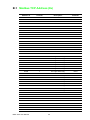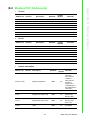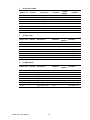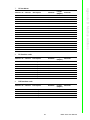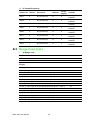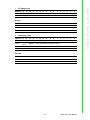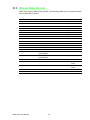
1
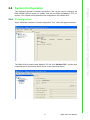
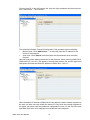
User Manual DMU-3010 8-ch AI, 8-ch DI, 4-ch DO Ethernet I/O Module Copyright The documentation and the software included with this product are copyrighted 2011 by Advantech Co., Ltd. All rights are reserved. Advantech Co., Ltd. reserves the right to make improvements in the products described in this manual at any time without notice. No part of this manual may be reproduced, copied, translated or transmitted in any form or by any means without the prior written permission of Advantech Co., Ltd. Information provided in this manual is intended to be accurate and reliable. However, Advantech Co., Ltd. assumes no responsibility for its use, nor for any infringements of the rights of third parties, which may result from its use. Acknowledgements Intel and Pentium are trademarks of Intel Corporation. Microsoft Windows and MS-DOS are registered trademarks of Microsoft Corp. All other product names or trademarks are properties of their respective owners. Product Warranty (2 years) Advantech warrants to you, the original purchaser, that each of its products will be free from defects in materials and workmanship for two years from the date of purchase. This warranty does not apply to any products which have been repaired or altered by persons other than repair personnel authorized by Advantech, or which have been subject to misuse, abuse, accident or improper installation. Advantech assumes no liability under the terms of this warranty as a consequence of such events. Because of Advantech’s high quality-control standards and rigorous testing, most of our customers never need to use our repair service. If an Advantech product is defective, it will be repaired or replaced at no charge during the warranty period. For outof-warranty repairs, you will be billed according to the cost of replacement materials, service time and freight. Please consult your dealer for more details. If you think you have a defective product, follow these steps: 1. Collect all the information about the problem encountered. (For example, CPU speed, Advantech products used, other hardware and software used, etc.) Note anything abnormal and list any onscreen messages you get when the problem occurs. 2. Call your dealer and describe the problem. Please have your manual, product, and any helpful information readily available. 3. If your product is diagnosed as defective, obtain an RMA (return merchandize authorization) number from your dealer. This allows us to process your return more quickly. 4. Carefully pack the defective product, a fully-completed Repair and Replacement Order Card and a photocopy proof of purchase date (such as your sales receipt) in a shippable container. A product returned without proof of the purchase date is not eligible for warranty service. 5. Write the RMA number visibly on the outside of the package and ship it prepaid to your dealer. DMU-3010 User Manual Part No. 2063B30005 Edition 1 Printed in Taiwan September 2011 ii Declaration of Conformity CE This product has passed the CE test for environmental specifications when shielded cables are used for external wiring. We recommend the use of shielded cables. This kind of cable is available from Advantech. Please contact your local supplier for ordering information. CE This product has passed the CE test for environmental specifications. Test conditions for passing included the equipment being operated within an industrial enclosure. In order to protect the product from being damaged by ESD (Electrostatic Discharge) and EMI leakage, we strongly recommend the use of CE-compliant industrial enclosure products. FCC Class A Note: This equipment has been tested and found to comply with the limits for a Class A digital device, pursuant to part 15 of the FCC Rules. These limits are designed to provide reasonable protection against harmful interference when the equipment is operated in a commercial environment. This equipment generates, uses, and can radiate radio frequency energy and, if not installed and used in accordance with the instruction manual, may cause harmful interference to radio communications. Operation of this equipment in a residential area is likely to cause harmful interference in which case the user will be required to correct the interference at his own expense. FCC Class B Note: This equipment has been tested and found to comply with the limits for a Class B digital device, pursuant to part 15 of the FCC Rules. These limits are designed to provide reasonable protection against harmful interference in a residential installation. This equipment generates, uses and can radiate radio frequency energy and, if not installed and used in accordance with the instructions, may cause harmful interference to radio communications. However, there is no guarantee that interference will not occur in a particular installation. If this equipment does cause harmful interference to radio or television reception, which can be determined by turning the equipment off and on, the user is encouraged to try to correct the interference by one or more of the following measures: Reorient or relocate the receiving antenna. Increase the separation between the equipment and receiver. Connect the equipment into an outlet on a circuit different from that to which the receiver is connected. Consult the dealer or an experienced radio/TV technician for help. FM This equipment has passed the FM certification. According to the National Fire Protection Association, work sites are classified into different classes, divisions and groups, based on hazard considerations. This equipment is compliant with the specifications of Class I, Division 2, Groups A, B, C and D indoor hazards. iii DMU-3010 User Manual Technical Support and Assistance 1. 2. Visit the Advantech web site at www.advantech.com/support where you can find the latest information about the product. Contact your distributor, sales representative, or Advantech's customer service center for technical support if you need additional assistance. Please have the following information ready before you call: – Product name and serial number – Description of your peripheral attachments – Description of your software (operating system, version, application software, etc.) – A complete description of the problem – The exact wording of any error messages Warnings, Cautions and Notes Warning! Warnings indicate conditions, which if not observed, can cause personal injury! Caution! Cautions are included to help you avoid damaging hardware or losing data. e.g. There is a danger of a new battery exploding if it is incorrectly installed. Do not attempt to recharge, force open, or heat the battery. Replace the battery only with the same or equivalent type recommended by the manufacturer. Discard used batteries according to the manufacturer's instructions. Note! Notes provide optional additional information. Document Feedback To assist us in making improvements to this manual, we would welcome comments and constructive criticism. Please send all such - in writing to: [email protected] Safety Precaution - Static Electricity Follow these simple precautions to protect yourself from harm and the products from damage. To avoid electrical shock, always disconnect the power from your PC chassis before you work on it. Don't touch any components on the CPU card or other cards while the PC is on. Disconnect power before making any configuration changes. The sudden rush of power as you connect a jumper or install a card may damage sensitive electronic components. DMU-3010 User Manual iv Safety Instructions 1. 2. 3. Read these safety instructions carefully. Keep this User Manual for later reference. Disconnect this equipment from any AC outlet before cleaning. Use a damp cloth. Do not use liquid or spray detergents for cleaning. 4. For plug-in equipment, the power outlet socket must be located near the equipment and must be easily accessible. 5. Keep this equipment away from humidity. 6. Put this equipment on a reliable surface during installation. Dropping it or letting it fall may cause damage. 7. The openings on the enclosure are for air convection. Protect the equipment from overheating. DO NOT COVER THE OPENINGS. 8. Make sure the voltage of the power source is correct before connecting the equipment to the power outlet. 9. Position the power cord so that people cannot step on it. Do not place anything over the power cord. 10. All cautions and warnings on the equipment should be noted. 11. If the equipment is not used for a long time, disconnect it from the power source to avoid damage by transient overvoltage. 12. Never pour any liquid into an opening. This may cause fire or electrical shock. 13. Never open the equipment. For safety reasons, the equipment should be opened only by qualified service personnel. 14. If one of the following situations arises, get the equipment checked by service personnel: The power cord or plug is damaged. Liquid has penetrated into the equipment. The equipment has been exposed to moisture. The equipment does not work well, or you cannot get it to work according to the user's manual. The equipment has been dropped and damaged. The equipment has obvious signs of breakage. 15. DO NOT LEAVE THIS EQUIPMENT IN AN ENVIRONMENT WHERE THE STORAGE TEMPERATURE MAY GO BELOW -20° C (-4° F) OR ABOVE 70° C (158° F). THIS COULD DAMAGE THE EQUIPMENT. THE EQUIPMENT SHOULD BE IN A CONTROLLED ENVIRONMENT. 16. CAUTION: DANGER OF EXPLOSION IF BATTERY IS INCORRECTLY REPLACED. REPLACE ONLY WITH THE SAME OR EQUIVALENT TYPE RECOMMENDED BY THE MANUFACTURER, DISCARD USED BATTERIES ACCORDING TO THE MANUFACTURER'S INSTRUCTIONS. 17. The sound pressure level at the operator's position according to IEC 704-1:1982 is no more than 70 dB (A). DISCLAIMER: This set of instructions is given according to IEC 704-1. Advantech disclaims all responsibility for the accuracy of any statements contained herein. v DMU-3010 User Manual DMU-3010 User Manual vi Contents Chapter 1 System Overview .................................1 1.1 1.2 1.3 1.5 Introduction ............................................................................................... 2 Features .................................................................................................... 2 Specifications ............................................................................................ 2 1.3.1 Hardware Specifications ............................................................... 2 1.3.2 Indicators ...................................................................................... 3 1.3.3 Environment.................................................................................. 3 Dimensions ............................................................................................... 4 Figure 1.1 Dimensions................................................................. 4 Wall Mounting Dimensions........................................................................ 4 2 Domain Focused Configuration Tool.5 2.1 2.2 2.3 Pre-Installation Considerations ................................................................. 6 Installation Procedures.............................................................................. 6 Software Usage......................................................................................... 9 2.3.1 Standard Toolbar .......................................................................... 9 System Configuration.............................................................................. 11 2.4.1 IP Configuration .......................................................................... 11 2.4.2 Device Management ................................................................... 15 Hardware Parameter Configuration ........................................................ 19 2.5.1 AI Group...................................................................................... 20 2.5.2 DI Group ..................................................................................... 24 2.5.3 DO Group.................................................................................... 27 1.4 Chapter 2.4 2.5 Appendix A I/O Wiring............................................29 A.1 I/O Wiring Diagrams................................................................................ 30 Figure A.1 DMU-3010 Connection ............................................. 30 Appendix B Modbus Address ...............................31 B.1 B.2 B.3 Modbus TCP Address (0x)...................................................................... 32 ModbusTCP Address(4x)........................................................................ 33 Range Code Index .................................................................................. 36 Appendix C Stream Data Format ..........................39 C.1 Stream Data Format................................................................................ 40 vii DMU-3010 User Manual DMU-3010 User Manual viii Chapter 1 System Overview 1 1.1 Introduction DMU-3010 is an Ethernet I/O module that supports the Modbus TCP protocol. DMU3010 delivers various onboard I/Os including analog input, digital input, and digital output, providing flexible options to satisfy versatile application requirements. It also features the powerful Advantech Domain Focused Configuration Tool for engineers to quickly develop their applications. 1.2 Features Modbus/TCP protocol Mixed I/O in the Module Remote maintenance through Ethernet Supports online device auto-scan or manual configure function Auto push data to specification target function Supports High/Low Alarm function Support cable burn-out check Support pulse /accumulator input.... 1.3 Specifications 1.3.1 Hardware Specifications General Dimensions (W x H x D): 120 x 120 x 44 mm (4.72" x 4.72" x 1.73") LAN: 10/100Base-T Connector: 1 x RJ-45 (LAN) 4 x Plug-in screw terminal block (I/O & Power) Watchdog: System (1.6 sec) Supported Protocols: Modbus/TCP Power Input: 10 ~ 30 VDC Power Consumption: 3 W @ 24 VDC Analog Input Channels: 8 Input Type: V, mA (Ch0-Ch3); V, mA, RTD (Ch4-Ch7) Voltage Range: 0~10 V Current Range: 0 ~ 20 mA, 4 ~ 20 mA RTD Type: – Pt 100 (3-wire): -50 ~150°C, 0 ~ 100°C, 0 ~ 200°C, 0 ~ 400°C, -50 ~ 200°C – Pt 1000 (3-wire): -40 ~ 160°C – IEC RTD 100 ohms (=0.0385) – JIS RTD 100 ohms (=0.0392) Input Impedance: 2M(voltage) Accuracy: ±0.01 V (Voltage), ±0.02 mA (Current); ±0.5° C (RTD); or better Span Drift: ±25 ppm/°C Zero Drift: ±6 V/°C Resolution: 16-bit DMU-3010 User Manual 2 Sampling Rate: 10 samples/second CMR @ 50/60 Hz 90 dB NMR @ 50/60 Hz 60 dB Over Voltage Protection: ±35 VDC Built-in TVS/ESD Protection Isolation Protection: 2500 VDC Chapter 1 System Overview Digital Input Channels: 8 Dry Contact: – Logic level 0: Open – Logic level 1: Close to Ground Supports 200 Hz pulse/accumulator input Isolation Protection 2500 VDC Digital Output Channels: 4 Open Collector to 30 V (30 mA max load) Power Dissipation: 300 mW for each channel PWM Period: 20 ms ~ 3600 sec PWM Minimum Duty On 2 ms Isolation Protection 2500 VDC 1.3.2 Indicators There are system indicators on the front panel of DMU-3010 for indicating the running status: Power indicator: The indicator will be turned on when the module is power on. DO status indicators: If the value of the digital output channel is logic high, its relative DO status indicator will be turned on. 1.3.3 Environment Humidity: 5 ~ 95% RH Operation Temperature: -40 ~ 70°C (-40 ~ 158°F) Storage Temperature: -40 ~ 70°C (-40 ~ 158°F) Note! Static electricity will be generated if the relative humidity of environment is below 30%. Therefore, the user must take measures against static electricity, such as grounding. 3 DMU-3010 User Manual 1.4 Dimensions 36.0 94.70 121.00 61.5 63.74 Unit: mm Figure 1.1 Dimensions 1.5 Wall Mounting Dimensions DMU-3010 User Manual 4 Chapter 2 2 Domain Focused Configuration Tool 2.1 Pre-Installation Considerations The Domain Focused Configuration Tool is a powerful utility, which can be used to configure Advantech BAS-3000BC, DMU-3010 and other I/O modules. This chapter will introduce how to configure DMU-3010 with Domain Focused Configuration Tool. The hardware connection is as follows: Requirements: Module: DMU-3010 Power Supply: 10 ~ 30 VDC OS: Microsoft Windows XP Network: Ethernet 2.2 Installation Procedures First, insert the CD into your CD-ROM Drive, then run Advantech Domain Focused Configuration Tool on your CD to start install Shield Wizard. It will guide you through the installation. 1. Run Advantech Domain Focused Configuration Tool Setup.exe, and the following message appears: DMU-3010 User Manual 6 Click "Next" and the following message appears: Chapter 2 2. 3. Click "Next" and the following message appears: 7 DMU-3010 User Manual Domain Focused Configuration Tool The default installation path is: C:\Program Files\Advantech\Advantech Domain Focused Configuration Tool Utility. You can click "Browse" to change the installation path. 4. Click "Next" and the following message will appear: 5. Click "Next" and the software will automatically finish the installation. After you have installed the software properly, it will appear in the start menu show as below. DMU-3010 User Manual 8 Advantech Domain Focused Configuration Tool consists of the following parts: standard toolbar, function list block and workspace block. 2.3.1 Standard Toolbar File: To exit program, click File > Exit. View: No. Sub Items Description 1. Status Bar Show or hide the Status Bar in the program window. 2. Function List Show or hide the function list zone in the program window. 9 DMU-3010 User Manual Domain Focused Configuration Tool Standard toolbar area: menu bar selection Function list area: device and object tree Workspace area: configure the property of DMU-3010. To start Advantech Domain Focused Configuration Tool, double-click the Advantech Domain Focused Configuration Tool icon on the desktop or from the Windows Program Group. Chapter 2 2.3 Software Usage Customize: The Customize menu includes three sub items: Advanced: From here users can change general user settings of the advance user settings of the Advantech Domain Focused Configuration Tool, default is general user setting. (This option is different for the BAS-3000BC configuration. For DMU-3010, “Advance User” and “General User” are the same). Language: No. Sub Items Description 1. English - Displays Advantech Domain Focused Configuration Tool user interface in English. 2. Chinese - Displays Advantech Domain Focused Configuration Tool user interface in Chinese. Reset All: It restores default settings when pressed. Help: The Help menu has one sub item: About Advantech Domain Focused Configuration Tool. When the user clicks “About Advantech Domain Focused Configuration Tool”, the software edition appears. DMU-3010 User Manual 10 The Advantech Domain Focused Configuration Tool can be used to configure the BAS-3000BC BACnet series I/O module, and also the DMU-3010Modbus TCP I/O module. This chapter mainly describes the configuration of the DMU-3010. 2.4.1 IP Configuration Chapter 2 2.4 System Configuration Open “Advantech Domain Focused Configuration Tool”, and it will appear as below: 11 DMU-3010 User Manual Domain Focused Configuration Tool The DMU-3010 is located under Modbus TCP list, click “Modbus TCP”, and the host username and IP information will be shown in the right hand screen: Click the host IP in the left function list, then the right workspace will show two buttons: “Add Device...” and “Search”: The Advantech Domain Focused Configuration Tool provides scan functionality: 1. Manual scan: Click “Add Device...” to manually input the IP address of the device to be scanned. 2. Auto scan: Click “Search” and the system will automatically scan all online devices. Use auto scan when starting the device for the first time. When scanning DMU-3010, “DMU-3010 (IP: 10.0.0.1)” will appear in the left hand function list, and the right hand workspace will show the default IP address of DMU-3010: 10.0.0.1: Note: the default IP address of DMU-3010 is not within the same network segment as the host, so users can only modify the device IP. Only when the network segment is the same, can users enter the parameter configuration screen. So the IPs of the host and DMU-3010 have to be changed to be within the same segment. DMU-3010 User Manual 12 Method 2: Change the IP address of the DMU-3010 IP, eg. change it from 10.0.0.1 to 10.2.2.1. 13 DMU-3010 User Manual Domain Focused Configuration Tool Then perform an auto scan of DMU-3010, “DMU-3010 (IP: 10.0.0.1)” will appear under the host IP in the left hand function list. Chapter 2 Method 1: Change the IP of the host, eg. change it from 10.2.2.3 to 10.0.0.10. After resetting the host IP to 10.0.0.10, click “Modbus TCP” on the left and return to the screen showing the host username and IP. Click “Refresh” and the software will adjust the new address of the host to 10.0.0.10: After scanning the DMU-3010, click “DMU-3010 (IP: 10.0.0.1)” in the left hand panel and device IP address information will show in the right hand panel: Then input the new IP in the “IP Address” column: 10.2.2.1, and click “Apply”, you’ll be reminded to input the password, the initial password is 00000000: Click “OK”, DMU-3010 User Manual 14 When the IP adresses of the host and DMU-3010 are within the same network segment, click “DMU-3010 (IP: 10.x.x.x)” and the following screen will appear, the left hand column shows AI/DI/DO list, and the right hand workspace is available for configuring relevant system information, password, network connection and active uploading: System Information, Password, Network and Stream: 15 DMU-3010 User Manual Domain Focused Configuration Tool 2.4.2 Device Management Chapter 2 After the IP address of the DMU-3010 has been updated, “DMU-3010 (IP: 10.0.0.1)” will appear under the host IP in the left hand function list. System Information: Display the current F/W version information and description of the module. If you need to update the F/W version, click “Update...”. If you need to change the description of the module, input the relevant content in “Description field, and then click “Apply” to save it. DMU-3010 User Manual 16 17 DMU-3010 User Manual Domain Focused Configuration Tool Network: Display the device IP address and network connection information. If you need to change the configuration, input the modifications and then click “Apply” to save them. Chapter 2 Password: To protect the device, users need to input the password when entering I/O channel configuration, or changing device IP. The password can be reset, which defaults to “00000000”. After setting a new password, click “Apply” to save it; if you need to restore the factory setting, click “Reset Password”. Stream: The DMU-3010 supports active data uploads. This field displays the host IP address receiving the data. It supports a maximum of 8 hosts to receive data simultaneously and the data upload frequency can be freely configured. If you need to monitor the upload state, click “Open Stream Monitor...” and the uploaded state of the data flow will be displayed. DMU-3010 User Manual 18 After scanning the DMU-3010, you’ll see the I/O listed under “DEV1: DMU-3010 (IP: ...)” function list in the left configuration utility: AI Group, DI Group and DO Group. This section gives a detailed introduction on how to configure the DMU-3010. Chapter 2 2.5 Hardware Parameter Configuration Domain Focused Configuration Tool 19 DMU-3010 User Manual 2.5.1 AI Group The DMU-3010 has 8 analog input channels, click “AI Group” and you’ll see every AI channel’s input state: CH: Channel numbers. RangeCode: Input type of every channel. Value (hex): Input value is displayed as real-time data, hex = (float-analymin)/ (analymax-analymin)*65535. Value (float): Input value is displayed as float type. BurnOut: Flag display during the burnout detection. 1: the input will produce burnout; 0: normal input. HighAlarm: High alarm flag display. 1: the input value is greater than or equal to the set upper limit (abnormal); 0: the input value is less than the set upper limit (normal). LowAlarm: Low alarm flag display. 1: the input value is less than or equal to the set lower limit (abnormal); 0: the input value is greater than the set upper limit (normal). 2.5.1.1 Input Type and Alarm Configuration AI Group has 8 channels, AI0 ~ AI7 all support 0 ~ 20 mA, 4 ~ 20 mA and 0~10 V input, and AI4 ~ AI7 also support the following RTD input signals: PT100 (385): -50 ~ 150°C PT100 (392): -50 ~ 150°C PT100 (385): 0 ~ 100°C PT100 (392): 0 ~ 100°C PT100 (385): 0 ~ 200°C PT100 (392): 0 ~ 200°C PT100 (385): 0 ~ 400°C PT100 (392): 0 ~ 400°C PT100 (385): -50 ~ 200°C DMU-3010 User Manual 20 AI channel Jumper AI0 CN6 AI1 CN7 AI2 CN8 AI3 CN9 AI4 CN10 AI5 CN11 AI6 CN12 AI7 CN13 21 DMU-3010 User Manual Domain Focused Configuration Tool Then it can be seen with 8 groups of jumpers (CN6 ~ CN13) on the board, you only need to connect the pins with the clip to close the jumper of the selected channel (Clips are enclosed in the accompanying package). Chapter 2 PT100 (392): -50 ~ 200°C PT1000: -40 ~ 160°C In addition, AI4 ~ AI7 can also be used as common DI. When wanting to select the input current of one AI channel, users need to configure 120resistor jumper. After that they can configure the input type as current input by the utility. Voltage input and RTD don’t need the resistor jumper configuration. The configuration method of the 120resistor jumper is as follows: First remove the top middle cover of the DMU-3010 and the fixed screws, and then remove the top case. Users can configure the input types of channels by the following two ways in the utility: 1. Perform all the configurations of channels in “AI Group”. For example, select CH1 and input “0 ~ 10 V”, and click “Apply” to save it, then CH1’s input configuration will be 0 ~ 10 V. If AI0 ~ AI7 need to be configured as the same input type, then put all channel colums to o, and select the input type, click “Apply To All” to quickly finish the configuration. If selecting input type eg. 0 ~ 20 mA, click “Apply To All” and all channels will be set to 0 ~ 20 mA. Click “Reset All”, and all AI channels will restore to the factory configurations. For AI4 ~ AI7, when selecting RTD input, the system will provide “Temperature Compensation” column, users can input the compensation value according to the actual requirements, and click “Apply” to save it. When AI4 ~ AI7 are used as DI, the input type should be set as RTD. DMU-3010 User Manual 22 23 DMU-3010 User Manual Domain Focused Configuration Tool 2.5.1.2 Frequency Selection According to the grid frequency, the selections are 50 Hz or 60 Hz. Click “Apply” to save the configuration. Chapter 2 2. Click one channel in the function list to separately configure it. You can not only configure the input type here, but also complete the alarm configuration: Burn Out, High Alarm and Low Alarm. Click “Apply” to save the configurations. 2.5.1.3 Calibration When executing zero calibration or span calibration operations, click “Zero Calibration...” or “Span Calibration...”. Users can calibrate according to the instructions of the popup window. 2.5.2 DI Group DMU-3010 is configured with 8 digital input channels. Click “DI Group” and you’ll see the input state of every DI channel. CH: Channel numbers. RangeCode: Input type of every channel. Start/Stop: When selecting frequency or accumulator input, you can start or stop inputting manually. DMU-3010 User Manual 24 Chapter 2 Then you can check DI8’s “Value” field to view AI4’s input state. When AI4+ and AI4- are closed, DI8’s “Value” field will show “1”. 25 DMU-3010 User Manual Domain Focused Configuration Tool Value: When the input type is “Normal DI”: 1: with input; 0: without input or burnout. When the input type is “Frequency”: displaying the input signals’ frequency. When the input type is “Accumulator”: displaying the input signals’ pulses. When AI4 ~ AI7 are used as common dry contact DI’s (See Appendix A for the wiring), their input states can be displayed here, corresponding to “DI8 ~ DI11”. For example, select AI4 as DI. First set CH4 of AI Group as any RTD input type, and short AI4- and AGND. When AI4+ and AI4- are open, DI8’s “Value” field will show “0”. Note! DI8 ~ DI11 “Value” fields show “1” by factory defaults of the software. 2.5.2.1 Input Type Configuration DI Group has 8 channels totally, supporting 3 input types: common DI, frequency and accumulator. Just as with DI, users can set the input type through two ways: 1. Perform all the configurations in “DI Group” interface. 2. Perform configurations separately by clicking a channel in the function list. DMU-3010 User Manual 26 DO Group has 4 digital output channels. Click “DO Group” and you’ll see the output state of every DO channel. CH: Channel numbers. RangeCode: Output type of every channel. Star/Stop: When it is PWM output, double click and you can start or stop the output manually. Value: 1: high level; 0: low level. When it is “Normal DO”, double click and you can start or stop the output manually. 27 DMU-3010 User Manual Domain Focused Configuration Tool Chapter 2 2.5.3 DO Group 2.5.3.1 Output Type Configuration DO Group has 4 channels totally, supporting two output types: common DO and PWM. Just as DO, users can set the output types through two ways: 1. Perform all configurations intensively in “DO Group”. When selecting PWM output, you need to set PWM period to 0.02 ~ 3600’s and duty cycle to 10% ~ 100%, and click “Apply” to save the configuration. 2. Perform configurations separately by clicking a channel in the function list. DMU-3010 User Manual 28 Appendix A I/O Wiring A A.1 I/O Wiring Diagrams Figure A.1 DMU-3010 Connection DMU-3010 User Manual 30 Appendix B B Modbus Address B.1 Modbus TCP Address (0x) Address 0x Channel Description Attribute 00001 0 DI0 Value Read 00002 1 DI1 Value Read 00003 2 DI2 Value Read 00004 3 DI3 Value Read 00005 4 DI4 Value Read 00006 5 DI5 Value Read 00007 6 DI6 Value Read 00008 7 DI7 Value Read 00009 UDI0 UI4 as DI Value Read 00010 UDI1 UI5 as DI Value Read 00011 UDI2 UI6 as DI Value Read 00012 UDI3 UI7 as DI Value Read 00401 0 DO0 Value R/W 00402 1 DO1 Value R/W 00403 2 DO2 Value R/W 00404 3 DO3 Value R/W 00501 0 UI0 High Alarm Flag Read 00502 1 UI1 High Alarm Flag Read 00503 2 UI2 High Alarm Flag Read 00504 3 UI3 High Alarm Flag Read 00505 4 UI4 High Alarm Flag Read 00506 5 UI5 High Alarm Flag Read 00507 6 UI6 High Alarm Flag Read 00508 7 UI7 High Alarm Flag Read 00601 0 UI0 Low Alarm Flag Read 00602 1 UI1 Low Alarm Flag Read 00603 2 UI2 Low Alarm Flag Read 00604 3 UI3 Low Alarm Flag Read 00605 4 UI4 Low Alarm Flag Read 00606 5 UI5 Low Alarm Flag Read 00607 6 UI6 Low Alarm Flag Read 00608 7 UI7 Low Alarm Flag Read 00701 0 UI0 Burn Out Read 00702 1 UI1 Burn Out Read 00703 2 UI2 Burn Out Read 00704 3 UI3 Burn Out Read 00705 4 UI4 Burn Out Read 00706 5 UI5 Burn Out Read 00707 6 UI6 Burn Out Read 00708 7 UI7 Burn Out Read DMU-3010 User Manual 32 1. AI float Address 4x Channel Description Attribute Length (2bytes) 40001 0 UI0 Float Value Read 2 40003 1 UI1 Float Value Read 2 40005 2 UI2 Float Value Read 2 40007 3 UI3 Float Value Read 2 40009 4 UI4 Float Value Read 2 40011 5 UI5 Float Value Read 2 40013 6 UI6 Float Value Read 2 40015 7 UI7 Float Value Read 2 Address 4x Channel Description Attribute Length (2bytes) 40101 0 UI0 Hex Value Read 1 40102 1 UI1 Hex Value Read 1 40103 2 UI2 Hex Value Read 1 40104 3 UI3 Hex Value Read 1 40105 4 UI4 Hex Value Read 1 40106 5 UI5 Hex Value Read 1 40107 6 UI6 Hex Value Read 1 40108 7 UI7 Hex Value Read 1 2. 3. Remarks AI hex Remarks System Information Address 4x Channel Description Attribute Length Remarks (2bytes) 41201~41218 System Information Read 18 Module name:10 version:2 AIO channel number:1 DIO channel number:1 Super user:1 AI Calibration:1 AO Calibration:1 reserved:1 41241 Supports AI range code Read 16 bit0: UV, bit1:UI, bit3:PT100, bit4:PT1000 41273 Supports DI range code Read 16 bit0: Nor DI, bit1:Accumu, bit2: Freq 41289 Supports DO range code Read 16 bit0: Nor DO, bit1:PWM 33 DMU-3010 User Manual Appendix B Modbus Address B.2 ModbusTCP Address(4x) 4. UI function code Address 4x Channel Description Attribute Length (2bytes) 41601 0 UI0 Range Code R/W 1 41602 1 UI1 Range Code R/W 1 41603 2 UI2 Range Code R/W 1 41604 3 UI3 Range Code R/W 1 41605 4 UI4 Range Code R/W 1 41606 5 UI5 Range Code R/W 1 41607 6 UI6 Range Code R/W 1 41608 7 UI7 Range Code R/W 1 5. Remarks UI Tem.Com. Address 4x Channel Description Attribute Length (2bytes) Remarks 42001 0 UI0 Temperature R/W 2 Data Type Float 42003 1 UI1 Temperature R/W 2 Data Type Float 42005 2 UI2 Temperature R/W 2 Data Type Float 42007 3 UI3 Temperature R/W 2 Data Type Float 42009 4 UI4 Temperature R/W 2 Data Type Float 42011 5 UI5 Temperature R/W 2 Data Type Float 42013 6 UI6 Temperature R/W 2 Data Type Float 42015 7 UI7 Temperature R/W 2 Data Type Float 6. UI high alarm Address 4x Channel Description Attribute Length (2bytes) Remarks 42101 0 High Alarm Value R/W 1 Set Value x 10 42102 1 High Alarm Value R/W 1 Set Value x 10 42103 2 High Alarm Value R/W 1 Set Value x 10 42104 3 High Alarm Value R/W 1 Set Value x 10 42105 4 High Alarm Value R/W 1 Set Value x 10 42106 5 High Alarm Value R/W 1 Set Value x 10 42107 6 High Alarm Value R/W 1 Set Value x 10 42108 7 High Alarm Value R/W 1 Set Value x 10 DMU-3010 User Manual 34 UI low alarm Address 4x Channel Description Attribute Length (2bytes) Remarks 42201 0 Low Alarm Value R/W 1 Set Value x 10 42202 1 Low Alarm Value R/W 1 Set Value x 10 42203 2 Low Alarm Value R/W 1 Set Value x 10 42204 3 Low Alarm Value R/W 1 Set Value x 10 42205 4 Low Alarm Value R/W 1 Set Value x 10 42206 5 Low Alarm Value R/W 1 Set Value x 10 42207 6 Low Alarm Value R/W 1 Set Value x 10 42208 7 Low Alarm Value R/W 1 Set Value x 10 42301 0 Burn Out Value R/W 1 Set Value x 10 42302 1 Burn Out Value R/W 1 Set Value x 10 42303 2 Burn Out Value R/W 1 Set Value x 10 42304 3 Burn Out Value R/W 1 Set Value x 10 42305 4 Burn Out Value R/W 1 Set Value x 10 42306 5 Burn Out Value R/W 1 Set Value x 10 42307 6 Burn Out Value R/W 1 Set Value x 10 42308 7 Burn Out Value R/W 1 Set Value x 10 Remarks 8. DI function code Address 4x Channel Description Attribute Length (2bytes) 43201 0 DI Range Code R/W 1 43202 1 DI Range Code R/W 1 43203 2 DI Range Code R/W 1 43204 3 DI Range Code R/W 1 43205 4 DI Range Code R/W 1 43206 5 DI Range Code R/W 1 43207 6 DI Range Code R/W 1 43208 7 DI Range Code R/W 1 9. DO function code Address 4x Channel Description Attribute Length (2bytes) 44001 0 DO Range Code R/W 3 44004 1 DO Range Code R/W 3 44007 2 DO Range Code R/W 3 44010 3 DO Range Code R/W 3 35 Remarks DMU-3010 User Manual Appendix B Modbus Address 7. 10. DI counter/frequency Address 4x Channel Description Attribute Length (2bytes) Remarks 44801 0 DI Counter/Freq R 2 Data Type Float or DWORD 44803 1 DI Counter/Freq R 2 Data Type Float or DWORD 44805 2 DI Counter/Freq R 2 Data Type Float or DWORD 44807 3 DI Counter/Freq R 2 Data Type Float or DWORD 44809 4 DI Counter/Freq R 2 Data Type Float or DWORD 44811 5 DI Counter/Freq R 2 Data Type Float or DWORD 44813 6 DI Counter/Freq R 2 Data Type Float or DWORD 44815 7 DI Counter/Freq R 2 Data Type Float or DWORD B.3 Range Code Index 1. AI Range code Address 15 41601 14 13 12 11 10 9 8 7 6 5 High Byte Low Byte Range Code 50 or 60 HZ 4 3 2 1 0 AI type Description Function Code UI_B Input signal is 4 ~ 20 ma 7 PT100_F Input signal is PT100-392 Measuring range is -50 ~ 150° C 28 PT100_E Input signal is PT100-385 Measuring range is -50 ~ 200° C 29 PT100_D Input signal is PT100-385 Measuring range is 0 ~ 400° C 30 PT100_A Input signal is PT100-385 Measuring range is -50 ~ 150° C 31 PT100_B Input signal is PT100-385 Measuring range is 0 ~ 100° C 33 PT100_C Input signal is PT100-385 Measuring range is 0 ~ 200° C 34 PT100_G Input signal is PT100-392 Measuring range is 0 ~ 100° C 37 PT100_H Input signal is PT100-392 Measuring range is 0 ~ 200° C 38 PT100_I Input signal is PT100-392 Measuring range is 0 ~ 400° C 40 PT100_J Input signal is PT100-392 Measuring range is -50 ~ 200° C 41 PT1000_A Input signal is PT1000 Measuring range is -40 ~ 160° C 42 UI_A Input signal is 0 ~ 20 ma 70 UV10 Input signal is 0 ~ 10 V 72 DMU-3010 User Manual 36 DI Range code Address 15 43201 14 13 12 11 10 9 8 7 6 5 4 3 2 High Byte Low Byte Range Code If DI as Counter, set on/off 1 0 1 0 DI type Description Function Code Normal_DI 0 counter 1 frequency 2 3. DO Range code Address 15 14 13 12 11 10 9 8 High Byte 7 6 5 4 3 2 Low Byte 44001 Range Code 44002 If DO as PWM to record period ON/OFF If DO as PWM to record duty cycle 44003 DO type Description Function Code Normal DO 0 PWM 1 37 DMU-3010 User Manual Appendix B Modbus Address 2. DMU-3010 User Manual 38 Appendix C C Stream Data Format C.1 Stream Data Format DMU-3010 support data active upload. The following table lists the packet formats sent by data active upload. Byte Order Byte Length Item Examples 0 1 Header 0x23 ('#') 1 1 Header 0x47 ('G') 2 1 Header 0x45 ('E') 3 1 Header 0x41 ('B') 4 1 Header 0x58 ('A') 5 1 Header 0x4d ('M') 6 1 Header 0x53 ('S') 7 1 Header 0x47 ('G') 8 1 Header 0x55 9 1 Header 0xaa 10 2 Sequence number 0x0001 12 1 Message code 0x10 0x0401 Remarks 15 2 Device type 13 2 Data length 17 2 Firmware version major (wFWVMajor) 19 2 Firmware version minor (wFWVMinor) 21 2 Hardware version (wHWVersion) 23 4 Reserved1 Reserved for future 27 4 Reserved2 Reserved for future 31 160 data 191 DMU-3010 User Manual 40 Appendix C Stream Data Format DMU-3010 User Manual 41 www.advantech.com Please verify specifications before quoting. This guide is intended for reference purposes only. All product specifications are subject to change without notice. No part of this publication may be reproduced in any form or by any means, electronic, photocopying, recording or otherwise, without prior written permission of the publisher. All brand and product names are trademarks or registered trademarks of their respective companies. © Advantech Co., Ltd. 2011