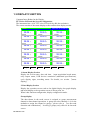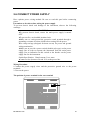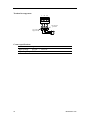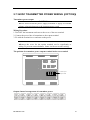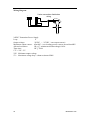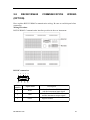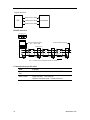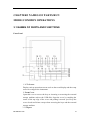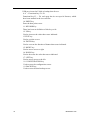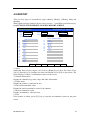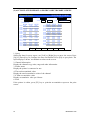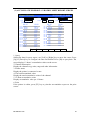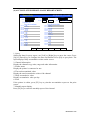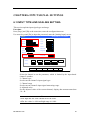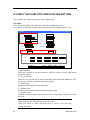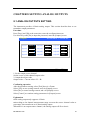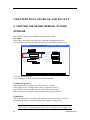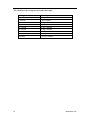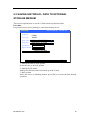
1
User’s Manual USER’S MANUAL IM01B82R01-01E First edition FOREWORD Thank you for purchasing our paperless recorder! This manual is about the functions, settings, wiring methods, methods of operation, treatment methods to failure of the paperless recorder. To ensure correct use, please read this manual carefully and use properly before operation and keep this manual in a safe place for quick reference. Notice ●The contents of this manual are subject to change without prior notice as a result of continuing upgrades to the instrument’s performance and functions. ●Every effort has been made in the preparation of this manual to ensure the accuracy of its contents. However, if you have any questions or find any errors, please feel free to contact us. ●Copying or reproducing all or any part of the contents of this manual without our permission is strictly prohibited. Revisions First edition IM01B82R01-01E June, 2010 I SAFETY PRECAUTIONS The following general safety precautions must be observed during all phases of operation. If the Instrument is used in a manner not specified in this manual, the protection provided by the Instrument may be impaired. We assume no liability for the customer ’s failure to comply with these requirements. WARNING ●Power Supply Before connecting the power cord, ensure that the power supply voltage matches the voltage rating for the instrument. ●Protective Grounding Make sure to connect the protective grounding to prevent electric shock before turning ON the power. ●Necessity of Protective Grounding Never cut off the internal or external protective grounding wire or disconnect the wiring of the protective grounding terminal. Doing so will pose a potential shock hazard. ●Defect of Protective Grounding Do not operate the instrument when the protective grounding or the fuse might be defective. Also, make sure to check them before operation. ●Do Not Operate in Explosive Atmosphere Do not operate the instrument in the presence of flammable liquids or vapors. Operation of any electrical instrument in such an environment constitutes a safety hazard. ●Do Not Remove Covers Some areas inside the instrument have high voltages. Do not remove the cover if the power supply is connected. The cover should be removed by our qualified personnel only. ●External Connection Connect the protective grounding before connecting to the item under measurement or control unit. ●Damage to the protection Using the instrument in a manner not specified in this manual can damage the instrument’s protection II IM01B82R01-01E CHECKING THE CONTENTS OF THE PACKAGE Unpack the box and check the contents before operating the instrument. If some of the contents are not correct or missing or if there is physical damage, contact the dealer from which you purchased them. There is a name plate on the left side of the instrument’s body. Open the cover and check that the model name and code given on the name plate match those on the order. name plate Standard Accessories The following standard accessories are supplied with the instrument. Make sure that all items are present and undamaged. Number Name Quantity Mounting 1 4 bracket User’s 2 1 Manual 3 Certification 1 4 Standard Software 1 5 U Disk 1 IM01B82R01-01E Notes For panel mounting This manual Manufacture Date Provided a CD-ROM (Included only when the Communication or External storage is ordered.) For Windows XP Included only when the External storage is ordered. Capacity and model of the USB Storage may vary. III Accessories (Sold Separately) The following optional accessories are available for purchase separately. If you make an order, make sure that all items are present and undamaged. For information about ordering accessories, contact the dealer from which you purchased the instrument. Number 1 IV Name U Disk Quantity 1 Notes 2GB 4GB IM01B82R01-01E HOW TO USE THIS MANUAL Structure of the Manual This user's manual consists of the following 12 chapters: Chapter Title and Contents 1 Overview of Functions Describes the functions of the instrument. 2 Before Using the Instrument Describes the installation and wiring procedures. 3 Names of Parts/Run Mode/Common Operations Describes the names of each part of the instrument, how to use the storage medium drive, run mode, and common key operations. 4 5 6 7 8 9 10 11 12 IM01B82R01-01E Switching Display Screens Describes how to use the operation screen such as the trend display and digital display. Describes the operations that can be performed using the arrow keys, page key and the enter key on the front panel. System Configurations Describes the related parameters of the running system. Setting Signal Input parameters Describes how to set input channel parameters Setting Alarms Parameters Describes how to set alarms and relays. Setting Analog Outputs Describes how to set analog outputs specifications Data acquisition and backup Describes how to acquire the measured/computed data and how to save the data to the external storage medium. Setting Communication Parameters Describes how to set communication parameters and how to use the mini-printer to connect the instrument Initializing Data Purge the accumulation , and alarm report, resume factory setting Specifications Lists the specifications of the Paperless Recorder. V Conventions used in this manual Unit K Denotes”1024” K Denotes”1000” M Denotes“1024K” G Denotes“1024M” B “Bytes” Symbols WARNING : Describes precautions that should be observed to prevent injury or death to the user. CAUTION :Describes precautions that should be observed to prevent minor or moderate injury, or damage to the instrument. Note : Provides important information for the proper operation of the instrument. Notation regarding procedures On pages that describe the operating procedures the following symbols are used to distinguish the procedures from their explanations. [ ] ............ Represent key’s name. Example: [Page] [En] 『』 …....Indicate a reference item. Example:『Input Setting』 VI IM01B82R01-01E Content FOREWORD................................................................................................................ I SAFETY PRECAUTIONS ......................................................................................... II CHECKING THE CONTENTS OF THE PACKAGE.......................................... III HOW TO USE THIS MANUAL................................................................................ V CHAPTER 1 OVERVIEW OF FUNCTIONS........................................................... 1 1.1 OVERVIEW OF THE INSTRUMENT. .................................................................. 1 1.2 FUNCTIONS OF THE INPUT SECTION .............................................................. 2 1.3 DISPLAY FUNCTION ............................................................................................ 5 1.4 STORAGE FUNCTION .......................................................................................... 7 1.5 ALARM FUNCTION .............................................................................................. 8 1.6 COMPUTATION FUNCTION (OPTION).............................................................. 9 1.7 OUTPUT FUNCTION (OPTION) ........................................................................ 10 1.8 COMMUNICATION FUNCTION (OPTION)...................................................... 11 1.9 OTHER FUNCTIONS ........................................................................................... 12 CHAPTER 2 BEFORE USING THE INSTRUMENT........................................... 13 2.1 PRECAUTIONS ON THE USE OF THE INSTRUMENT .................................. 13 2.2 INSTALLING THE INSTRUMENT. .................................................................... 14 2.3 INPUT AND OUTPUT SIGNAL WIRING .......................................................... 17 2.4 ALARM OUTPUT WIRING (OPTION)............................................................... 21 2.5 INPUT DIGITAL SIGNAL WIRING (OPTION) ................................................. 23 2.6 CONNECT POWER SUPPLY .............................................................................. 25 2.7 24VDC TRANSMITTER POWER WIRING(OPTION)................................. 27 2.8 RS232C/RS485 COMMUNICATION WIRING (OPTION) ................................ 29 CHAPTER 3 NAMES OF PARTS/RUN MODE/COMMON OPERATIONS .... 31 3.1 NAMES OF PARTS AND FUNCTIONS.............................................................. 31 3.2 INSERTING/REMOVING THE EXTERNAL STORAGE MEDIUM ................ 34 3.3 RUN MODE .......................................................................................................... 35 3.4 CONFIGURING THE FUNCTIONS .................................................................... 37 3.5 COMMON KEY OPERATIONS........................................................................... 38 CHAPTER 4 SWITCHING OPERATION SCREENS .......................................... 42 4.1 SWITCHING OPERATION SCREENS ............................................................... 42 4.2 EXPLANATION OF THE STATUS DISPLAY SECTION .................................. 43 4.3 DIGTAL DISPLAY SCREEN ............................................................................... 44 4.3.1 LARGER DISPLAY SCREEN ........................................................................... 45 4.4 BAR GRAPH DISPLAY ....................................................................................... 46 4.5 REAL-TIME TREND SCREEN ........................................................................... 47 4.6 HISTORY TREND SCREEN ................................................................................ 50 4.7 ALARM SUMMARY ............................................................................................ 52 4.8 REPORT................................................................................................................. 53 CHAPTER 5 SYSTEM CONFIGURATIONS ........................................................ 58 5.1 SETTING THE DATE AND TIME ....................................................................... 58 5.2 SETTING THE ALALIS ....................................................................................... 59 IM01B82R01-01E VII 5.3 SETTING THE SYSTEM PASSWORD ............................................................... 60 5.4 SETTING THE SCREEN BRIGHTNESS ............................................................ 61 5.5 SETTING TREND DIRECTION AND TREND COMBINATGION .................. 62 5.6 VIEW SYSTEM INFORMATION ........................................................................ 64 CHAPTER 6 INPUT SIGNAL SETTINGS ............................................................. 65 6.1 INPUT TYPE AND SCALING SETTING. ........................................................... 65 6.2 INPUT VACUUM TYPE AND SCALING SETTING ......................................... 68 6.3 CHANNEL TAG AND UNIT SETTING .............................................................. 70 6.4 INPUT FILTER SETTING .................................................................................... 71 6.5 BURNOUT SETTING........................................................................................... 72 6.6 REFERENCE JUNCTION COMPENSATION .................................................... 73 6.7 ACCUMULATION SETTING .............................................................................. 74 6.8 COPYING CHANNEL PARAMETERS ............................................................... 75 6.9 SQUARE ROOT COMPUTATION AND SMALL SIGNAL CUTTING ............ 76 CHAPTER 7 SETTING ALARMS .......................................................................... 78 7.1 CHANNEL ALARM SETTING. ........................................................................... 78 CHAPTER 8 SETTING ANALOG OUTPUTS ...................................................... 81 8.1 ANALOG OUTPUTS SETTING .......................................................................... 81 CHAPTER9 DATA STORAGE AND BACKUP..................................................... 82 9.1 SETTING THE SAVING INTERVAL OF DATA STORAGE .............................. 82 9.2 SAVING HISTORIACL DATA TO EXTERNAL STORAGE MEDIUM ............ 85 CHAPTER 10 SETTING COMMUNICATION PARAMETERS ........................ 87 10.1 COMMUNICATION USING RS232C (OPTION) ............................................. 87 10.2 COMMUNICATION USING RS485(OPTION) ........................................... 89 10.3 CONNECT WITH MICRO PRINTER(OPTION) ......................................... 91 10.4 TIMER PRINT FUNCTION SETTING .............................................................. 92 CHAPTER 11 INITIALIZING DATA ..................................................................... 93 11.1 RESTORE FACTORY SETTING ....................................................................... 93 11.2 PURGE ALARM SUMMARY ............................................................................ 96 11.3 PURGE ACCUMULATION REPORT ................................................................ 97 CHAPTER 12 SPECIFICATIONS .......................................................................... 98 12.1 SIGNAL INPUT AND ALARM.......................................................................... 98 12.2 DISPLAY SPECIFICATIONS ........................................................................... 100 12.3 DATA STORAGE SPECIFICATIONS .............................................................. 102 12.4 OTHER STANDARD FUNCTIONS ................................................................ 103 12.5 SELECT FITTINGS .......................................................................................... 104 12.6 GENERAL SPECIFICATIONS......................................................................... 106 12.7 EXTERNAL DIMENSION ............................................................................... 109 VIII IM01B82R01-01E CHAPTER 1 OVERVIEW OF FUNCTIONS 1.1 OVERVIEW OF THE INSTRUMENT. Unlike conventional record that record data on charts, the Instrument displays the measured /computed data acquired in the internal memory to a LCD. The measured data can also be saved to external storage media such as U Disk (option). Measured/ operational data can be used as displayed data stored in the memory, or you can also insert the external storage to save it in the external storage media through the manual backup. Displayed data is shown as curves and other data on meter screen. It is the data filter out from the samples by the instrument. A datum is equivalent to a point on the curve of the screen. The time of a datum is determined by recorded meter intervals. Historical data is equivalent to the original recording paper, which is very suitable for long-time observation. IM01B82R01-01E 1 1.2 FUNCTIONS OF THE INPUT SECTION Number of Measurement Channels/Scan Interval The number of measurement channels can be selected from 1~40. The scan interval of measurement is 1 second. Input Type and Computation You can select the input type of a measurement channel as follows. You can also perform computation for instance, the “square root,” on the measured data. For the procedure related to setting the different modes, see section 『 channels measurement configurations』 Input Mode DC current DC voltage Resistance Thermocouple Thermal Resistance Frequency signal Range 0–10mA 4–20mA 0–20mV 0–100mV 0–5V 1-5V 0-10V 0 – 350Ω S、B、K、T、E、J、R、N、F1、F2、WRE PT100、Cu50、BA1、BA2 0 – 10000Hz Input Range and Measurable Range You can select the “Input range” that is appropriate for the input signal in “DC current,” “DC voltage,” “Resistance,” “Thermocouple” “Thermal Resistance,” “Frequency signal”. For each “Input range,” a measurable range is defined. 2 IM01B82R01-01E Input type Electric thermo-couple(℃) Thermal resistance (℃) C150 Pt100 BA1 2000 1900 1800 1700 1600 1500 1400 1300 1200 1100 Range 1000 900 800 700 600 500 400 300 200 140 100 0 -100 -50 -200 IM01B82R01-01E BA2 WRE F1 F2 2000 2000 1800 B S K E J R 1600 1300 1300 1000 600 T 1800 1600 600 N 20mV 100mV R: 0~350Ω FR: 0~10KHZ Ⅱ:0~10mA 0~5V Ⅲ:4~20mA 1~5V Within (-9999~19999) 1000 600 600 600 500 380 0 -100 -200 -100 -100 -100 -100 -100 -50 -100 -200 3 Burnout When measuring temperature with a thermocouple and the thermocouple burns out, you can specify the measurement result to be set to maximum of measurable range, minimum of measurable range, last value or Error Flag*1. For the setting procedure, see section 『Burnout setting』 *1 when the burnout setting is Error Flag, the measured value is indicated as “**.*”. Reference Junction Compe nsation (RJC) When measuring the temperature using a thermocouple, the reference junction compensation can be used. Reference junction compensation current is installed. You can adjust the temperature that measured by the instrument. For the setting procedure, see section 『reference junction compensation』. Filter The filter is used to suppress the disturbance that is curbing the signal. Filtering is provided by the standard products. The filter can be set on each channel. For the setting procedure, see section 『set input filter parameter』. 4 IM01B82R01-01E 1.3 DISPLAY FUNCTION Common Items Related to the Display TFT Color LCD and the Screen Configuration The instrument has a 10.4” TFT color LCD (640-by-480 dot resolution). The screen consists of the status display section and the data display section. Value Chnl01 38.24 % Chnl04 38.24 % Chnl07 38.24 % Chnl10 38.24 % Chnl13 38.24 % Chnl16 38.24 % Chnl19 38.24 % Chnl22 38.24 % 2010-06-20 10:08:20 H H L L H H L L H H L L H H L L H H L L H H L L H H L L H H L L Chnl02 38.24 % Chnl05 38.24 % Chnl08 38.24 % Chnl01 38.24 % Chnl14 38.24 % Chnl17 38.24 % Chnl20 38.24 % Chnl23 38.24 % H H L L H H L L H H L L H H L L H H L L H H L L H H L L H H L L Chnl03 38.24 % Chnl06 38.24 % Chnl09 38.24 % Chnl12 38.24 % Chnl15 38.24 % Chnl18 38.24 % Chnl21 38.24 % Chnl24 38.24 % H H L L H H L L H H L L H H L L H H L L H H L L H H L L H H L L Page 1. Status Display Section Display the screen name, date and time, input acquisition board status, relay output status, USB devices connection (additional specifications), cycle display signs, searching status. For details, see section 『status display』. 2. Data Display Section Display the operation screen such as the digital display, bar graph display and trend display or the operation screen of alarm, print, etc. When it has function configuration, display configuration mode. Group dis play The data shown in the trend screen is assigned to group measurement channel or data channel operations. A group can select channels 1-8, for the methods to assign the channel to groups , please refer to 『set the trend direction and combination』. It can log 5 groups, only effective in the trend screen. IM01B82R01-01E 5 Run Mode This mode is entered when the power is turned ON. Display various operation screens such as signal’s digital, alarm status, trend, historical trend, alarm summary. Running condition is under a number of remarkable figure images, including digital display screen, bar graph screen, real-time curve screen, history curve screen, the alarm list screen. Setting Mode The various functions of the instrument are configured using the setting mode. This screen is used to set the parameters of signal type, input range, digital filter, alarm, group ,time, etc. LCD screen atmosphere To set the following screen atmosphere before use. Screen atmosphere LCD brightness 6 Content Meter brightness: adjust from 0% to 100%; the initial value is 10%. IM01B82R01-01E 1.4 STORAGE FUNCTION The instrument can save measured data and computed data, which are first acquired to the instrument’s internal memory as display data. Then, the data are saved to the external storage medium on paper. For detail, see sections『data storage and backup 』. External Storage Media Various data can be saved to the U disk. The capacity is from 256MB to 1GB. Measure ment period and Recording Interval The scan interval of signal is fixed at 1s. The measuring and computing are comple ted in every scan interval. Display data is generated by these data. Recording Interval is used by the instrument to record the time interval of data which is saved to the internal memory. Saving Data to Internal Memory The display data are saved to internal memory continuously by saving interval. If the instrument is unplugged, the data that lost while unplugged will be complemented when the power is turned ON. Data will be written to the internal memory according to recording interval. Saving Data to External Storage Media Insert the storage media into the drive; enter the [data backup] screen, back up the data from the internal memory of the instrument to external storage media. IM01B82R01-01E 7 1.5 ALARM FUNCTION This function generates an alarm when the measured/computed data meets a certain condition. When an alarm occurs, information notifying the alarm occurrence is displayed on the screen, which is displayed as alarm icons in the status display section. In addition, a signal can be output from the relay output terminals on the rear panel of the instrument (Option). For details, see section 『Setting Alarms』. Types of Alarms You can set up to four alarms for each channel. ●. High alarm (H) An alarm occurs when the measured value exceeds the alarm value. ● Low alarm (L) An alarm occurs when the measured value falls below the alarm value. ● High high alarm (HH) An alarm occurs when the measured value exceeds the alarm value. ● Low low alarm (LL) An alarm occurs when the measured value falls below the alarm value. Alarm Accessibility Use the following auxiliary functions Function Alarm Hysteresis Alarm relay output (additional specifications) Content Set any hysteresis within the range When alarm occurs, output contacts signal Alarm display Show alarm icon in the alarm status display column or show alarm state in the multi channel digital display screen. 8 IM01B82R01-01E 1.6 COMPUTATION FUNCTION (OPTION) The accumulation computation can be performed. Accumulation Computation The accumulation computation is performed every second. The accumulation computation can be performed on each measurement channel. For detail, see section『Channel Accumulation Setting』 IM01B82R01-01E 9 1.7 OUTPUT FUNCTION (OPTION) Measured data can be transmitted and output as an analog signal. Transmitter Output The signal type of transmitter output is 4-20mA. The instrument provides 8 channels transmitter output. The maximum load of each channel is 750Ω. For detail, see section『 Analog Output Configuration Setting』 10 IM01B82R01-01E 1.8 COMMUNICATION FUNCTION (OPTION) The instrument can communicate with RS232C/RS485. And also can print data by micro printer. RS232C/RS485 Communications RS232C or RS485 can be select when the instrument communicates with PC. By using the wired network (485 networks), radio, GPRS, Modem and other methods, connect to the computer. The Instrument adopts the international common standards: MODBUS-RTU communication protocol. The OPC software also provides for users, you can use it to connect the he configuration software. Connect to the panel printer The instrument can be connected to the panel printer. You can print history data and history curve manually. Print real-time data will be automatic. IM01B82R01-01E 11 1.9 OTHER FUNCTIONS 24 VDC Powe r Supply for Trans mitter (Option) The instrument provides 8 channels power supply of 24 VDC. The maximum current of each channel can be provided is 60mA. Because the same connection corresponds to 4-20mA current signal, measured data of the transmitter can be displayed after it after connected with the input terminals. 12 IM01B82R01-01E CHAPTER2 BEFORE USING THE INSTRUMENT 2.1 PRECAUTIONS ON THE USE OF THE INSTRUMENT Read the following precautions before using the instrument and the external storage medium (U disk). Handling Precautions ●Be careful when cleaning the instrument, especially any plastic parts. When cleaning, wipe with a dry, soft cloth. Do not use chemicals such as benzene or thinner, since these may cause discoloring and deformation. ●Keep electrically charged objects away from the instrument as this may cause malfunction. ●Do not apply shock to the instrument. ●If there are any symptoms of trouble such as strange odors or smoke coming from the instrument immediately turn OFF the power and unplug the power cord. Then, contact your dealer or our company. Handling precautions of external storage media ●Handling external storage media carefully as they are delicate products. ●Please note the U disk ESD protection. ●Recommend using this company's products ●If you are using them in a high- temperature environment (greater than 40°C), we recommend the external storage medium be inserted into the drive when saving the data and be removed after the data have been saved. ●Remove the external storage medium from the drive when turning ON/OFF the instrument. ●When the store lights (in the U disk) light up, do not remove the storage media, otherwise it may destroy the data. ●For general precautions see the instruction manual that came with the external storage medium. IM01B82R01-01E 13 2.2 INSTALLING THE INSTRUMENT. To the installing place of this instrument, the installation method will explain here. Be sure to read this section before install it. Installation location Install the instrument in a location that meets the following conditions. ● Instrument panel The instrument is designed for panel mounting. ●Location of installation To prevent rain and direct heat, install the instrument indoors. ● Well- ventilated location To prevent overheating, install the instrument in a well- ventilated location. ●Minimum mechanical vibrations Choose an installation location with the minimum mechanical vibration. ●Horizontal Install the instrument horizontally (However, the instrument can be inclined up to 10 degrees backwards for panel mounting). Note ●Condensation may occur if the instrument is moved to another place where both the ambient temperature and humidity are higher, or if the temperature changes rapidly. In addition, measurement errors will result when using thermocouples. In this case, let the instrument adjust to the new environment for at least one hour before using the instrument. ●The lifetime of the LCD may be shortened (lower picture quality, etc.) if the instrument is used in a high- temperature environment over a long period of time. When installing the instrument in a high-temperature environment (greater than 40°C), please reduce the LCD brightness. For LCD brightness setting, please refer to 『screen brightness setting』 Do not install the instrument in the following places: 1. In direct sunlight or near heat sources Install the instrument in a place with small temperature fluctuations near room temperature (23℃). Placing the instrument in direct sunlight or near heat sources can cause adverse effects on the internal circuitry. 2. Where an excessive amount of soot, steam, moisture, dust, or corrosive gases are present Soot, steam, moisture, dust, and corrosive gases will adversely affect the instrument. Avoid such locations. 3. Near strong magnetic field sources Do not bring magnets or instruments that produce electromagnetic fields close to the instrument. Operating the instrument in strong magnetic fields can cause errors in 14 IM01B82R01-01E the measurements. 4. Bad angle for viewing the screen Because the instrument uses a “10.4” TFT color LCD, it is difficult to view the display from an extreme angle. Please install the instrument so that the monitor can be viewed from the front. IM01B82R01-01E 15 Installation Procedure The instrument should be mounted on a steel panel of thickness from 2 mm to 12 mm. 1. Insert the instrument from the front side of the panel. 2.As shown in the figure below, mount the instrument to the panel using the mounting brackets that came with the package. ●Use two brackets under the cover of the instrument ●The screws of instrument panel mounting bracket are the standard M4 screws. Installation diagram panel mo u n tin g b ra cke ts scre w scre w d rive r fro n t p a n e l te rmin a l co ve r mo u n tin g b ra cke ts 16 IM01B82R01-01E 2.3 INPUT AND OUTPUT SIGNAL WIRING Here will explain the measurement of input / output signal lines. Be sure to read this section before connecting the input and output signal wiring. Caution If a strong tension is applied to the cable wired to the instrument, the terminals of the instrument and the cable can be damaged. In order to prevent tension from being applied directly on the terminals, fasten all wiring cables to the rear of the mounting panel. Precautions to be taken while wiring Take the following precautions when wring the input signal cables. It is recommended that crimp-on lugs (designed for 4 mm screws) with insulation sleeves be used on the lead wire ends. Take measures to prevent noise from entering the measure ment circuit. ●Move the measurement circuit away from the power cable (power circuit) and ground cable. ●It is desirable that the item being measured does not generate noise. However, if this is unavoidable, isolate the measurement circuit from the item. Also, ground the item being measured. ●Shielded wires should be used to minimize noise caused by electrostatic induct ion. Connect the shield to the ground terminal of the instrument as necessary (make sure you are not grounding at two points). ●For the interference generated by electromagnetic induction, if splicing the equidistant dense circuit wiring, it will be more effective. ●The resistance of ground terminal is lower. When using the the rmocouple input, take measures to stabilize the temperature at the input te rminal. ●Always use the input terminal cover. ●Do not use thick wires which may cause large heat dissipa tion (cross sectional area 0.5mm2 or less recommended). ●Make sure that the ambient temperature remains reasonably stable. Large temperature fluctuations can occur if a nearby fan turns ON or OFF. Connecting the input wires in parallel with other devices can affect measured value. If you need to make a parallel connection, then ● Ground the instruments to the same point. ●Do not turn ON or OFF another instrument during operation. This can have adverse effects on the other instruments. ●RTD cannot be wired in parallel. ●Current signal cannot be wired in parallel. IM01B82R01-01E 17 WARNING ●To prevent electric shock, ensure the main power supply is turned OFF CAUTION ●Do not apply input signals that exceed the following values. This can damage the instrument。 1.Maximum input voltage Voltage range of 0.2 VDC or less or thermocouples:-1V ~ +5V Voltage range between 2 and 10 VDC: -1V ~ +12V Current: -4mA ~ +25mA 2.Maximum common mode noise voltage 250VACrms(50Hz) Wiring Procedure 1. Turn OFF the instrument and remove the input terminal cover. 2. Connect the input/output signal wires to the input/output terminals. 3. Fit with the rear terminal cover and supply electricity. Note Remove the rear terminal cover in order to easily carry out wiring work. To prevent bad connection, after wiring please carefully tighten the screws. 18 IM01B82R01-01E The position of input / output signal terminal in the tail terminal L N input / output signal terminal Input / output signal channel arrangement IM01B82R01-01E 19 Wiring diagram RTD signal input DC voltage input A + - + DC voltage input - B C A C B DC voltage input + + wire resistence: Maximum 10Ω/ per wire, the resistence of 3 wires should be the same.DC current input DC voltage input - RTD signal input frequency input B + - + frequency input - DC current output C compensation wire limit to 25-28 channel limit to 33-36 channel + - + DC current output - Note Order 4-way current output, output channels 33-36 correspondingly transmit 1-4. Order 8-way current output, output channels 25-28 transmit correspondingly 1-4, and output channels 33-36 correspondingly transmit 5-8. 20 IM01B82R01-01E 2.4 ALARM OUTPUT WIRING (OPTION) WARNING ●To prevent electric shock, ensure the main power supply is turned OFF. ●If a voltage of more than 30 VAC or 60 VDC is to be applied to the alarm output terminal, use ring-tongue crimp-on lugs with insulation sleeves on all terminals to prevent the wires from slipping out when the screws become loose. Furthermore, use double- insulated wires (dielectric strength of 2300 VAC or more) for the signal wires on which a voltage of more than 30 VAC or 60 VDC is to be applied. For all other wires, use basic insulated wires (dielectric strength of 1350 VAC). To prevent electric shock, attach the terminal cover after wiring and make sure not to touch the terminals. Wiring Procedure 1. Turn OFF the instrument and remove the cover for the rear terminal. 2. Connect the alarm output cables to the terminal. 3. Replace the terminal cover and turn the power on. CAUTION Remove the rear terminal cover to wire easily. In order to prevent poor contact, tighten the screws after wiring IM01B82R01-01E 21 Alarm Output Terminal Position Alarm Outpot Terminal L N Alarm output channel arrange ment Contact specifications Item Output Output capacity Dielectric 22 Content Relay transfer contact switchable) 250VAC/3A 30VDC/3A 500VAC/ one minute (energize/de-energize IM01B82R01-01E 2.5 INPUT DIGITAL SIGNAL WIRING (OPTION) Here will explain the input signal wiring. Be sure to read this section before connecting the power. Wiring Procedure 1. Turn OFF the instrument and remove the cover for the rear terminal. 2. Connect input signal line to the input terminal 3. Fit with the terminal cover and turn on the power. CAUTION Remove the rear terminal cover to wire easily. In order to prevent poor contact, tighten the screws after wiring Digital Input Terminal Position on the Rear Terminal L N Digital Input Terminal Digital Input Channel Arrange ment IM01B82R01-01E 23 Contact specifications Item Input signal Input conditions Input type Dielectric strength 24 Specification Voltage-free (dry) contact, open-collector (TTL or transistor) Signal width:above 250ms Input voltage: ON: 4VDC – 24VDC OFF: 0VDC – 1VDC Photocoupler isolation; Internal isolation power source (24VDC±5%) (Voltage- free (dry) contact or open-collector (TTL or transistor) 30VDC for one minute between the positive side and negative side of input terminals. IM01B82R01-01E 2.6 CONNECT POWER SUPPLY Here explains power wiring method. Be sure to read this part before connecting power. Precautions to be taken when wiring the powe r supply To prevent electric shock and damage to the instrument, observe the following warnings. WARNING ●To prevent electric shock, ensure the main power supply is turned OFF. ●To prevent fire, use doubled- insulated wire ●Make sure to earth ground the protective earth terminal through a grounding resistance less than 100Ω before turning ON the power. ●Use crimp-on lugs (designed for 4mm screws) for power and ground wiring termination. ●Make sure to provide a power switch (double-pole type) on the power supply line in order to separate the instrument from the main power supply. Put an indication on this switch as the breaker on the power supply line for the instrument. Switch Specification Rated current: 3A or more ●Connect a fuse (between 2A and 15A) to the power line. Wiring Procedure 1.Connect the power supply wires and the protective ground wire to the power terminals. 2. Turn on the power. The position of powe r terminal in the rear terminal L N power terminal IM01B82R01-01E 25 Terminal Arrange ment L G N The protective groud wire The power supply wires Contact specifications Item Input voltage Input frequency 26 Specification 85VAC ~ 265VAC 50Hz IM01B82R01-01E 2.7 24VDC TRANSMITTER POWER WIRING(OPTION) Transmitter power output CAUTION ●Never short-circuit the power supply terminals or apply an external voltage, otherwise damage to the instrument may result. Wiring Procedure 1. Turn OFF the instrument and remove the cover of the rear terminal. 2. Connect the power line of transmitter to the output terminal. 3. Fit with the terminal cover and turn on the power. Note ●Remove the cover for the option terminal can be expediently to wiring. To prevent contact badness, fasten it with screws after wiring. The position of transmitter powe r output te rminal in the rear te rminal L N transmitter power output terminal Output channel arrange ment of transmitter powe r IM01B82R01-01E 27 Wiring Diagram + - 2-wire transmitter distribution wiring A B C + - 24VDC Transmitter Power Supply Loop: 8 Output voltage: 22VDC ~ 25VDC(rate output current) Maximum output current: 65mADC(over-loading protect current: about 90mADC) Allowed resistance: RL≤(17–minimumcirculatevoltage)/0.02A There into: RL ≤ 750Ω 17V = 22V – 5V 22V:Minimum output voltage 5V: Maximum voltage drop(shunt resistance250Ω) 28 IM01B82R01-01E 2.8 RS232C/RS485 COMMUNICATION WIRING (OPTION) Here explains RS232C/RS485 communication wiring. Be sure to read this part before connecting. Wiring Procedure RS232C/RS485 Communication interface position in the rear instrument. RS232C connection 1 2 6 3 7 Pin number 4 8 5 9 Signal Name 2 RXD 3 TXD 5 GND IM01B82R01-01E Description Receive data from the RS232 interface, and the instrument input signal Send data to the RS232 interface, and the instrument output signal Signal Ground 29 Signal direction PC RXD[receive data] TXD[receive data] GND[receive data] instrument RS485connection 485A 485B GND Terminal resistance(option) 120Ω,above 1/2W Terminal resistance(option) RS485 terminal 485A 485A (485A) 485B 485A (485A) 485B (485B) GND 485A (485A) 485B 485B (485B) GND (GND) (485B) GND (GND) #1 GND (GND) #2 #n #n≤99 Don’t connect terminal resistance between #1 and #n-1 Communication Specifications Item Content Speed(baud 1200/2400/4800/9600/19200/38400/57600 rate) Data format Eight data bits,One stop bit Optional checkout code(None/odd/even) 30 IM01B82R01-01E CHAPTER3 NAMES OF PARTS/RUN MODE/COMMON OPERATIONS 3.1 NAMES OF PARTS AND FUNCTIONS Front Panel 1. LCD Screen Display various operation screens such as the trend display and the setup screen to configure the instrument. 2. Front Cover Open this cover to access the keys or inserting or removing the external storage medium such as the USB disk. Open the cover by catching the center of the top edge of the cover and pulling it toward you. Keep the cover closed at all times except when accessing the keys and the external storage medium. 3. USB port IM01B82R01-01E 31 USB port, insert the U disk to backup data for use. 4~9 :Functional key F1~F6 Functional key F1 ~ F6, each page has its own special features, which have been marked in the screen below. 10. PRINT key Enter the data print screen. 11. RECORD Key There has been no definition of this key so far. 12. UP key Used to increase the value that cursor indicated. 13 EXIT key Used to exit the screen 14. ENTER key Used to execute the function of button that cursor indicated. 15. RIGHT key Used to move cursor to right 16. DOWN key Used to decrease the value that cursor indicated. 17. LEFT key Used to move cursor to the left 18. CONFIGURATION key Used to enter the configuration screen. 19. BACKUP key Used to enter the data backup screen. 32 IM01B82R01-01E Rear Panel 1. Power terminals Connect the power cord and ground protective line. 2.RS232 Port RS-232 port is used to connect the interface cable. 3. Alarm output terminal Connect relay alarm output signal line. 4. I/O signal terminals Connect the input signal cable of the item being measured or output signal cable of analog current. 5. 24 VDC Powe r Supply for Trans mitter Provide 24 VDC power line to sensor. 6. Digital input terminals Connect the input digital signal cable. 7. RS485 Interface RS485 interface for connecting communication cables. IM01B82R01-01E 33 3.2 INSERTING/REMOVING THE EXTERNAL STORAGE MEDIUM This section describes the procedures to insert and remove the external storage medium. USB disk is the only type of media can be used. For the handling procedure of the storage medium, see section 『back up history data』. Procedure Inserting the storage medium 1. Open the front cover. Insert the U disk into the USB port. 2. The instrument detects the U disk in the drive automatically. 3. Enter Backup screen, and prepare to back up data. Success information will be displayed when backup ended. 4. back up data CAUTION ●Keep the front cover closed during operation except when accessing the external storage medium. This will protect the storage medium and the drive from particles such as dust. ●Keep the metal face upper when inserting the U disk, otherwise the U disk can’t be inserted. ●If you are using a commercially available U disk, be careful of static electricity. ●It is recommended using our company's products. Remove the storage media 1.make sure there is no data saved in storage media Caution ●The access lamp is lit while the storage medium is being accessed. ●A message “Data are being saved to the medium.” is displayed while data are being saved to the medium. Description Formatting external storage media Use the external storage medium which has been formatted. Please use the PC to carry on the formatting for the USB flash drives (FAT32), because this product doesn’t provide the formatted function. Specification 34 Item Content USB port U disk capacity Support the USB 2.0 protocol The maximum capacity is 1GB IM01B82R01-01E 3.3 RUN MODE There are two run modes: operating and setting. This section describes the functions and relationships of the two modes. Mode Types Mode Type Operation Mode Content This mode is used for daily operation. This mode is entered when the power is turned ON. Setting mode This mode is used to configure the operation such as input range, input type, data storage type, alarms, etc. This mode is entered by pressing the configuration key at the setting mode menu. Measured / operated data can’t be displayed in this mode. Operations such as measurements, alarm IM01B82R01-01E Possible operations ●Display measured /operated data ●Data acquisition ●Data printing ●Set a variety of configuration parameters ●Operations related to the files in external storage media 35 detection, and data acquisition are continued. Back up data to external storage media Functions and Operations of the Operation Mode Switching the operation screen Display various operation screens such as digital display, bar graph, trend, historical trend, alarm summary, etc. Screens are switched by the [Page] key. See section 『switch operation screens』. The operation screen with different key operating has the different functions. The concrete pressed key operation and the function please see section 『operation of operation screen』. Functions and ope ration of setting modes Use arrow keys and [En] key to set the instrument’s functions. Please refer to 『set functions 』, for the setting method, see 『chapter 5~ chapter 12』. 36 IM01B82R01-01E 3.4 CONFIGURING THE FUNCTIONS Setting Mode The configuration mode is used to set the various parameters of the running system. CAUTION ●Change some system parameters will affect the data acquisition. We suggest backing up data before changing system parameters. Setting Items User can carry out the following content in configuration mode: ●Set System Configurations ●Setting Signal Inputs ●Setting Alarms ●Setting Analog Outputs ●Setting storage and backup ●Setting Communication Function ●Initializing Data IM01B82R01-01E 37 3.5 COMMON KEY OPERATIONS This section describes common key operations which are often used. Key operations in the setting mode Entering the setting mode 1. Enter the running mode directly after power on 2. Select [Exit] to enter the setting mode in the configuration mode. Key operations in the configuration mode Entering the setting mode 1.Under the setting mode, Press [Page] and [En] to enter the configuration screen. 2. Move the cursor and press the [En] to enter each configuration screen. 3. Move the cursor and press [En] to enter all the configuration screens. Config Pswd: 2008-12-10 13:21:32 000000 * System Display Input Output Timer Report About Amatuer please exit! A8GV2011 Exit Selecting the item Used [Left] and [Right] to move the cursor (blue) to the appropriate item or operation key. Confirming operation Press [En] to confirm the settings. Modifying the parameter There are two types of the revisable parameters, select input parameter and edit input parameter. ●Selecting input parameter (The right side of the item has a sign) Used [Up] and [Down] to move the cursor to modify the appropriate parameter. ● Editing input parameter(The right side of the item has no sign) 38 IM01B82R01-01E When the parameter can be edited, user can input Number, English (Caps), English, Special Symbol. Move the cursor to the edited parameter, press [En] and there will be an input panel, user can operate on it. Input Number/English (Caps)/English/Special Symbol Used in inputting range, unit, etc. ●Direct Input Method Directly use the "arrow keys" to adjust the default parameters. IM01B82R01-01E 39 Enter numbers Enter the number "4.00": 1, press [F5 ], delete the original contents in the input display field; 2, press [F1 ] to select ; 3, press [Left] [Right], move the cursor to select the number "4"; 4, press [F6 ], display "4" in the input display column; 5, press [left ] [Right], move the cursor to select the "."; 6, press [F6 ] display "4." in the input display column; 7, press [left ] [Right], move the cursor to select "0"; 8, press [F6], display "4.0" in the input display column ; 9, press [F6 ], display "4.00" in the input display column ; 10, press [En], confirm enter, exit the input menu. Enter capital English letters Enter capital letter "A": 1, press [F5 ], delete the original contents in the input display field; 2, press [F1 ] to select ; 3, press [left ] [Right], move the cursor to select the letter "A"; 4, press [F6 ], display "A" in the input display column; 5, press [En], confirm input, then exit the input menu. 40 IM01B82R01-01E Enter lowe r case letters Enter lowercase letter "a"; 1, press [F5 ], delete the original contents in the input display field; 2, press [F1 ] to select ; 3, press [left ] [Right], move the cursor to select the letter "a"; 4, press [F6 ], display "a" in the input display column ; 5, press [En], confirm input, exit the input menu. ; Enter special symbols Enter the special symbol "#": 1, press [F5 ], delete the original contents in the input display field; 2, press [F1 ] to select ; 3, press [left ] [Right], move the cursor to select the letter "#"; 4, press [F6 ], display "#" in the input display column; 5, press [En], confirm input , then exit the input menu; IM01B82R01-01E 41 CHAPTER 4 SWITCHING OPERATION SCREENS 4.1 SWITCHING OPERATION SCREENS This chapter describes the screen (operation screen) used to display the measured / computed data. The operation screens are composed of digital display, bar, real-time trend, history trend, alarm summary, accumulative report (option). Use the [F1] key to switch each screen. In the operation screen, press [backup] key to enter the backup screen, press the [Print] to enter print screen, press the [configuration] to enter the configuration screen. Power ON digital display screen bar screen real-time trend screen accumulative report screen alarm list screen history trend screen backup screen 42 print screen IM01B82R01-01E 4.2 EXPLANATION OF THE STATUS DISPLAY SECTION When in operation mode or configuration mode, display the following information in the status display section. Value 总 貌 1.Screen name Display name, display [device name] when display full channel digital scree n. 2..USB device status USB icon: have connections between a USB device and instrument. No show: no USB devices connection with the instrument. 3.Circular display symbol (real-time screen) Circular display symbol:Circularly display all groups No display:Fixed screen, having no circular display 4. Current date and time The current date and time of the instrument IM01B82R01-01E 43 4.3 DIGTAL DISPLAY SCREEN The large digital display measured / computed data. On the way of display, please refer to the section 『switch operation screen』. Value Chnl01 38.24 % Chnl04 38.24 % Chnl07 38.24 % Chnl10 38.24 % Chnl13 38.24 % Chnl16 38.24 % Chnl19 38.24 % Chnl22 38.24 % 2010-06-20 10:08:20 H H L L H H L L H H L L H H L L H H L L H H L L H H L L H H L L Chnl02 38.24 % Chnl05 38.24 % Chnl08 38.24 % Chnl01 38.24 % Chnl14 38.24 % Chnl17 38.24 % Chnl20 38.24 % Chnl23 38.24 % H H L L H H L L H H L L H H L L H H L L H H L L H H L L H H L L Chnl03 38.24 % Chnl06 38.24 % Chnl09 38.24 % Chnl12 38.24 % Chnl15 38.24 % Chnl18 38.24 % Chnl21 38.24 % Chnl24 38.24 % H H L L H H L L H H L L H H L L H H L L H H L L H H L L H H L L Page 1.Channel name,can be set. On the setting methods, see 『set channel tag and unit』. 2.Measurement of channel /computed data Note: ●Measure the channel’s data display When measuring data of measurement channel anomalies (see below), the screen shows measurements for #### ●Data exception 4-20 mA: signal bellows 2 mA. Thermocouple: The thermocouple burnout, and the [burnout set] displays an error flag. 3.Channel unit can be set. With regard to setting method, see section『Channel Tag and Channel Unit Setting』 4.Warning signs. From the top to bottom are high high alarm / high alarm/ low alarm / low low alarm, green is normal, red is alarm. 5. Channel cursor Ope ration Pop up multi channel digital display. Press [up], [down] [left] [right] keys to move the channel cursor, press [En] to enter larger display screen, press the [exit] to return. Please refer to the section 『larger display screen』 44 IM01B82R01-01E 4.3.1 LARGER DISPLAY SCREEN Use a multi channel digital display, bar graph to show the measured / commutated data of a channel. 1. Channel name, can be set. On the setting methods, see 『set channel tag and units 』. 2. Channel type, can be set. On the setting methods, see 『set channel type and range』 . 3. Channel units, can be set. On the setting methods, see 『set channel tag and units 』. 4. Measurement of channel /computed data. Note: ●Measure the channel’s data display When measuring data of measurement channel anomalies (see below), the screen shows measurements for #### ●Data exception 4-20 mA: signal bellows 2 mA. Thermocouple: The thermocouple burnout, and the [burnout set] displays an error flag. 5. Warning signs. From the top to bottom are high high alarm / high alarm/ low alarm / low low alarm, green is normal, red is alarm. 6. Indication signs. 7. Bar graph display. Operation Quit press [Exit] to exit the larger screen display screen. Channel switch Press the [Up] key to switch to the next channel, press [Down] key to switch to the last channel. IM01B82R01-01E 45 4.4 BAR GRAPH DISPLAY Bar graph displays the measured / operated data. On the way to show, please refer to 『switch the operation screen』 1. Channel name, can be set. On the setting methods, see 『set channel tag and units』. 2. Bar. Bar chart ruler has the length of 5 grids, and the length of filling color represents proportion in percent. 3. Measurement of channel /computed data. Note: ●Measure the channel’s data display When measuring data of measurement channel anomalies (see below), the screen shows measurements for #### ●Data exception 4-20 mA: signal bellows 2 mA. Thermocouple: The thermocouple burnout, and the [burnout set] displays an error flag. 4. Channel cursor. Ope ration: Pop-up larger digital display. Press [up], [down] [left] [right] keys to move the channel cursor, press [En] to enter larger display screen, press the [exit] to return. Please refer to the section 『larger display screen』. 46 IM01B82R01-01E 4.5 REAL-TIME TREND SCREEN The waveform displays measured / operated data. On the way to show, please refer to 『switch the operation screen』 An example of Real-time curve display (vertical) Trend 2010-06-20 09:20:45 60Sec/Div Group 1 2 3 4 5 09:02 28 Chnl01 % Chnl02 % √ 1 69.97 √ 2 0.0 √ 3 0.0 Chnl03 09:04 28 Chnl04 % Chnl05 % Chnl06 % 09:06 28 √ 4 78.25 09:08 28 √ 5 60.0 09:10 28 √ 6 0.0 √ 7 0.0 √ 8 0.0 Chnl07 09:12 28 Chnl08 09:14 28 Loop Page PreGrp % % % NxtGrp An example of Real-time curve display (horizontal) Trend 2010-06-20 09:20:45 60Sec/Div Group 1 2 3 4 5 Chnl01 % Chnl02 % Chnl03 % Chnl04 % Chnl05 % Chnl06 % Chnl07 % Chnl08 % √ 1 69.97 √ 2 ##.# √ 3 ##.# √ 4 78.25 √ 5 60.0 √ 6 ##.# √ 7 ##.# 09:02 28 09:04 28 Page IM01B82R01-01E 09:06 28 09:08 28 Loop PrGp 09:10 28 √ 8 ##.# NxGp 47 1. Trend cycle. Each grid means the length. The cycle is related with recording interval, each grid time length = recording interval × 30. 2. Data trend. Display up to 8 trends at the same screen. It can set the color of trend. With regard to setting method, please refer to 『trend direction and combination setting』 3. Grid, used to estimate the time and data value. 4. Time of the current grid. 5. Trend combination. Show the current trend combination name, can be set. 6. Scale. Display the percentage of the trend. 7. Current value mark. Display the position of the current value on the scale. 8. Channel name, can be set. On the setting methods, refer to 『set channel tag and units』. Background color and the corresponding color of the channel trend should be same. 9. Measured / computed data of channels Note ●Measure the channel’s data display When measuring data of measurement channel anomalies (see below), the screen shows measurements for#####。 ●Data exception 4-20 mA : signal bellows 2 mA. When the thermocouple burnout, the [burnout set] displays an error flag 10. Alarm mark. From the top to the bottom, it is high high alarm, high alarm, low alarm, and low low alarm. Green is normal, and red is alarm. 11. Channel unit, can be set. With regard to setting method, see section『Channel Tag and Unit Setting』 12. Trend sequence 13. Trend show / hide mark. "√" display trend, "×" hide trend. Curve refresh: Every pixel in the timeline of LCD screen represents a record of each interval. Each interval in the curve moves once. . Curve cycle When the display function is enabled, switch to display trend in the next channel every 5 seconds. Ope ration With regard to trend direction and combination , please refer to the section 『trend direction and combination setting』 Switching trend display and combinations Press [F5], switch to the previous valid trend display combination. Press [F6], switch to the latter valid trend display combination. 48 IM01B82R01-01E Circular dis play of trends Use [F4] to open or close the circular display function. If the function is enabled, there is a mark in the status display column. Please refer to the section 『status display column』 Show or hide a trend Use the [Left] [Right] to move the cursor, select the channel which needs to display or hide the trend, press [En] to hide or show the trend. IM01B82R01-01E 49 4.6 HISTORY TREND SCREEN Display the measured / operated data stored in the memory with historical curve. Historical Curves show no alarm. On the way to show, please refer to 『switch the operation screen』 Vertical history curve History 2010-06-20 09:20:45 60Sec/Div Group 1 2 3 4 5 History time: 2010-06-20 09:20:45 Chnl01 √ 1 % 69.97 Chnl02 09:02 28 % √ 2 0.0 √ 3 0.0 √ 4 78.25 √ 5 60.0 √ 6 0.0 √ 7 0.0 √ 8 0.0 Chnl03 09:04 28 % Chnl04 09:06 28 % Chnl05 09:08 28 % Chnl06 09:10 28 % Chnl07 09:12 28 % Chnl08 09:14 28 Page ß Enlarge à PreGrp % NxtGrp Horizontal history curve History 2010-06-20 09:20:45 60Sec/Div Group 1 2 3 4 5 History time: 2010-06-20 09:20:45 Chnl01 √ 1 % 69.97 Chnl02 % √ 2 0.0 √ 3 0.0 √ 4 78.25 √ 5 60.0 √ 6 0.0 √ 7 0.0 √ 8 0.0 Chnl03 % Chnl04 % Chnl05 % Chnl06 % Chnl07 % Chnl08 09:02 28 Page 50 09:06 28 09:04 28 Enlarge 09:08 28 ß 09:10 28 à PreGrp % NxtGrp IM01B82R01-01E 1. Trend cycle. Each grid means the length. Time length = recording interval ×Zoom multiple×30. 2. Data trend. Display up to 4 trends at the same screen. It can set the color of trend. With regard to setting method, please refer to 『trend direction and combination setting』 3. Grid. Estimate the time and data value. 4. Cursor time. The point where the current cursor indicates. 5. Trend combination. Show the current curve combination name. 6. Scale. Display the percentage the trend. 7. Current value mark. Display the position of the current value on the scale. 8. Channel tag, can be set. With regard to setting method, See section『Channel Tag and Unit Setting』. Background color and this corresponding trend color are identical. 9. Historical data of channels. Show the data of channels that the Meter recorded. 10. Channel unit can be set. With regard to setting method, see section『Channel Tag and Unit Setting』 11. Trend sequence 12. Trend display symbol. “√” display, “×” hide. 13. Searching cursor. Display the trend position of searching time. Ope rations: On the trend direction, please refer to 『trend direction and combination setting』 Trend zoom Press [F2] to switch the trend zoom times, circulation switch between 1 times/ 2 times/ 4 times/ 8 times/ 16 times/ 32 times. Continuous state Within this state, uses [F3] to search forward, and press [F4] to search afterward. Fixed point state Uses [Left] and [Right] to move cursor. Set the data and time to a desired point by using [Up] and [Down]. Press [En], the trend will be moved to the fixed point automatically. Show or hide a trend Uses [Left] and [Right] to move cursor, and select the channel which needs to display or hide the trend, press [En] to hide or show the trend. IM01B82R01-01E 51 4.7 ALARM SUMMARY Display the latest channel alarm information. It can display up to 17 pieces alarm information every page, and display a total number of 187 alarm information. On the way to display, please see the section 『switching the running screen』 Alarm Summary Channel Start 2010-06-21 15:04:23 End Type Chnl01 2008-12-09 10:12:35 2008-12-09 10:13:25 HH Chnl02 2008-12-09 10:12:39 2008-12-09 10:13:29 LL Chnl03 2008-12-09 10:14:35 2008-12-09 10:15:25 HH Chnl04 2008-12-09 10:16:35 2008-12-09 10:18:25 HH R01 R02 R03 R04 R05 R06 R07 R08 R09 R10 R11 R12 R13 R14 R15 R16 Page:10/10 Page PgUp Pgdw 1. Channel. This column is used to display the channel which generates alarm information. 2.Channel sequence number. Display the signal channel number which has the current alarm information. 3. Channel name, can be set. On the setting methods, please refer to 『set channel tag and units 』. 4. Alarm time. This column is used to display the alarm time. 5. Cancellation time. This column is used to display the cancellation time. 6. Alarm type. Display the alarm type. 7. Current alarm time. Display alarm information generated at this time. 8. Current cancellation time. Display alarm status eliminated at this time. 9. Current alarm type. Display the current alarm type. 10. Relay status. Display the current output state of 24 relays. Relay Type Green Red Normally Open open close Normally closed close open Operation Press [F5], switch to the previous page to alarm, then press [F6], switch to the next page to alarm. 52 IM01B82R01-01E 4.8 REPORT There are four types of accumulative report (Hourly, 8Hourly, 12Hourly, Daily and Monthly) With regard to display method, please refer to section 『switch the operation screen』 (1) ACCUMULATIVE REPORT---HOURLY REPORT SCREEN 2010-06-20 17:18:25 Report-Hourly Date: Unit: 2010-06-20 % Chnl: Scale: 01 0.0 ∑49403.39 Hour-Accumulate 01 02 03 04 05 06 07 08 09 10 11 12 13 14 15 16 0.00 2560.00 120.05 78.05 65.38 0.00 0.00 0.00 0.00 77.08 0.00 0.00 0.00 26.00 0.00 0.00 ~ 100.0 Chnl01 Print: Print offline! Hour-Accumulate 17 18 19 20 21 22 23 00 Page Tag: 0.00 2560.00 120.05 54.06 65.38 220.00 0.00 10.00 Print 1. Query Setting the date for query report, use [Left] or [Right] key to move the cursor, Press [Up] or [Down] key to configure the time and channel .Press [En] to query data. The report displays 24 hours’ accumulation values on the screen. 2. Channel information Display the channel's tag, units, range and other information. 3. Printer status Display the printer is connected or not. 4. The total accumulated value Display the total accumulative value of the channel. 5. Hours accumulative value Display accumulative value per hour. 6. Print If the printer is online, press [F2] key to print the accumulative report on the print screen. IM01B82R01-01E 53 (2) ACCUMULATIVE REPORT---8 HOURLY SHIFT REPORT SCREEN Report-8 Hourly Date: Unit: 2010-01 % 2010-06-20 17:18:25 Chnl: Scale: 01 0.0 Tag: ~ ∑49403.39 00-08 08-16 16-00 01-01 01-02 01-03 01-04 01-05 01-06 01-07 01-08 01-09 01-10 01-11 01-12 01-13 01-14 01-15 01-16 0.00 256.00 120.05 78.05 65.38 0.00 0.00 0.00 0.00 77.08 0.00 0.00 0.00 26.00 0.00 0.00 0.00 0.00 256.00 256.00 120.05 120.05 78.05 78.05 65.38 65.38 0.00 0.00 0.00 0.00 0.00 0.00 0.00 0.00 77.08 77.08 0.00 0.00 0.00 0.00 0.00 0.00 26.00 26.00 0.00 0.00 0.00 0.00 Page 100.0 Print: Chnl01 Print offline! 00-08 08-16 16-00 01-17 01-18 01-19 01-20 01-21 01-22 01-23 01-24 01-25 01-26 01-27 01-28 01-29 01-30 01-31 0.00 256.00 120.05 54.06 65.38 220.00 0.00 10.00 0.00 0.00 0.00 0.00 0.00 0.00 0.00 0.00 0.00 256.00 256.00 120.05 120.05 54.06 54.06 65.38 65.38 220.00 220.00 0.00 0.00 10.00 10.00 0.00 0.00 0.00 0.00 0.00 0.00 0.00 0.00 0.00 0.00 0.00 0.00 0.00 0.00 Print 1. Query Setting the date for query report, use [Left] or [Right] key to move t he cursor, Press [Up] or [Down] key to configure the time and channel .Press [En] to query data. The report displays 8 hours’ accumulation values on the screen. 2. Channel information Display the channel's tag, units, range and other information. 3. Printer status Display the printer is connected or not. 4. The total accumulated value Display the total accumulative value of the channel. 5. 8-Hour accumulative value Display accumulative value per 8 hours. 6. Print If the printer is online, press [F2] key to print the accumulative report on the print screen. 54 IM01B82R01-01E (3) ACCUMULATIVE REPORT---12 HOURLY SHIFT REPORT SCREEN Report-12 Hourly Date: 2010-01 Unit: Chnl: % ∑49403.39 00-12 01-01 01-02 01-03 01-04 01-05 01-06 01-07 01-08 01-09 01-10 01-11 01-12 01-13 01-14 01-15 01-16 2010-06-20 17:18:25 0.00 256.00 120.05 78.05 65.38 0.00 0.00 0.00 0.00 77.08 0.00 0.00 0.00 26.00 0.00 0.00 Scale: 01 0.0 Tag: ~ 00-12 12-00 0.00 256.00 120.05 78.05 65.38 0.00 0.00 0.00 0.00 77.08 0.00 0.00 0.00 26.00 0.00 0.00 Page 100.0 01-17 01-18 01-19 01-20 01-21 01-22 01-23 01-24 01-25 01-26 01-27 01-28 01-29 01-30 01-31 0.00 256.00 120.05 54.06 65.38 220.00 0.00 10.00 0.00 0.00 0.00 0.00 0.00 0.00 0.00 Chnl01 Print: Print offline! 12-00 0.00 256.00 120.05 54.06 65.38 220.00 0.00 10.00 0.00 0.00 0.00 0.00 0.00 0.00 0.00 Print 1. Query Setting the date for query report, use [Left] or [Right] key to move the cursor, Press [Up] or [Down] key to configure the time and channel .Press [En] to query data. The report displays 12 hours’ accumulation values on the screen. 2. Channel information Display the channel's tag, units, range and other information. 3. Printer status Display the printer is connected or not. 4. The total accumulated value Display the total accumulative value of the channel. 5. 12-Hour accumulative value Display accumulative value per 12 hours. 6. Print If the printer is online, press [F2] key to print the accumulative report on the print screen. IM01B82R01-01E 55 (4) ACCUMULATIVE REPORT---DAILY REPORT SCREEN Report-Daily Date: Unit: 2010-01 % 2010-06-20 17:18:25 Chnl: Scale: 01 0.0 Tag: ~ ∑49403.39 Day-Accumulate 01-01 01-02 01-03 01-04 01-05 01-06 01-07 01-08 01-09 01-10 01-11 01-12 01-13 01-14 01-15 01-16 Print: Print offline! Day-Accumulate 0.00 256.00 120.05 78.05 65.38 0.00 0.00 0.00 0.00 77.08 0.00 0.00 0.00 26.00 0.00 0.00 01-17 01-18 01-19 01-20 01-21 01-22 01-23 01-24 01-25 01-26 01-27 01-28 01-29 01-30 01-31 Page 100.0 Chnl01 0.00 256.00 120.05 54.06 65.38 220.00 0.00 1000.00 0.00 0.00 0.00 0.00 0.00 0.00 0.00 Print 1. Query Setting the date for query report, use [Left] or [Right] key to move the cursor, Press [Up] or [Down] key to configure the time and channel .Press [En] to query data. The report displays daily accumulation values on the screen. 2. Channel information Display the channel's tag, units, range and other information. 3. Printer status Display the printer is connected or not. 4. The total accumulated value Display the total accumulative value of the channel. 5. Daily accumulative value Display accumulative value per day. 6. Print If the printer is online, press [F2] key to print the accumulative report on the print screen. 7. Monthly report display Press [F6] key to enter the monthly report of the channel. 56 IM01B82R01-01E (5) ACCUMULATIVE REPORT---MONTHLY REPORT SCREEN Report-Montyly Chnl: Unit: 01 2010-06-20 17:18:25 Tag: % Scale: Chnl01 0.0 ~ 100.0 Print: Print offline! ∑49403.39 Month-Accumulate 2008-01 2008-02 2008-03 2008-04 2008-05 2008-06 2008-07 2008-08 2008-09 2008-10 2008-11 2008-12 2009-01 0.00 256.00 120.05 78.05 65.38 0.00 0.00 0.00 0.00 77.08 0.00 0.00 0.00 Page Print Daily 1. Query Setting the date for query report, use [Left] or [Right] key to move the cursor, Press [Up] or [Down] key to configure the time and channel .Press [En] to query data. The report displays monthly accumulation values on the screen. 2. Channel information Display the channel's tag, units, range and other information. 3. Printer status Display the printer is connected or not. 4. The total accumulated value Display the total accumulative value of the channel. 5. Monthly accumulative value Monthly accumulative value per day. 6. Print If the printer is online, press [F2] key to print the accumulative report on the print screen. 7. Daily report display Press [F6] key to enter the daily report of the channel IM01B82R01-01E 57 CHAPTER5 SYSTEM CONFIGURATIONS 5.1 SETTING THE DATE AND TIME Procedure System 2010-06-21 15:04:23 Alias: Value Date: 2010-06-21 15:04:23 Password: 000000 Interval: 02Sec Address: 8 Baudrate: 9600 Parity: None RJC: 0.0 31.5 AlarmDelay: 04Sec Fac Set Clr Alm Accu-Com: ×1 Language: Language Clr Rpt Edit Exit Set time The current date and time of the instrument Confirming operation After the parameter setting, select [Exit] there is a Frame. Select [Yes] to save setting content, and exit [System] screen. Select [No] to cancel setting content, and exit [System] screen. Select [Cancel] to continue setting parameters in [System] screen. Caution After setting system date / time, those historical data stored in instrument is invalid. New and effective data begins after setting system date / time. Before setting system date / time, please back up history data. 58 IM01B82R01-01E 5.2 SETTING THE ALALIS Set the device alias, device alias is displayed in the [Status column] of [digital screen]. Ope ration Press the [Configuration key] to enter the configuration menu. Use arrow keys and [En] to input the password, enter the [System] screen. System Alias: Value Date: 2010-06-21 15:04:23 Password: 000000 Interval: 02Sec Address: 8 Baudrate: 9600 Parity: None RJC: 0.0 31.5 AlarmDelay: 04Sec Fac Set Clr Alm Accu-Com: ×1 Language: Language Clr Rpt Edit Exit Alias 1.Setting device aliases With regard to the input method on the editing parameters, please refer to the section 『common key operation 』 Confirming operation After the parameter setting, select [Exit] there is a Frame. Select [Yes] to save setting content, and exit [System] screen. Select [No] to cancel setting content, and exit [System] screen. Select [Cancel] to continue setting parameters in [System] screen. IM01B82R01-01E 59 5.3 SETTING THE SYSTEM PASSWORD System password is used to modify configuration parameters and prevent the system parameters from being accidentally modified. System password is six digits. Ope ration Press [Page] and [En] at the same time, enter the configuration menu. Use arrow keys and [En] to input the password, enter the [System] screen. System 2010-06-21 15:04:23 Alias: Value Date: 2010-06-21 15:04:23 Password: 000000 Interval: 02Sec Address: 8 Baudrate: 9600 Parity: None RJC: 0.0 31.5 AlarmDelay: 04Sec Fac Set Clr Alm Accu-Com: ×1 Language: Language Clr Rpt Edit Exit Password 1. Set the system password With regard to password input method, please refer to the section 『common key operation 』 Confirming operation After the parameter setting, select [Exit] there is a Frame. Select [Yes] to save setting content, and exit [System] screen. Select [No] to cancel setting content, and exit [System] screen. Select [Cancel] to continue setting parameters in [System] screen. NOTE The system password is the only password which can enter the system configuration to modify parameters. If it is lost, modification is unavailable. The initial password is 000000, after the purchase please change password as soon as possible, and properly preserve it. 60 IM01B82R01-01E 5.4 SETTING THE SCREEN BRIGHTNESS Use the LCD screen brightness to adjust backlight brightness, can be set from 0 % to 100%. Ope ration Press the [Configuration key] to enter the configuration menu. Use the arrow keys] and [En] button, enter the password, and then choose to enter [Display Configuration]. Display 2010-06-21 15:04:23 Brightness: Trend: Horizontal DispChnl: 40 CurveGrp: Curve 1: Curve 2 Curve 3: Curve 4: Curve 5: Curve 6: Curve 7: Curve 8: Group01 Chnl1 Chnl2 Chnl3 Chnl4 Chnl5 Chnl6 Chnl7 Chnl8 √ History √ Value Enable: Colour: Colour: Colour: Colour: Colour: Colour: Colour: Colour: Bar Alarm √ √ 10 Yes Yes Yes Yes Yes Yes Yes Yes Yes Trend Report √ √ Exit 1.Set the screen brightness With regard to the input method on the selection of parameters, please refer to 『Common key operation』. Confirming operation After the parameter setting, select [Exit] there is a Frame. Select [Yes] to save setting content, and exit [System] screen. Select [No] to cancel setting content, and exit [System] screen. Select [Cancel] to continue setting parameters in [System] screen. Attention LCD backlight life is inversely proportional to the backlight brightness, the lighter it is, the shorter life expectancy will it have. So do not set LCD screen particularly bright. Factory default setting is 10%. IM01B82R01-01E 61 5.5 SETTING TREND DIRECTION AND TREND COMBINATGION User can choose two directions of trends, horizontal and vertical. When the horizontal, the trend is from right to left; when vertical, it’s from up to down. Users can set 5 trend combinations, which can all be set to be enabled. Each trend combination is formed by 1-8 trends, which can choose 8 different colors. Procedure Press [Page] and [En] at the same time, enter the configuration menu. Use arrow keys and [En] to input the password, enter the [Display] screen. Display 2010-06-21 15:04:23 Brightness: Trend: Horizontal DispChnl: 40 CurveGrp: Curve 1: Curve 2 Curve 3: Curve 4: Curve 5: Curve 6: Curve 7: Curve 8: Group01 Chnl1 Chnl2 Chnl3 Chnl4 Chnl5 Chnl6 Chnl7 Chnl8 √ History √ Value Enable: Colour: Colour: Colour: Colour: Colour: Colour: Colour: Colour: Bar Alarm √ √ 10 Yes Yes Yes Yes Yes Yes Yes Yes Yes Trend Report √ √ Exit Set the trend direction Press arrow keys to choose the trend direction (horizontal or vertical). It’s also usable for Trend and History. Select the current trend combination Move the cursor to [curve combination], use the [Up] [down] keys to select the curve combination. Set the current curve combination to be enabled or not Move the cursor to the [Enable], use the [up] [down] keys to choose whether enable the current curve combination or not. Set the current component channel of the trend combination and trend color 8 trends can be set to any input channel; the right side of this trend display color, a total number of 8 colors is available. 62 IM01B82R01-01E Confirming operation After the parameter setting, select [Exit] there is a Frame. Select [Yes] to save setting content, and exit [System] screen. Select [No] to cancel setting content, and exit [System] screen. Select [Cancel] to continue setting parameters in [System] screen. IM01B82R01-01E 63 5.6 VIEW SYSTEM INFORMATION Display instrument information in the system information screen Procedure Press [Page] and [En] to enter configuration menu. Use arrow keys and [En] to input the password, and then enter the [About] screen Explanation The hardware and software function About 2010-06-21 15:04:23 Accumulate:Yes Output:Yes Socket1: 8 Input Communication:Yes Socket3: 8 Input Print:Yes Socket4: 8 Input Report:Yes Socket5: 8 Input USB:Yes Socket2: 8 Input Relay:6 Hangzhou Pangu Produce:2010/06/15 A8GV2011 2010/06/17 Exit 64 IM01B82R01-01E CHAPTER 6 INPUT SIGNAL SETTINGS 6.1 INPUT TYPE AND SCALING SETTING. This section explains input signal type and range. Procedure Press [Page] and [En] at the same time, enter the configuration menu. Use arrow keys and [En] to input the password, enter the [Analog Input] screen. Input 2010-06-21 15:04:23 Chnl01 Tag: Chnl: 1 Type: 4-20mA Scale: 0.0 Vacu: No 100.0 Unit: % Sqrt: No Filter: 0.0Sec Cut: 0.0% BurnOut: Accu: No Magnify: Freq K: Min 1 1 Adjust K: 1.00 0.00 Adjust B: LL L H HH Zone 0.00 Value: 0.0 0.0 100.0 100.0 Relay: 0 0 0 0 ClrAccu Copy Paste Edit Exit 1. Input channel Select the channel to set the parameter, which is limited by the input board channel’s number. 2. Channel type Set the current channel’s input signal type. 3. Channel range Set the current channel's input signal measuring range. 4. Adjusted value Set the adjusted value of the current channel, display data measurement data * k + B. Note ●The high and low value should not be the same. ●The low value is -9999 and high range is 19999. IM01B82R01-01E 65 Confirming operation After the parameter setting, select [Exit] there is a Frame. Select [Yes] to save setting content, and exit [System] screen. Select [No] to cancel setting content, and exit [System] screen. Select [Cancel] to continue setting parameters in [System] screen. Specification Measuring range Types, Range, Measuring range are as follows: 66 IM01B82R01-01E Type Current Range 4-20mA 0-10mA Voltage 1-5V 0-5V 0-10V 20mV 100mV Resistance 350Ω Frequency FR RTD PT100 Cu50 Cu53 BA1 BA2 Thermocouple S R B K N E J T WRE5-26 WRE3-25 F1 F2 Simulation Sin Measuring range 4.00mA ~ 20.00mA 0.00mA ~ 10.00mA 1.000V ~ 5.000V 0.000V ~ 5.000V 0.000V ~ 10.000V 0.00mV ~ 20.00mV 0.00mV ~ 100.00mV 0.0Ω ~ 350.0Ω 0Hz ~ 10000Hz -200.0℃ ~ 650.0℃ -50.0℃ ~ 140.0℃ -50.0℃ ~ 150.0℃ -100℃ ~ 600℃ -100℃ ~ 600℃ -100℃ ~ 1600℃ -50℃ ~ 1600℃ 500℃ ~ 1800℃ -50℃ ~ 1300℃ -200℃ ~ 1300℃ -100℃ ~ 1000℃ -100℃ ~ 1000℃ -100℃ ~ 380℃ 0℃ ~ 2310℃ 0℃ ~ 2315℃ 600℃ ~ 2000℃ 600℃ ~ 2000℃ Set the range freely. For the reference junction compensation and burnout during the input of thermocouple, please refer to the section『burnout and reference conduction compensation setting』 IM01B82R01-01E 67 6.2 INPUT VACUUM TYPE AND SCALING SETTING Here explains the input vacuum type and scaling setting Procedure Press [Page] and [En] at the same time, enter the configuration menu. Use arrow keys and [En] to input the password, enter the [Analog Input] screen. Input 2010-06-21 15:04:23 Chnl: 1 Tag: Chnl01 Type: 4-20mA Unit: % Scale: 0.0 Sqrt: No Vacu: No Filter: 0.0Sec 100.0 Cut: 0.0% BurnOut: Accu: No Magnify: Freq K: Min 1 1 Adjust K: 1.00 0.00 Adjust B: LL L H HH Zone 0.00 Value: 0.0 0.0 100.0 100.0 Relay: 0 0 0 0 ClrAccu Copy Paste Edit Exit 1. Input channel Select the channel to set the parameter, which is limited of the input board channel’s number. 2. Set vacuum type There are two vacuum types, normal arithmetic and subsection arithmetic. User can choose it based on vacuum transmitter signal. 3. Channel type Set the current channel’s input signal type. 4. Channel range Set the current channel's input signal measuring range. 5. Adjusted value when the method of signal measurement is the vacuum type, adjusted value has no effect. Note ●The high and low value should not be the same. ●The low value is 1.0E-9 and high range is 1.0E+9. You can only change the index. 68 IM01B82R01-01E Confirming operation After the parameter setting, select [Exit] there is a Frame. Select [Yes] to save setting content, and exit [Input] screen. Select [No] to cancel setting content, and exit [Input] screen. Select [Cancel] to continue setting parameters in [Input] screen. IM01B82R01-01E 69 6.3 CHANNEL TAG AND UNIT SETTING Here explains channel tag and unit. Procedure Press [Page] and [En] at the same time, enter the configuration menu. Use arrow keys and [En] to input the password, enter the [Analog Input] screen. Input 2010-06-21 15:04:23 Chnl: 1 Tag: Chnl01 Type: 4-20mA Unit: % Scale: 0.0 Sqrt: No Vacu: No Filter: 0.0Sec 100.0 Cut: 0.0% BurnOut: Accu: No Magnify: Freq K: Min 1 1 1.00 Adjust K: 0.00 Adjust B: LL L H HH Zone 0.00 Value: 0.0 0.0 100.0 100.0 Relay: 0 0 0 0 ClrAccu Copy Paste Edit Exit 1.Channel tag Press [En] to input channel tag, it can input up to 10 English characters. 2.Channel unit Press [En] to input channel tag, it can input up to 7 English characters. Note Support input English Channel unit and measuring signal calculation are independent. Confirming operation After the parameter setting, select [Exit] there is a Frame. Select [Yes] to save setting content, and exit [Input] screen. Select [No] to cancel setting content, and exit [Input] screen. Select [Cancel] to continue setting parameters in [Input] screen. 70 IM01B82R01-01E 6.4 INPUT FILTER SETTING Procedure Press [Page] and [En] at the same time, enter the configuration menu. Use arrow keys and [En] to input the password, enter the [Input] screen. Input 2010-06-21 15:04:23 Chnl: 1 Tag: Chnl01 Type: 4-20mA Unit: % Scale: 0.0 Sqrt: No Vacu: No Filter: 0.0Sec 100.0 Cut: 0.0% BurnOut: Accu: No Magnify: Freq K: Min 1 1 Adjust K: 1.00 0.00 Adjust B: LL L H HH Zone 0.00 Value: 0.0 0.0 100.0 100.0 Relay: 0 0 0 0 ClrAccu Copy Paste Edit Exit 1. Setting filter time constant Set the filter time constant, the range is from 0.0S to 9.9S. Confirming operation After the parameter setting, select [Exit] there is a Frame. Select [Yes] to save setting content, and exit [Input] screen. Select [No] to cancel setting content, and exit [Input] screen. Select [Cancel] to continue setting parameters in [Input] screen. Explanations Filter setting method: Display value= (Last value ×Input filter + Current value)/ (Input filter +1) IM01B82R01-01E 71 6.5 BURNOUT SETTING Here explains the setting method of burnout. Procedure Press [Page] and [En] at the same time, enter the configuration menu. Use arrow keys and [En] to input the password, enter the [Input] screen. Input 2010-06-21 15:04:23 Chnl: 1 Tag: Chnl01 Type: 4-20mA Unit: % Scale: 0.0 Sqrt: No Vacu: No Filter: 0.0Sec 100.0 Cut: 0.0% BurnOut: Accu: No Magnify: Freq K: Min 1 1 Adjust K: 1.00 0.00 Adjust B: LL L H HH Zone 0.00 Value: 0.0 0.0 100.0 100.0 Relay: 0 0 0 0 ClrAccu Copy Paste Edit Exit 1. Setting method of burnout Setting Result Minimum Low limit Maximum High limit Hold the Keep it fixed at the finally right value before previous value burnout Error flag ##### Confirming operation After the parameter setting, select [Exit] there is a Frame. Select [Yes] to save setting content, and exit [Input] screen. Select [No] to cancel setting content, and exit [Input] screen. Select [Cancel] to continue setting parameters in [Input] screen. 72 IM01B82R01-01E 6.6 REFERENCE JUNCTION COMPENSATION Here explains how to set reference junction compensation. Procedure Press [Page] and [En] at the same time, enter the configuration menu. Use arrow keys and [En] to input the password, enter the [System] screen. System 2010-06-21 15:04:23 Alias: Value Date: 2010-06-21 15:04:23 Password: 000000 Interval: 02Sec Address: 8 Baudrate: 9600 Parity: None RJC: 0.0 31.5 AlarmDelay: 04Sec Fac Set Clr Alm Accu-Com: ×1 Language: Language Clr Rpt Edit Exit 1. CJ compensational value When there are some differences between the scene temperature a nd the cold temperature instrument measured, user can use the adjust function. Pressing the [Up and down] keys to set the value. Compensation value= CJ measurement value + CJ adjusted value Confirming operation After the parameter setting, select [Exit] there is a Frame. Select [Yes] to save setting content, and exit [System] screen. Select [No] to cancel setting content, and exit [System] screen. Select [Cancel] to continue setting parameters in [System] screen. IM01B82R01-01E 73 6.7 ACCUMULATION SETTING Here explains how to set channel accumulation function. Procedure Press [Page] and [En] at the same time, enter the configuration menu. Use arrow keys and [En] to input the password, enter the [Analog input] screen. Input 2010-06-21 15:04:23 Chnl01 Tag: Chnl: 1 Type: 4-20mA Scale: 0.0 Vacu: No 100.0 Unit: % Sqrt: No Filter: 0.0Sec Cut: 0.0% BurnOut: Accu: No Magnify: Freq K: Min 1 1 Adjust K: 1.00 0.00 Adjust B: LL L H HH Zone 0.00 Value: 0.0 0.0 100.0 100.0 Relay: 0 0 0 0 ClrAccu Copy Paste Edit Exit Set the accumulated function Move the cursor to [Accumulate], use [Up] and [Down] to set the accumulate function. Set the accumulated magnification Move the cursor to the [Accu magnification], use the [up] [down] keys to modify the accumulative magnification or edit in the input box. Confirming operation After the parameter setting, select [Exit] there is a Frame. Select [Yes] to save setting content, and exit [Input] screen. Select [No] to cancel setting content, and exit [Input] screen. Select [Cancel] to continue setting parameters in [Input] screen. Explanation ●Accumulation function carries out time integral for current channel measurement value and arithmetic value. ●The range of accumulation value is 0 ~ 9,999,999,999.9, 2 radix point. ●It will clear voluntarily when accumulate value exceeding 9,999,999,999.9. ●When enabled the accumulation function; the accumulation value can be displayed in the overview screen automatically. 74 IM01B82R01-01E 6.8 COPYING CHANNEL PARAMETERS Here explains how to copy channel parameters. Use this function when channel A and channel B need to set the same parameter. Procedure Press [Page] and [En] at the same time, enter the configuration menu. Use arrow keys and [En] to input the password, enter the [Input] screen. Input 2010-06-21 15:04:23 Chnl: 1 Tag: Chnl01 Type: 4-20mA Unit: % Scale: 0.0 Sqrt: No Vacu: No Filter: 0.0Sec 100.0 Cut: 0.0% BurnOut: Accu: No Magnify: Freq K: Min 1 1 Adjust K: 1.00 0.00 Adjust B: LL L H HH Zone 0.00 Value: 0.0 0.0 100.0 100.0 Relay: 0 0 0 0 ClrAccu Copy Paste Edit Exit Copy the channel parameter Move the cursor to [Channel]. Use the [Up] and [Down] to adjust and copy source channel, and press the [F3] to copy the source channel. Use the [Up] and [Down] to adjust and copy purpose channel, and press the [F3] to paste to purpose channel. Confirming operation After the parameter setting, select [Exit] there is a Frame. Select [Yes] to save setting content, and exit [Input] screen. Select [No] to cancel setting content, and exit [Input] screen. Select [Cancel] to continue setting parameters in [Input] screen. Explanations Copy ope rations: copy the following parameters: Type / Units / Range / accumulation / Sqrt / vacuum / filter / cut / low low alarm /low alarm / high alarm / high high alarm / zone / 4 contacts setting / adjusted value. IM01B82R01-01E 75 6.9 SQUARE ROOT COMPUTATION AND SMALL SIGNAL CUTTING Here explains the square root computation and small signal cutting function in the flow measurement. Procedure Press [Page] and [En] at the same time, enter the configura tion menu. Use arrow keys and [En] to input the password, enter the [Input] screen. Input 2010-06-21 15:04:23 Chnl: 1 Tag: Chnl01 Type: 4-20mA Unit: % Scale: 0.0 Sqrt: No Vacu: No Filter: 0.0Sec 100.0 Cut: 0.0% BurnOut: Accu: No Magnify: Freq K: Min 1 1 Adjust K: 1.00 0.00 Adjust B: LL L H HH Zone 0.00 Value: 0.0 0.0 100.0 100.0 Relay: 0 0 0 0 ClrAccu Copy Paste Edit Exit 1. Set the square root computation Move the cursor to [Sqrt], enabled the square root computation with [Up] and [Down] keys. 2. Set the small signal cutting Move the cursor to [Cut], modify the small signal cutting percent with [Up] and [Down] keys. If the signal is smaller than the signal cutting percent, it will be forced into lower limit of measurement range. Confirming operation After the parameter setting, select [Exit] there is a Frame. Select [Yes] to save setting content, and exit [Input] screen. Select [No] to cancel setting content, and exit [Input] screen. Select [Cancel] to continue setting parameters in [Input] screen. 76 IM01B82R01-01E Explanation ●Need to use to square root function in measurement differential pressure flow meter in pore plate, and a few flow meters which is not bringing the square root function can use this function. ●small signal cutting is used to solve the problem that the real flow shws zero while the measurement flow is not zero. IM01B82R01-01E 77 CHAPTER 7 SETTING ALARMS 7.1 CHANNEL ALARM SETTING. Each channel can set four alarm values, high high alarm, high alarm, low alarm and low low alarm. CAUTION ●Set the measurement range before setting the alarm. ●All of the alarm settings of a channel are canceled in the following cases: 1)When the signal type is changed(Voltage, Resistance) 2)When the input range is changed 3) When there is the square root operation setting Procedure Press [Page] and [En] at the same time, enter the configuration menu. Use arrow keys and [En] to input the password, enter the [Alarm] screen. Input 2010-06-21 15:04:23 Chnl: 1 Tag: Chnl01 Type: 4-20mA Unit: % Scale: 0.0 Sqrt: No Vacu: No Filter: 0.0Sec 100.0 Cut: 0.0% BurnOut: Accu: No Magnify: Freq K: Min 1 1 Adjust K: 1.00 0.00 Adjust B: LL L H HH Zone 0.00 Value: 0.0 0.0 100.0 100.0 Relay: 0 0 0 0 ClrAccu Copy Paste Edit Exit 1. Select the alarm channel The setting method is the same as the signal type and signal range 2. Set the alarm threshold value The threshold value must in the channel range. 3. Set the alarm threshold value zone Prevent the relay frequent action when the signal is surged by the alarm threshold value. 78 IM01B82R01-01E 4. Set relay contact Output the relay which has been setted with serial number when an alarm occurs. Confirming operation After the parameter setting, select [Exit] there is a Frame. Select [Yes] to save setting content, and exit [Alarm] screen. Select [No] to cancel setting content, and exit [Alarm] screen. Select [Cancel] to continue setting parameters in [Alarm] screen. IM01B82R01-01E 79 Explanation Alarm condition and Undo Alarm condition Threshold Alarm condition type High-high Channel value > threshold high- high threshold High threshold Low threshold Low low threshold Channel value > high threshold Channel value <low threshold Channel value <low- low threshold Undo Alarm condition Channel value< high- high threshold-zone. Channel value< high threshold-zone. Channel value > low threshold+zone. Channel value > low- low threshold+zone. Relay contact setting ●Alarm doesn’t output to relay when the relay number setting is zero. ●When sharing an alarm output relay among multiple alarms, each alarm will make the relay activated. Relay delay to contact For preventing the relay’s mistake, relay delay time can set 0-10 seconds to delay trigger under the system configuration. After the alarm, if the signal is under alarm state for continuous seconds, the relay will act. Normally closed relay(Option) The Initialization is normally opened relay, if you need normally closed relay, please contact us. 80 IM01B82R01-01E CHAPTER 8 SETTING ANALOG OUTPUTS 8.1 ANALOG OUTPUTS SETTING The instrument provides 4-20mA analog output. This section describes how to set transmitter output parameters. Procedure Press [Page] and [En] at the same time, enter the configuration menu. Use arrow keys and [En] to input the password, enter the [Output] screen. Output 2010-06-21 15:04:23 Output1: None AdjustK: 1.00 AdjustB: 0.00 Output2: None AdjustK: 1.00 AdjustB: 0.00 Output3: None AdjustK: 1.00 AdjustB: 0.00 Output4: None AdjustK: 1.00 AdjustB: 0.00 Edit Exit 1. Set the output source channel Set the source of this channel output value. 2. Output the adjust value Output value = Current value × K + B。 Confirming operation After the parameter setting, select [Exit] there is a Frame. Select [Yes] to save setting content, and exit [Output] screen. Select [No] to cancel setting content, and exit [Output] screen. Select [Cancel] to continue setting parameters in [Output] screen. Explanation ●The analog output only supports 4-20mA ●According to the channel measurement range converts the source channel value to percentage, then transforms to 4-20mA analog output. When there is no output source channel , the analog output will fix to 4mA。 IM01B82R01-01E 81 CHAPTER9 DATA STORAGE AND BACKUP 9.1 SETTING THE SAVING INTERVAL OF DATA STORAGE Here explains how to set recording interval of data storage. Procedure Press [Page] and [En] at the same time, enter the configuration menu. Use arrow keys and [En] to input the password, enter the [System] screen. System 2010-06-21 15:04:23 Alias: Value Date: 2010-06-21 15:04:23 Password: 000000 Interval: 02Sec Address: 8 Baudrate: 9600 Parity: None RJC: 0.0 31.5 AlarmDelay: 04Sec Fac Set Clr Alm Accu-Com: ×1 Language: Language Clr Rpt Edit Exit 1. Set the saving interval User can choose 1s/2s/5s/10s/15s/30s/1min/2min/4min. Confirming operation After the parameter setting, select [Exit] there is a Frame. Select [Yes] to save setting content, and exit [System] screen. Select [No] to cancel setting content, and exit [System] screen. Select [Cancel] to continue setting parameters in [System] screen. Explanation The sample period is 1 second, so the smallest records interval is 1 second. Increasing the interval can prolong the time length of storage data. Note The interior saving historical data will be invalid if you modify the 82 IM01B82R01-01E saving interval, therefore, please back up the historical data before you modify it to prevent the loss. IM01B82R01-01E 83 The relation of the saving interval and time length Saving interval 1 second 2 second 5 second 10 second 15 second 30 second 1 minute 2 minute 4 minute 84 Time length 72 hour/channel 6 day/ channel 15 day/ channel 30 day/ channel 45 day/ channel 90 day/ channel 180 day/ channel 360 day/ channel 720 day/ channel IM01B82R01-01E 9.2 SAVING HISTORIACL DATA TO EXTERNAL STORAGE MEDIUM This section explains how to use the U disk to back up historical data. Procedure In operation screen, press [backup] to enter data backup screen. Backup 2010-06-21 15:04:23 Capacity: Free Cap: 0.00M 0.00M Start Time: 2010-06-15 15:07:20 End Time: 2010-06-21 15:47:44 File Name: DAT0000 Report Name: 1 Please insert disk. Data Report Exit 1. Modify the time to back up data Select the time to to back up data. 2. Modify the file name Modify the filename which is backed up in the U disk 3. Back up data Move the cursor to [Backup] button; press [En] to execute the data backup operation. IM01B82R01-01E 85 Explanation The meanings of the status bar information Item Contents Please insert the flash disk! Instrument has’t detected the U disk on the USB interface. …Find the hardware... Measure the U Disk information and available space Initialization succeeds! Finish U Disk checking and have good preparation for data backup. Back up the file ( Blue Backup now, please wait for it schedule) Backup is finished! Backup is finished; you can pullout the U Disk. File of the same name exists! The same name document has existed, change the name of this file and back up again. Backup fails! Format the disk, and backup again. 86 IM01B82R01-01E CHAPTER10 SETTING COMMUNICATION PARAMETERS 10.1 COMMUNICATION USING RS232C (OPTION) Here explains how to use RS232C for communication. Procedure Press [Page] and [En] at the same time, enter the configuration menu. Use arrow keys and [En] to input the password, enter the [Communication] screen. System 2010-06-21 15:04:23 Alias: Value Date: 2010-06-21 15:04:23 Password: 000000 Interval: 02Sec Address: 8 Baudrate: 9600 Parity: None RJC: 0.0 31.5 AlarmDelay: 04Sec Fac Set Item Address Communication baud rate Communication parity mode Clr Alm Accu-Com: ×1 Language: Language Clr Rpt Edit Exit Content 1 - 254 1200/2400/4800/9600/19200/38400/57600 None/Odd/Even Confirming operation After the parameter setting, select [Exit] there is a Frame. Select [Yes] to save setting content, and exit [Communication] screen. Select [No] to cancel setting content, and exit [Communication] screen. Select [Cancel] to continue setting parameters in [Communication] screen. IM01B82R01-01E 87 Explanation 1. Connects communication wiring. 2. Setting the instrument’s communication address, baud rate, parity. 3. The setting of the PC’s communication address, baud rate, and parity are the same with the instruments. 4. Use it. The port of RS232C is DB9. Where, 2 –> RXD,3 –> TXD,5 –> GND Note The instrument’s RS485 port uses 7 and 8 two pin in DB9 port, if user has ordered two RS232C and RS485 function at the same time; don’t use 9 core connecting lines to link up with instrument and PC machine, two of RS485 pin communication that can disturb RS232C, makes communication fail. Use 3 core communication lines and PC machine to link up 88 IM01B82R01-01E 10.2 COMMUNICATION USING RS485(OPTION) Here explains how to use RS485 for data communication. Procedure Press [Page] and [En] at the same time, enter the configuration menu. Use arrow keys and [En] to input the password, enter the [Communication] screen. System 2010-06-21 15:04:23 Alias: Value Date: 2010-06-21 15:04:23 Password: 000000 Interval: 02Sec Address: 8 Baudrate: 9600 Parity: None 0.0 RJC: 31.5 AlarmDelay: 04Sec Fac Set Item Address Communication baud rate Communication parity mode Clr Alm Accu-Com: ×1 Language: Language Clr Rpt Edit Exit Content 1 - 254 1200/2400/4800/9600/19200/38400/57600 None/Odd/Even Confirming operation After the parameter setting, select [Exit] there is a Frame. Select [Yes] to save setting content, and exit [Communication] screen. Select [No] to cancel setting content, and exit [Communication] screen. Select [Cancel] to continue setting parameters in [Communication] screen. IM01B82R01-01E 89 Explanation 1. Connects communication wiring. If connecting PC, use 232-485 coverting modes. 2. Sets the instrument’s communication address, baud rate, parity mode. 3. The setting of the PC’s communication address, baud rate, and parity mode are the same with the instruments. 4. Use it. The port of RS485 is DB9. Where, 7 –> 485+,8 –> 485Note ●Allow multiple instruments to connect to RS485 network. Use the type of the bus-based connections. ●When the link of the RS485 is further or the interference in the connecting with the bus is larger. Add120Ω resistance at both ends in the network. Connection is between the 485+ and 485-. 90 IM01B82R01-01E 10.3 CONNECT WITH MICRO PRINTER(OPTION) If there is need for printing, the instrument can connect with the micro printer. Ope ration: In the operation screen, press the [Print] to enter print screen. DataPrint 2010-06-21 15:04:23 TimeRange: 2010-06-15 15:07:20 2010-06-21 15:47:44 Start Time: 2010-06-15 15:07:20 End Time: 2010-06-21 15:47:44 Channel: Chnl01 Interval: 1 1 2 3 4 5 Print offline! DataPrt CurPrt ChkPrt Exit 6 Procedure 1. Set the printer ’s start time 2. Set the printer ’s end time 3. Select the print channel 4. Set the interval 5. Check printer status. The checking result will display at the printer status column. It can print only the printer is on line. 6. Print the data or trend Explanation Use the RS232C port(DB9) to connect the instrument and the printer Port of the instrument Printer port RXD RTS TXD RXD GND GND The instrument doesn’t need to set communication parameter Set the printer ’s communication parameter Baud rate 9600 Start bit 1 Data bit 8 Parity None IM01B82R01-01E 91 10.4 TIMER PRINT FUNCTION SETTING This section describes how to set the start time and end time of time print. Procedure Press [Page] and [En] at the same time, enter the configuration menu. Use arrow keys and [En] to input the password, enter the [Timer] screen. Timer 2010-06-21 15:04:23 Timer Print: Disable Start Time: 00:00 Interval: 00:01 1 2 3 Exit 1. Set the timer print function Move the cursor to [Timer Prt], choose it with [Up] and [Down] [Yes]: The timer print function is opened. [No]: The timer print function is closed. 2. The starting time 3. Interval: Between two printing intervals. Confirming operation After the parameter setting, select [Exit] there is a Frame. Select [Yes] to save setting content, and exit [Timer] screen. Select [No] to cancel setting content, and exit [Timer] screen. Select [Cancel] to continue setting parameters in [Timer] screen. Note ●When use the timer print function, the printer must connect with the communication port all the time. ●About the printer setting, see section 『connect with miniprint』. ●There is an indication when print 92 IM01B82R01-01E CHAPTER 11 INITIALIZING DATA 11.1 RESTORE FACTORY SETTING This section describes the methods to restore factory setting and affecting parameters. Procedure Press [Page] and [En] at the same time, enter the configuration menu. Use arrow keys and [En] to input the password, enter the [system] screen. System 2010-06-21 15:04:23 Alias: Value Date: 2010-06-21 15:04:23 Password: 000000 Interval: 02Sec Address: 8 Baudrate: 9600 Parity: None RJC: 0.0 31.5 AlarmDelay: 04Sec Fac Set Clr Alm Accu-Com: ×1 Language: Language Clr Rpt Edit Exit Restore factory setting Press [F 1] Confirming operation Select [Yes] and press [En] to restore factory setting. Select [No] and press [En] to cancel factory setting. After Restore Factory setting, select [Exit] there is a Frame. Select [Yes] to save setting content, and exit [System] screen. Select [No] to cancel setting content, and exit [System] screen. Select [Cancel] to continue setting parameters in [System] screen. Note After factory setting, the historical data stored in instrument will be cleared. Before the factory setting, please back up the historical data. IM01B82R01-01E 93 Explanation The influencing parameter tabulation Type Name System Alias parameters Password Direction Screen brightness Trend combination 1 Data save parameter Communication parameter Trend combination 2 – 4 Interval Address Baud rate Parity Relay delay Timing printer Analog input Tag parameter Type (all channels) Unit Lower limit Upper limit Accumulation Vacuum Filter Burnout setting Cold junction adjustment Accumulative magnification Adjust value K 94 Value of parameters Overview 000000 Horizontal 10 enabled trend 1 – channel1 – blue trend 2 – channel2 – dark green trend 3 – channel3 – deep purple trend 4 – channel 4 – brown trend 5 – channel 5 – purple trend 6 – channel6 – orange trend 7 – channel7 – blue trend 8 – channel 8 – green Not enabled 02 seconds 8 9600 None 4seconds Prohibited Channel[No.] 4-20mA % 4.00 20.00 no No 0.0second Minimum 0.0 1 1.00 IM01B82R01-01E Adjust value B Alarm Alarm low low threshold parameter Alarm low threshold (all channels) Alarm high threshold Alarm high high threshold Alarm contact(all alarm) Analog output Analog output parameter Adjust value K (all loops) Adjust value B Configuration Type of report parameters of Time of settlement report IM01B82R01-01E 0.00 4.00 4.00 20.00 20.00 0 none 1.00 0.00 Daily report 0:00 95 11.2 PURGE ALARM SUMMARY Here explains the methods to purge alarm summary. Procedure Press [Page] and [En] at the same time, enter the configuration menu. Use arrow keys and [En] to input the password, enter the [system] screen. System 2010-06-21 15:04:23 Alias: Value Date: 2010-06-21 15:04:23 Password: 000000 Interval: 02Sec Address: 8 Baudrate: 9600 Parity: None RJC: 0.0 31.5 AlarmDelay: 04Sec Fac Set Clr Alm Accu-Com: ×1 Language: Language Clr Rpt Edit Exit Purge Alarm Summary Press [F2] Confirming operation Select [Yes] and press [En] to purge alarm summary. Select [NO] and press [En] to cancel purge alarm summary. After Purge Alarm Summary, select [Exit] there is a Frame. Select [Yes] to save setting content, and exits [System] screen. Select [No] to cancel setting content, and exits [System] screen. Select [Cancel] to continue setting parameters in [System] screen. Explanation Clearing alarm list will eliminate alarm records in memory, and can not be recovered. Clearing alarm list will not affect other parameters and functions of this instrument. 96 IM01B82R01-01E 11.3 PURGE ACCUMULATION REPORT Here explains the methods to purge accumulation. Procedure Press [Page] and [En] at the same time, enter the configuration menu. Use arrow keys and [En] to input the password, enter the [System] screen. System 2010-06-21 15:04:23 Alias: Value Date: 2010-06-21 15:04:23 Password: 000000 Interval: 02Sec Address: 8 Baudrate: 9600 Parity: None RJC: 0.0 31.5 AlarmDelay: 04Sec Fac Set Clr Alm Accu-Com: ×1 Language: Language Clr Rpt Edit Exit Clear Accumulation Press [F 3] Confirming operation ect [Yes] and press [En] to purge accumulation data. Select [NO] and press [En] to cancel purge accumulation data. After Purge Alarm Summary, select [Exit] there is a Frame. Select [Yes] to save setting content, and exits [Accumulation] screen. Select [No] to cancel setting content, and exits [Accumulation] scree n. Select [Cancel] to continue setting parameters in [Accumulation] screen. Explanation Clearing accumulation will eliminate accumulation records in memory, and can not be recovered. Clear accumulative reports will clear the total accumulation. IM01B82R01-01E 97 CHAPTER 12 SPECIFICATIONS 12.1 SIGNAL INPUT AND ALARM Measure ment input Item Specifications The number of Simultaneously measuring up to 40 input channels input channels Measurement 2seconds period Signal type DC current (I), DC voltage (V), thermocoup le (TC), thermal resistance (RTC), frequency (FR) Input measurement range and the measurable range Type Range Measurable range Current 4-20mA 4.00mA ~ 20.00mA 0-10mA 0.00mA ~ 10.00mA Voltage 1-5V 1.000V ~ 5.000V 0-5V 0.000V ~ 5.000V 0-10V 0.000V ~ 10.000V 20mV 0.00mV ~ 20.00mV 100mV 0.00mV ~ 100.00mV Resistance 350Ω 0.0Ω ~ 350.0Ω Frequency FR 0Hz ~ 10000Hz RTD PT100 -200.0℃ ~ 650.0℃ Cu50 -50.0℃ ~ 140.0℃ Cu53 -50.0℃ ~ 150.0℃ BA1 -100℃ ~ 600℃ BA2 -100℃ ~ 600℃ Thermocouple S -100℃ ~ 1600℃ R -50℃ ~ 1600℃ B 500℃ ~ 1800℃ K -50℃ ~ 1300℃ N -200℃ ~ 1300℃ E -100℃ ~ 1000℃ J -100℃ ~ 1000℃ T -100℃ ~ 380℃ WRE5-26 0℃ ~ 2310℃ WRE3-25 0℃ ~ 2315℃ 98 IM01B82R01-01E Thermocouple burnout Item Thermocouple cold junction compensation Digital filter Vacuum operation General algorithm Sub-algorithm Alarm Item The number of alarms Alarm type Alarm delay time Alarm output Delay Display Alarm information IM01B82R01-01E F1 600℃ ~ 2000℃ F2 600℃ ~ 2000℃ Measuring current: I = 0.5mA (resistance, RTC) Choose the maximum, minimum, error flag or keeping the former displayed value Standard: ≤ 2kΩ, burnout: ≥ 100kΩ Check current: About 2.5uA Specifications Using internal cold junction compensation, the compensation accuracy :± 0.5 ℃ 0 ~ 9.9 seconds inertia filter LOG curve is used in the whole range Linear operation is used in every section Specifications Each channel has 4 alarm High high alarm , high alarm, low alarm, low low alarm, 0-10s(applies to each channel) Alarm outputs to the internal relay Internal relay number: 24 Internal relay operations: OR operation 0.0% ~ 100% of the range When alarm occurs, the corresponding screen displays the alarm status; the status display section displays the alarm icon. Display alarm log in the alarm list 99 12.2 DISPLAY SPECIFICATIONS Display Item Specifications Display * 10.4-inch TFT color LCD display (640×480 points) Brightness 0 ~ 100% adjustment * LCD display section may contain the pixels which often shine or eliminate, d ue to the different LCD features, LCD brightness may not be the same, this is not a fault. Display Information Item Specifications Display group Allocate channels to the groups on the real-time trend and history trend and then display them Group number 5 Channels which can be allocated to groups ≤8 Display color 256 colors Real-time curve display Renewal rate 1 record interval Waveform width 1 pixel Display method Display perpendicular axes with timeline (T) and the measurement axis (Y) Layout: horizontal, vertical Curve cycle: recording interval × 30 div Ruler Ruler to display each channel (0% ~ 100%) Digital Display Display measured values with digital Update Rate 2seconds Bar graph Display measured value on the bar graph display Update Rate 2seconds Ruler 0% ~ 100% Historical curves Display stored data in the memory show Timeline Can enlarge one times / 2 times / 4 times / 8 times / 16 times / 32 operation times Alarm list Display up to 187 alarm records display 100 IM01B82R01-01E Other Display Information Item Specifications Channel tag Ten letters (numbers) Channel units Seven letters (numbers) Status display Show the status of this instrument in the upper part of the display section screen Display content Screen name, board status, alarm status , USB condition, circular display status, searching status, year, month, day, hour, minute, seconds Automatic At the specified time interval to switch display groups switch of display Time interval: 5 seconds group Language English System Show the number of input and output card channels, relay output information channels, instrument additional features, firmware version, and display released date IM01B82R01-01E 101 12.3 DATA STORAGE SPECIFICATIONS Setting Item External storage media Media Capacity File format File Name Report Name Data type Item Data Size Sampled data Cumulative amount Data Format The sampling period Recording method 102 Specifications Back up the recorded data in the device U Disk Up to 1GB FAT32 DAT+ "number" REP+ "number" Specifications 2 bytes/ data values 4 bytes/ data values Binary Data equal to recording interval Always recording IM01B82R01-01E 12.4 OTHER STANDARD FUNCTIONS Time-related functions Item Specifications Clock Can operate in 2000 ~ 2099 Clock Accuracy ± 10ppm (0 ~ 50 ℃), does not include the delay caused by the error when the power is on(less than 1 second ) Life of clock About 10 years ( under room temperature) battery The type of characters which can be input Item Specifications Characters English (uppercase, lowercase), numbers, and symbols (within limitations) IM01B82R01-01E 103 12.5 SELECT FITTINGS Alarm output relay Item Specifications Action Output relay contacts signal from the back panel of the terminal when alarm occurs Output points Up to 24 points Relay electric 250VAC(50/60Hz)/3A,250VDC/0.1A((load resistance)) shock rating Output Type Normal open or normally closed Relay Operation OR operation RS232C/RS485 Item Protocol Communication rate Data length Parity method Specifications MODBUS-RTU 1200/2400/4800/9600/19200/38400/57600 bps 8 bits None / odd parity / even parity 24VDC Powe r Distribution Item Specifications Loop 4 Output voltage 22VDC ~ 25VDC(rated output current) Maximum output 65mADC(overload protection current: approximately 90mADC) current Allowed ≤ 750Ω Resistence USB Function Item USB port Number of ports Power Supply Devices can be connected 104 Specifications Compatible with USB2.0 protocol 1 5V±10%,300mA U disk IM01B82R01-01E Analoge signal output Item Specification Output type 4-20mA Output channel Up to 8 Allowed ≤ 750Ω Resistence IM01B82R01-01E 105 12.6 GENERAL SPECIFICATIONS. Frame Item Installation Angle Plate thickness of installation Material External dimensions Weight Specifications Embedded instrument panel installation (vertical plane) Allow for a maximum of 30 degrees after the tilt fro m horizontal 2 ~ 12 mm Panels and Terminal Material: ABS plastic Shell: Aluminum alloy 288(W)×288(H)×168(D) (D:the length from the installation panel to terminal) About 4 Kg (not including accessories) Standard operating conditions Item Specifications Supply power 220VAC Voltage Power Frequency 50Hz Ambient 0℃ ~ 50℃ temperature Environment 0% ~ 85%( non-condensing) Humidity Warm-up Time 30 minutes after power is switched on Installation Indoor location Powe r Item Rated supply voltage Allowed voltage range Rated power frequency Started current Power consumption 106 Specifications 220VAC 85VAC ~ 220VAC 50Hz ≤7.5A ≤109W(including the matching function) IM01B82R01-01E Insulation Item Resistance voltage Grounding resistance Specifications Measurement input terminals:: ≥400V Grounding resistance ≤ 10Ω Transportation and storage conditions Item Specifications Ambient -10℃ ~ 60℃ temperature Environment 0% ~ 95%( non-condensing) Humidity Function Standard Item Specifications Display Standard operating conditions: /measurement Temperature: 23± 2℃ Accuracy Humidity: 55%±10%RH Supply Voltage: 220VAC Power Frequency: 50Hz±1% Warm-up Time: at least 30 minutes Other environmental conditions (e.g. vibration) does not adversely affect the operation Numerical precision:Basic error of full range ≤ 0.2%F.S. Curve Accuracy:0.5%F.S. Maximum input -2VDC ~ +10VDC voltage Input impedance Voltage signal:≥1MΩ voltage Current signal:250Ω Resistance 0.5mA measures current Current when About 2.5uA checking burnout Maximum ≥ 300VACrms(50Hz) common- mode noise voltage Series mode 5VDC: 1VAC(50Hz) rejection 100mV:100mVAC(50Hz) 20mV: 50mVAC(50Hz) IM01B82R01-01E 107 Other criteria Item Data retention 108 Specifications About 10 years IM01B82R01-01E 12.7 EXTERNAL DIMENSION Unit: mm Dimensions of the instrument Dimensions of Instrume nt installation Hole size of Instrument Hole size of container 282+20 minimum: 340 282 +20 minimum: 294 IM01B82R01-01E 109