1
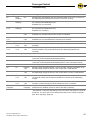
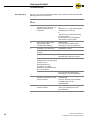
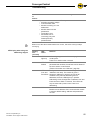
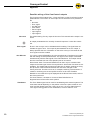
ConveyorControl Troubleshooting Symptom Possible cause Help The ConveyorControl system is not working or is working incorrectly No or insufficient power supply Check whether the output voltage of the power supply is within the specified voltage range. Check the connections and correct if necessary. ConveyorControl system module faulty or damaged Internal fuse triggered or faulty. Replace ConveyorControl system module. RollerDrive does not rotate RollerDrive not or not correctly inserted, control module or RollerDrive faulty Check whether the power supply is within the specified voltage range. Check the connections and correct if necessary. RollerDrive Replace if necessary Zone sensor is incorrectly parametrized (PNP/NPN or normally open / normally closed) or faulty Check the sensor's settings or replace the sensor if necessary Packages jammed Remove jammed packages. Overheating of the chopper resistor: The application feeds back too much energy or the power supply is too high Allow to cool down. Check the application properties and adjust if necessary, check the power supply and set to 24 V is necessary Line interruption of bus communication Check bus communication. Modules were addressed in the wrong order Perform addressing again. Package stops briefly at the sensor although the next zone is unblocked The sensor signal bounces for longer than the integrated lock time (especially when using light barriers) and, as such, there is delayed or double recognition of the package (see page 46). Use light barriers or, if necessary, optimize the position of the light switch Addressing cannot be performed or only with problems Bus line not contacted or contact is faulty Check the bus line and, if necessary, create contact at a new point Conveyor process interrupted Version 2.0 (04/2013) en Translation of the original instructions 67