1
Remark Office OMR User’s Guide
314
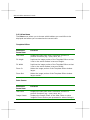
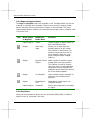
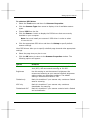
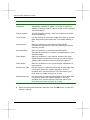
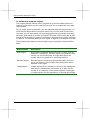
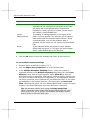
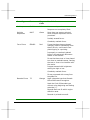
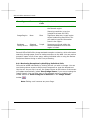
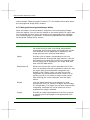
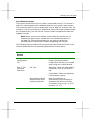
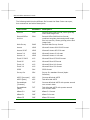
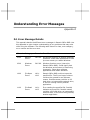
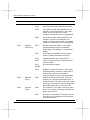
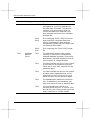
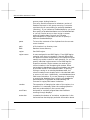
Class #
Category
Error #
Error Text
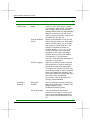
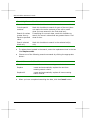
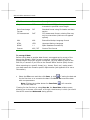
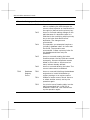
1200
File Write
Errors
12011214
Error occurred while writing file to disk.
Possible causes could be a full hard drive,
an inaccessible network drive, or the file
is being used by another application.
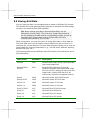
1300
File Access
Errors
13011310
Error occurred while attempting to access
a file. The file may be damaged. Possible
causes could be a full hard drive, an
inaccessible network drive, or the file is
being used by another application.
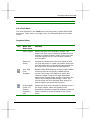
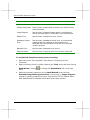
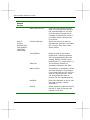
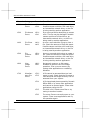
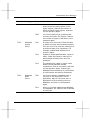
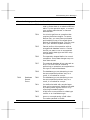
1400
File Close
Errors
14011403
An error occurred while trying to close a
file. Check the amount of free disk space.
Possible causes could be a full hard drive,
an inaccessible network drive, or the file
is being used by another application.
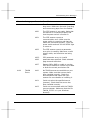
1500
File
Creation
Errors
15011502
An error occurred while trying to create a
file. Check the amount of free disk space.
Possible causes could be a full hard drive,
an inaccessible network drive, or the file
is being used by another application.
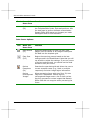
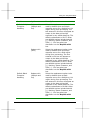
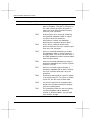
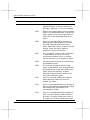
1600
View
Image
Errors
16001610
Not enough memory or disk space
available to perform the view image
operation. Free up more memory by
closing other applications or restarting
Windows.
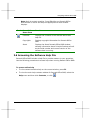
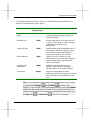
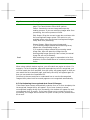
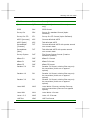
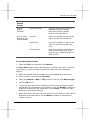
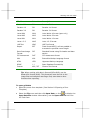
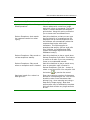
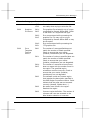
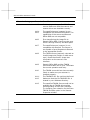
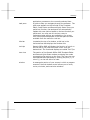
1700
Miscellaneous File
Errors
17001703
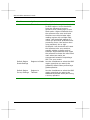
A file cannot be accessed due to a bad
name or path. Check that the file name is
valid and that the target directory can be
accessed from your system.
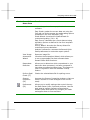
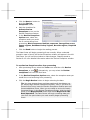
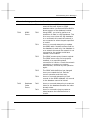
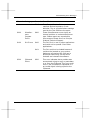
1704
A file has already been opened by Remark
Office OMR or by some other application
and cannot be opened again. Close other
applications using this file.
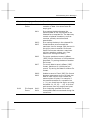
1705
The disk is full. Delete some files or try
saving to another location.
1706
Too many files are currently open on your
system. Close some applications and try
the operation again.