1
LN-200 IMU DATA INTERFACE/LOGGER
3
LN-200 IMU DATA INTERFACE/LOGGER AUTOMATED START-UP SEQUENCE:
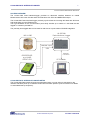
This section presents how the automated start-up sequence works:
1. The Interface try to establish a connection with the PC (until it succeed).
2. The interface try to read time furnished by the GPS Receiver (until it succeed).
Note: For the start-up, the Interface need a correct NMEA/ZDA (or GPS Time with Javad GPS
Receiver) and 1 second interval PPS outputted from the GPS Receiver. If not, the Interface
will not be ready to receive data from the IMU.
After the start-up, the Interface only need the 1 second interval PPS. If the GPS receiver fails
to output correct PPS, then the Interface will time stamp data with a time based on it oscillator.
In the mode, the precision of time stamps may not be guaranteed for a long time
3. The Interface wait for incoming data from the IMU.
4. The Interface timestamp packets and send them to the PC.
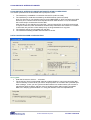
DATA LOGGER PROGRAM CONFIGURATION:
Saving data:
• Enter the file name or click on ... to browse.
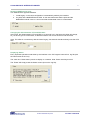
• The check box "Save incoming data" permits to select whether or not to save incoming data.
This functionality is useful when you want to acquire position in a location with a potential poor
GPS coverage. In fact you can synchronise the Interface in a location where you are sure to
get sufficient GPS coverage, and then move to another location without saving unneeded
data, but in keeping synchronisation or in using the Interface clock to extrapolate time.
© 2003 VNR Electronique SA
CH 1004 Lausanne