1
Find & Replace It!
User's Manual
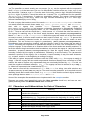
Perl's extended /x syntax is not supported, nor are directives, e.g. (?i), or regexp comments,
e.g. (?#comment).
Both zero-width positive and zero-width negative look-ahead assertions (?=pattern) and (?!
pattern) are supported with the same syntax as Perl. Perl's look-behind assertions,
"independent" sub-expressions and conditional expressions are not supported.
Non-capturing parentheses are also supported, with the same (?:pattern) syntax.
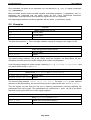
8.9 Examples
^\d\d?$
Match integers from 0 to 99
123
Do not match
-6
Do not match
6
Match
The third string matches 6. This is a simple validation regexp for integers in the range 0 to 99.
^\S+$
Match strings without white spaces
Hello world
Do not match
This_is-OK
Match
The second string matches This_is-OK. We've used the character set abbreviation \S (nonwhitespace) and the anchors to match strings which contain no whitespace.
In the following example we match strings containing mail or letter or correspondence but
only match whole words i.e. not email.
\b(mail|letter|correspondence)\b
Match words mail, letter and correspondence
I sent you an email
Do not match
Please write the letter Match
The second string matches Please write the letter. The word letter is also captured
(because of the parentheses). We can see what text we've captured like this: %1 = \1 = letter
This will capture the text from the first set of capturing parentheses (counting capturing left
parentheses from left to right). The parentheses are counted from 1 since %0 (\0) is the whole
matched regexp (equivalent to & in most regexp engines).
&(?!amp;)
Match ampersands but not &
This & that
Match one occurrence at index 6
His & hers & theirs Match one occurrence at index 16
Page 46/49