1
8.
9.
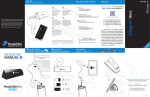
Start the CWI program. During the first run the software detects the CWI module on a specific
serial port and saves it, it also detects the camera. Confirrm or modify the proposed
configuration (file, configuration).
At this stage you should see on the CWI program :
a. The image provided by the webcam
b. A green elipse (driving zone) superimposed on the image
Usage
1.
2.
3.
WARNING : make sure that you have plenty of space to maneuver and to exercise driving
without causing harm to yourself or others ! As soon as the system is turned on, looking in the
green elipse will make the chair move in the corresponding direction.
Press the on/off switch (C) to start the system. At this stage, the chair should beep, then the
system will be functional, look at the center of the screen.
As soon as you are ready look in the corresponding area of the green elipse for the chair to
move in the same direction.
a. For an emergency stop press the on/off switch (C).
b. To stop the wheelchair leave the green area.
c. If you stay focused on a specific point of the green elipse, the system will automatically
stop after a few seconds.
Technical Specifications
-
-
-
The « CWI » package contains :
o 1x CWI box
o 1x 3m USB cable
o 1x USB webcam
o 1x CWI software installation CD
o Optional : 1x sub9 cable adapter
o Optional : 1x switch (on/off)
o Optional : x tentacle(s) (between 0 and 4)
o Optional : in/out R-Net module box
Warning : tempering with the box voids warranty
Warning : use only accessories certified by FST
Usage : CWI is designed for an indoor use in a secure location only and must be positioned
away from moisture and shocks (under wheelchair).
Operating temperature : between 0° and +70°
Minimum power supply tension 4.35 volts, maximum 5.25 volts
FST Lugano
p.a. Electrasim SA
Tél. +41 91 923 39 46