1
VP-443 – Overview
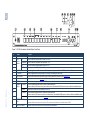
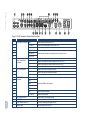
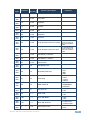
Figure 2: VP-443 Presentation Switcher/Scaler Rear Panel
#
17
Feature
VIDEO INPUT Connectors HDMI
Function
Connect to the HDMI source (from 1 to 4)
18
PC 15-pin HD
Connect to the computer graphics source (from 1 to 2)
19
CV RCA
Connect to the composite video source (from 1 to 2)
20
COMP Pr RCA
21
COMP Pb RCA
22
COMP Y RCA
23
HDMI
Connect to the analog audio HDMI source (from 1 to 4)
PC
Connect to the analog audio computer graphics source (from 1 to 2)
CV
Connect to the analog audio composite video source (from 1 to 2)
COMP
Connect to the analog audio component video source (from 1 to 2)
L
Connect to the left stereo analog audio acceptor
25
R
Connect to the right stereo analog audio acceptor
26
S/PDIF
Connect to a digital audio acceptor
24
27
28
AUDIO IN Unbalanced
Stereo Terminal Block
Connectors
Connect all three connectors to the component video source (from 1 to 2)
OUT RCA Connectors
VIDEO OUTPUT
Connectors
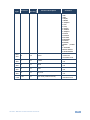
H BNC
V BNC
29
R BNC
30
G BNC
Connect to the RGBHV video acceptor
31
B BNC
32
HDMI
Connect to the HDMI acceptor
33
PC 15-pin HD
Connect to a VGA acceptor
7
34
RS-232 9-pin D-sub Port
Connect to the PC or the remote controller
35
ETHERNET Connector
Connects to the PC or other Serial Controller through computer networking
36
Power Connector with Fuse
AC connector, enabling power supply to the unit
37
POWER Switch
Switch for turning the unit ON or OFF