1
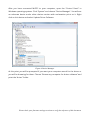
This time it is the file MIOPS_v1_6.miops. The file name can change for the future
versions to reflect the version changes. After this click the Upgrade MIOPS button. It
should take about 15 seconds to upgrade the firmware. Then MIOPS will restart again
and you will have your MIOPS with the new firmware updated. If anything goes during
the firmware upgrade you can start over. Repeat the same of putting MIOPS to
firmware upgrade mode locate the firmware file and then complete the upgrade.
Figure 8 Firmware Upgrade Process
When the firmware upgrade is completed, you should see the following confirmation
message.
Figure 9 Firmware Upgrade Complete
Please check your firmware and app versions to verify the reference of this document.