1
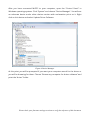
Figure 5 Locate Driver Folder
The driver files will be copied and you should see the following screen.
Figure 6 Driver Installed
After that step you are ready to install the firmware. Switch off MIOPS again and
switch it back on as you press and hold down the Up Scroll button. At this point,
when you start MiopsUpgrade.exe, the program should recognize MIOPS and it will
Please check your firmware and app versions to verify the reference of this document.