1
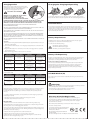
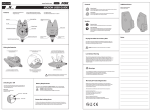
Charging Socket
Changing the Charging Adapter Plug
Pull back the protective rubber bung from the bottom
and plug the AC adaptor into the charging socket on the
side of the unit. The charging LED will illuminate
according to the charging status (see chart).
IMPORTANT SAFETY WARNINGS
WARNING: DO NOT UNDER ANY CIRCUMSTANCES
ATTEMPT TO USE ALKALINE OR OTHER
NON-RECHARGEABLE BATTERIES WITH THE
RECHARGING FEATURE. USE ONLY THE NICKEL METAL
HYDRIDE BATTERIES SUPPLIED. FAILURE TO OBSERVE THIS MAY RESULT IN RISK OF FIRE,
EXPLOSION, BATTERY LEAKAGE OR PERSONAL INJURY AND WILL INVALIDATE THE
WARRANTY. FOX WILL NOT BE HELD LIABLE FOR ANY DAMAGE OR INJURY CAUSED.
DO NOT MIX DIFFERENT BATTERY TYPES. DO NOT MIX RECHARGEABLE AND
NON-RECHARGEABLE BATTERIES.
USE ONLY FOX APPROVED NICKEL METAL HYDRIDE BATTERIES. THE USE OF ANY OTHER TYPE
OF RECHARGEABLE BATTERY WILL INVALIDATE YOUR WARRANTY.
THE RECHARGING UNIT IS INTENDED FOR INDOOR OR IN-CAR USE ONLY. DO NOT EXPOSE TO
RAIN, DAMP OR MOISTURE.
USE ONLY THE AC/DC ADAPTOR SUPPLIED. THE USE OF ANY OTHER ADAPTER MAY DAMAGE
THE UNIT AND WILL INVALIDATE YOUR WARRANTY. THE AC/DC ADAPTOR IS INTENDED FOR
INDOOR USE ONLY. FOR SAFETY REASONS, THE IN-CAR CHARGING OPTION SHOULD NOT BE
USED WHILST THE VEHICLE IS IN MOTION.
THE CAR CHARGING LEAD MAY BE USED WITH 12 VOLT NEGATIVE EARTH VEHICLE ELECTRICAL
SYSTEMS ONLY.
Operation
1. Ensure that the rechargeable Nickel-Metal Hybride batteries supplied are fitted correctly in
the battery compartment.
2. Connect either the AC/DC adaptor, or car charging lead supplied to the socket ad the side
of the unit.
3. Plug the AC/DC adaptor into a wall socket, or insert the car charging lead into a standard
cigarette lighter socket.
To change the adapter from a 3 pin UK plug to a Euro 2 pin plug simply push the
button and slide off of the adapter body. Then slide the required plug plate back on.
Anti Theft Alarm
If your alarms are switched off the receiver will omit an audio tone and the
corresponding alarm LED will turn yellow. (The unit will also vibrate if vibration is
switched on). For example, if you are away from your rods and you hear three
beeps and see three yellow LED light up on your receiver, someone other then
you has switched your alarms off.
Battery Requirements
The NTX Receiver requires 3 x LR6 AA 1.5V Alkaline batteries. The use of good
quality batteries is essential for maximum battery life.
To reduce the risk of battery leakage;
DO NOT mix old and new batteries.
DO NOT mix different battery types.
DO NOT try to recharge alkaline batteries
4. Observe the charging LED. The normal sequence is as follows:
LED Colour
Meaning
Duration
Fast charge
Batteries are
being fast charged
Up to 2 hours (less if
batteries were only partially
discharged)
Fast charge terminated
Batteries have reached
maximum allowable
temperature
Approx 5-10 minutes
until batteries have
cooled down
Flashing green
(after fast charge)
Top – off charge
Batteries are being given
a final slow charge to ensure
maximum capacity
2 hours
Flashing green
(after top – off charge)
Trickle charge
Batteries are being trickle
charged to maintain at
full capacity
Can be safely left in
this condition for many
hours (e.g. overnight)
Constant amber, (with
occasional red flashes)
Charging Status
LED Extinguished
(this stage may, or may
not be seen)
Battery Life Expectancy
All types of rechargeable battery have a lower capacity than the equivalent sized
alkaline (non-rechargeable) battery. Using Nickel Metal Hydride batteries, you
should expect to recharge the batteries before each session of use.
Replacement of Rechargeable Batteries
In normal use, it should be possible to recharge the batteries many hundreds of
times. If, however, you notice that it is becoming necessary to recharge more
often, then the batteries may require replacement. Replace only with Fox
approved Nickel Metal Hydride batteries. The use of any other type of battery
may invalidate your warranty.
Occasionally, the following indications may be seen when charger is first connected (before
constant amber LED)
LED Colour
Charging Status
Meaning
Duration
Flashing green
Charge pending
Battery temperature is
too low or too high to allow
fast charge
Until temperature
requirements are met
– above 0oC and below 40oC
Flashing red
Preconditioning charge
Charger is attempting to
revive deeply discharged
batteries
Can be from a few
seconds to more than an
hour
Note: If the LED does not stop flashing red after an hour or so, this may indicate that the
batteries are faulty!
When fast charge is completed (2 hours or less), the unit is ready for use and will give almost
full battery life before recharging is necessary. For optimum performance, however, it is
recommended that the top-off charge is allowed to complete, when possible (a further
2 hours)
- To avoid overheating the batteries, do not repeatedly re-start the charging sequence (by
interrupting the power)
- The batteries will become quite warm during fast charge, this is normal
- The AC/DC adapter will become warm in use
Receiver Care
1. Do NOT leave the receiver unit switched on if not used. As with any product using
rechargeable batteries, running the batteries totally flat causes a deep-discharge, which will
take a long time to recover when plugged into the wall.
2. The receiver should not be allowed to deep-discharge. Batteries should be charged as soon
as possible after low battery warning are seen. Allowing the batteries to deep-discharge may
permanently reduce their capacity.
3. Batteries must be charged before unit is used for the first time
4. Batteries must be removed, if unit is not to be used for a long period
5. Battery life may be noticeably reduced after a deep-discharge has occurred. This may
improve over several charge/discharge cycles
Infa Red Window (IR)
This is fitted to the receiver for future compatibly with next generation Fox bivvy
light products.
Warnings
• Do not trigger LED or speaker in close proximity to human or animal eyes and ears.
• Store this equipment out of reach of children and infants.
• Avoid dropping or subjecting the Micron to severe impacts.
• Use only recommended batteries and accessories.
Warranty & Product Registration
Register your Fox product online at www.foxint.com. You will be given a
Customer Reference Number and a Warranty Reference Number, please make
a note of these numbers. You can view warranty details online using the
Customer Reference number.
Alternatively fill out the Warranty Card enclosed in the box and post to:
Customer Care Department
Fox International Group Ltd, UK Headquarters,
56-58 Fowler Road, Hainault Business Park,
Hainault, Essex, IG6 3UT
Micron & NTX are Registered Trade Marks
Patents Pending
We reserve the right to alter or modify the contents of this manual.