1
NEW_CW_manual_EN.qxd
9/20/05
9:10 AM
Page 21
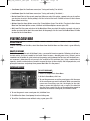
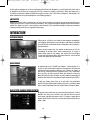
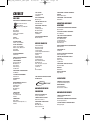
Yellow means you have the component available, red means that you don’t have the component.
A transparent gadget icon indicates that you do not have the required parts to assemble it.
To view an inventory of your components, press and hold the I key
while the Assembly screen is open. The number you have available
is displayed in the bottom right corner of each component icon. To
close the component inventory, release the I key.
To construct a gadget or device for which you have the blueprint
and all of the necessary components, use the arrow keys on the
keyboard to scroll through the icons on the Assembly screen until
the one you want to build is highlighted. Press Enter, and then click
Yes on the confirmation prompt to build the item. Click No if you
decide not to build the item. Newly constructed gadgets and
devices are automatically added to your inventory.
BYPASSING SECURITY DEVICES
Most of the places through which you must move are high-security areas, so you are bound to encounter
many security devices along the way. Knowing how to avoid and disarm these devices is vital to your success.
THERE ARE TWO TYPES OF SECURITY DEVICES:
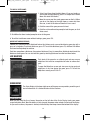
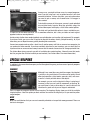
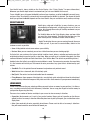
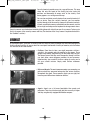
• Security Cameras: Security cameras are among the most
common security devices you will encounter. Active security
cameras are easy to spot—they emit a red laser beam. By
watching the beam, you can easily determine the viewing area
covered by the camera. As long as you avoid the beam, you are
out of the camera’s field of view. If the beam hits you, you have
been spotted, and the enemy is very likely on the way to your
position. You should also avoid killing or incapacitating guards
when they are within the camera’s field of view—seeing a guard
collapse on-camera is enough to bring other guards running.
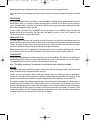
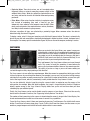
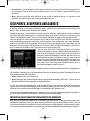
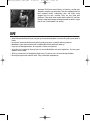
• Laser Security Fence: Laser security fences block some doors
and passageways. If the laser beams are blinking on and off, you
can pass through the fence while the beams are off (with a little
luck and good timing). Otherwise, you must find a way to
deactivate the fence in order to pass through undetected.
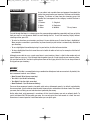
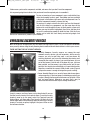
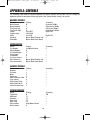
Security cameras and laser fences can be deactivated if you can
find the security terminal that controls them. To use the security
terminal, move up to the panel, select Use Terminal from the
Actions Menu, and then select Turn Security Off. Note that the
Actions Menu works a bit differently when you are using a security
terminal. To select an option, highlight it and press Enter or click
the left mouse button.
21