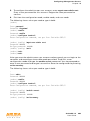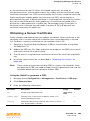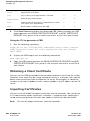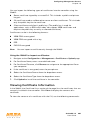
1
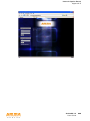
Configuring Management Access Chapter 19 Management Interfaces There are several interfaces that you can use to configure and manage components of the Aruba user-centric network: The Web User Interface (WebUI) allows you to configure and manage Aruba controllers. The WebUI is accessible through a standard Web browser from a remote management console or workstation. NOTE: The command line interface (CLI) allows you to configure and manage Aruba controllers. The CLI is accessible from a local console connected to the serial port on the controller or through a Telnet or Secure Shell (SSH) session from a remote management console or workstation. NOTE: Most WebUI pages parse and validate the information you enter to create CLI commands. When you apply configuration changes and the WebUI accepts the changes, the commands are sent as XML to the controller. The WebUI does not send any commands to the controller until all changes are validated. Because the commands are validated before they are sent to the controller, the controller always receives valid commands. For this reason, no CLI error messages are generated. If you attempt to make an invalid change (such as entering a parameter value that is outside of the supported range), the WebUI returns an error message similar to the message you might see on the CLI. By default, you can only access the CLI from the serial port or from an SSH session. To use the CLI in a Telnet session, you must explicitly enable Telnet on the controller by issuing the telnet cli command. The Aruba Mobility Management System is a suite of applications for monitoring multiple master controllers and their related local controllers and APs. Each application provides a Web-based user interface. The Aruba Mobility Management System is available as an integrated appliance and as a software application that runs on a dedicated system. See the Mobility Manager User Guide for more information. NOTE: Before you can use the management interface from a remote console or workstation you must configure the controller with an IP address and default gateway and connect it to your network. See “Deploying a Basic Aruba User-Centric Network” on page 49 for more information. All Aruba controllers have a serial port for connecting to a local console. The Aruba 6000 controllers contain a 10/100 Mbps Fast Ethernet port for out-of-band management (see the Installation Guide for your controller for more information). By default, management sessions through the serial port, SSH, Telnet, or the WebUI time out after 15 minutes. You can change or disable the timeout with the CLI loginsession timeout command. 462 ArubaOS 3.2 User Guide 0510339-02 September 2007