1
Prima Switch User Manual
Rev 1.1 2007
2.4.14 <Auto Logout Timeout>
OSD
Use cursor keys to navigate to the Auto Logout option on the OSD Setup Menu, and then hit Enter to select
and edit the timeout value of the auto logout. The OSD Menu Timeout is disabled by default. You can
specify a timeout value between 0 and 99 min. [00 means disabled]
2.4.15 <OSD Menu Timeout>
OSD
The OSD Menu Timeout is the time for the OSD display to stay on the screen if no keyboard activity is
detected while the OSD Menu is displayed. Use cursor keys to navigate to the OSD Timeout option on the
OSD Setup Menu, and then hit Enter to select and edit the OSD Menu Timeout. The OSD Menu Timeout is
default to 60 seconds. The OSD Menu timeout can be specified within the range of 5 seconds to 95 seconds
by an increment of 1 second. Users can adjust this parameter to suit their needs.
2.4.16 <OSD Title Bar ON/OFF>
Hotkey
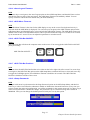
The OSD Title Bar will show the computer name on the screen. You can toggle the OSD Title bar ON/Off
just by the hotkey:
OSD Title Bar ON/OFF =
Scr
Lk
Scr
Lk
T
2.4.17 <OSD Title Bar Position>
OSD
You can select the OSD Title Bar Position to be either on the left or right side of the screen Use cursor keys
to navigate to the OSD Title Bar option on the OSD Setup Menu, and then hit Enter to select and cursor key
to toggle the Left/Right option. The OSD Menu Timeout is default to 60 seconds. The OSD Title Bar
Position is default to left side of the screen.
2.4.18 <Setup Password>
OSD
Navigate with cursor keys downward to the Setup Password option on the OSD Setup Menu, and then hit
Enter key to select. Just follow the submenu to Enable or Disable the Password Protection. Every time you
want to change the password configuration, you will be prompted for the current password. You have to type
in the correct password to validate the change. The password is up to 8 characters long and is default to
00000000. Later you can change the default password with your own by this option.
Page 21
Chapter2 Prima Switch Operation