1
Prima Switch User Manual
2.3
Rev 1.1 2007
On Screen Display
Note that while OSD is activated, all the front-panel buttons and mouse activity will be made inactive.
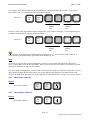
To activate the OSD Menu, use the hotkey sequence
Show OSD Menu
Scr
Lk
=
(space bar)
Scr
Lk
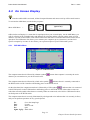
OSD (On Screen Display) is a menu that is superimposed on your screen display. On the OSD Menu, you
will see a listing of the available banks and channels for selection and the currently online status of each
channel. You can use the OSD to control the KVM switch with more convenient and intuitive menu-driven
operation. The OSD menu also allows you to rename your computer (up to 8 characters), and to find a
specific computer by its name. It also allows you to password-protect your KVM switch system.
2.3.1
OSD Main Menu
Figure 12: OSD Main Menu
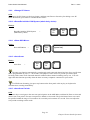
The computer name that is followed by a human symbol,
channel you can monitor on your local console now.
, means that computer is currently the active
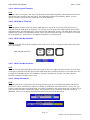
The computer name that is followed by a little solar symbol,
, indicates that it is currently connected to
the KVM switch via PS/2 interface and feeding power to the KVM switch.
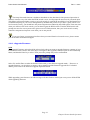
On the other hand, the computer name that is followed by a USB symbol,
, indicates that it is connected
to the KVM switch via the USB interface and feeding power to the KVM switch. Others that are not seen
with either of both symbols after them are currently either not connected, or the PS/2 or USB interface does
not feed power to the KVM switch.
The computer name that is inversely illuminated by a background color indicates that it is currently in focus,
and you can perform operation on it by your keyboard.
F1 :
F10 :
INS:
Esc:
PgDn / PgUp :
Go to the Setup Page
Logout
Insert to edit
Quit
Bank Select
Page 16
Chapter2 Prima Switch Operation