1
7
Keypad Configuration
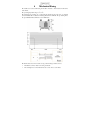
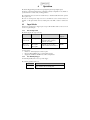
The CC320 is set up using the push buttons and display on the front of the unit. The set up is
non-volatile, so the CC320 will resume the same operation after a power cycle.
7.1
Startup
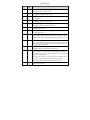
On power up, the CC320 will display “8.8.8.” to test the display is working, then “CC”, “320”,
followed by the version number, eg “001”, and then will be ready for operation. To show that the
unit is operating normally, a moving pattern is drawn on the display.
7.2
Cold Start
In the unlikely event that the non-volatile
memory becomes corrupt the CC320 may
not start up properly. In this case the
memory can be cleared by powering up
the CC320 while holding down the
SELECT and DOWN buttons. The
CC320 will display “COL” for about 2
seconds while the memory is cleared.
7.3
---
SEL
OP I
SEL
UP/DOWN
OP2
SEL
OP8
SEL
Set up an
output
channel
Configuration
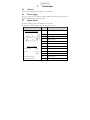
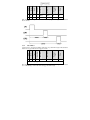
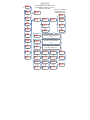
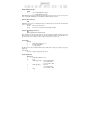
To configure the controller from the
keypad, press and hold SEL for 1 second.
“OP1” will be displayed.
The overall structure of keypad
configuration is given to the right.
UP/DOWN
EnC
SEL
Set up
encoder
mode
SEL
Set up
Ethernet
SEL
Set up
free
running
timer
UP/DOWN
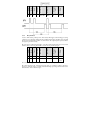
The UP and DOWN buttons are used to
change the selection and to change
numeric values. The SEL button is used
to confirm a selection and move to the
next item. When configuration is
complete, “End” is displayed.
See the section on the Ethernet for setting
up IP addresses.
7.3.1
EtH
UP/DOWN
FrE
Setting Numeric Values
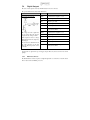
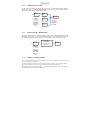
When the CC320 displays numeric values for the user to change, the right hand digit will be
flashing to indicate that the Up and Down buttons can be used to change the value.